191
* When you shoot in RAW+JPEG image quality, the JPEG image file size will be
displayed.
* For still photos taken during movie shooting, <G> will be displayed.
* For RAW images processed with the camera and images applied with Creative
filters, the <1+> icon changes to < >.
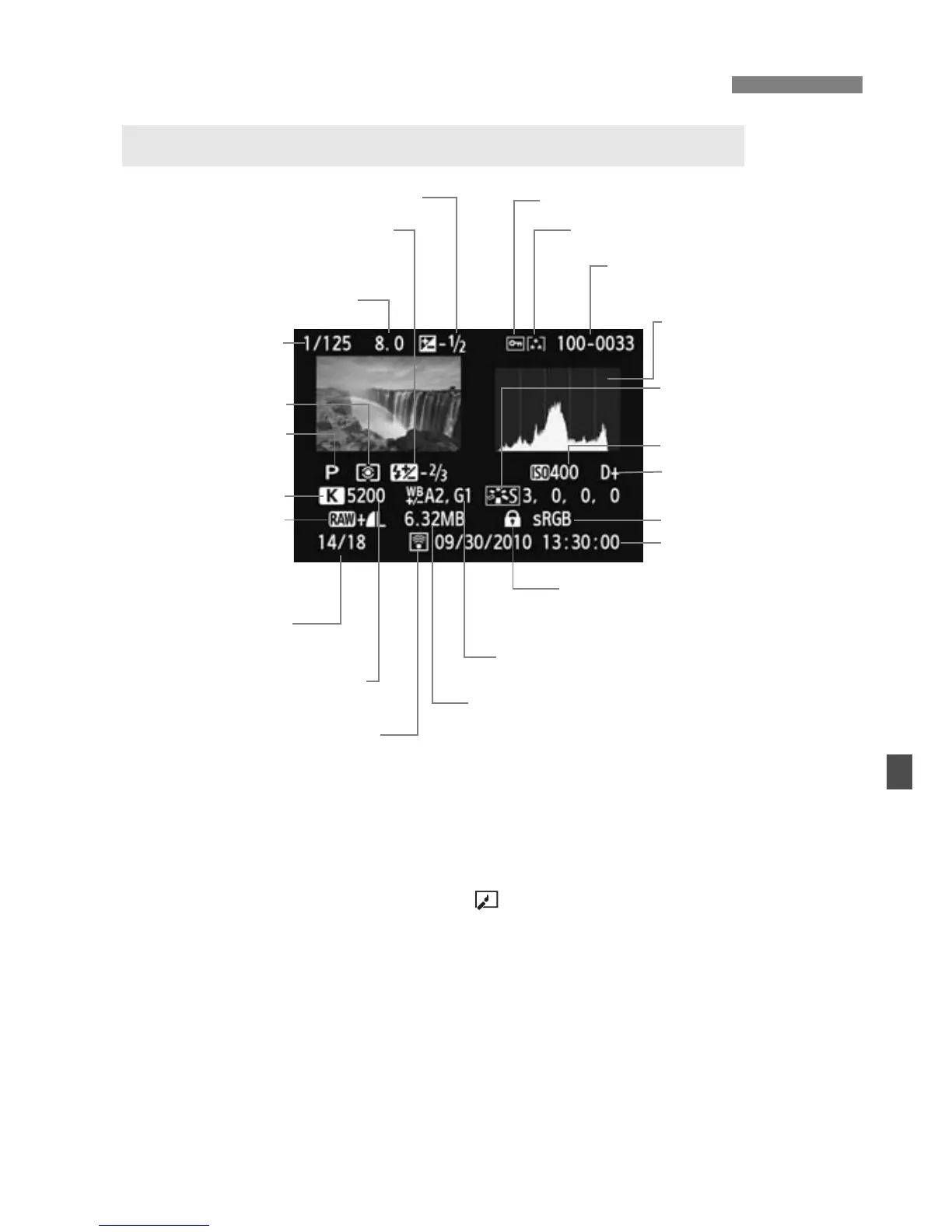
B Shooting Information Display
Sample of Image Taken in a Creative Zone Mode
Flash exposure
compensation amount
Metering mode
Shooting mode
Highlight tone priority
Color temperature
when <P> is set
Shooting date and time
Image verification data
appended
White balance correction
Histogram
(Brightness/RGB)
Color space
White balance
Picture Style/Settings
File size
Image-recording
quality
Playback number/
Total images recorded
Folder number - File number
Rating
Aperture
Shutter speed
Protect
Exposure compensa ion amount
ISO speed
Eye-Fi card
transmission status






 To Next Page