80
Autofocus can fail to achieve focus (the focus confirmation light <o>
blinks) with certain subjects such as the following:
Subjects difficult to focus
Very low-contrast subjects
(Example: Blue sky, solid-color walls, etc.)
Subjects in very low light
Extremely backlit or reflective subjects
(Example: Car with a highly reflective body, etc.)
Near and far subjects covered by an AF point
(Example: Animal in a cage, etc.)
Repetitive patterns
(Example: Skyscraper windows, computer keyboards, etc.)
In such cases, do one of the following:
(1) With One-Shot AF, focus an object at the same distance as the
subject and lock the focus before recomposing (p.56).
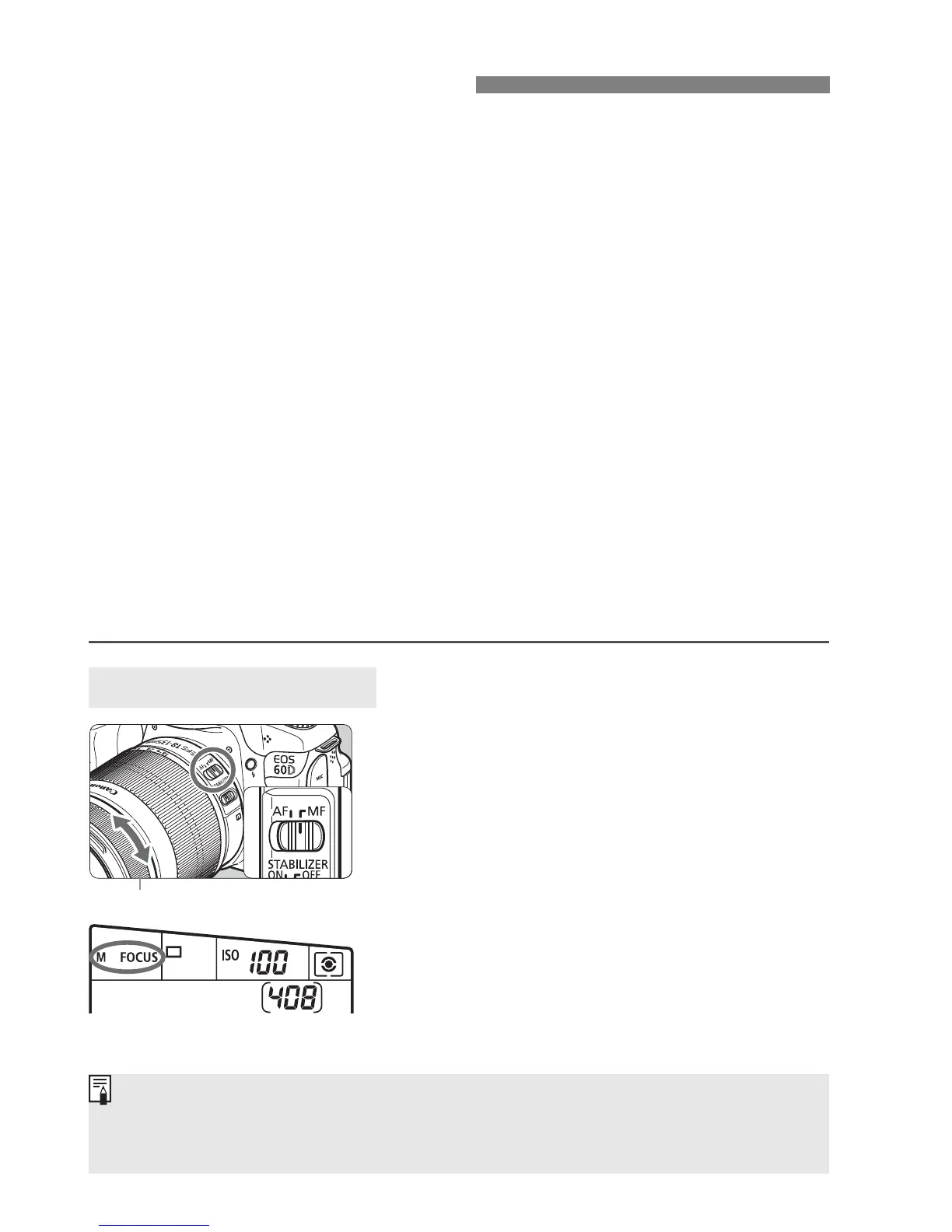
(2) Set the lens focus mode switch to <MF> and focus manually.
1
Set the lens focus mode switch to
<MF>.
X <4 L> will be displayed on the
LCD panel.
2
Focus the subject.
Focus by turning the lens focusing
ring until the subject looks sharp in
the viewfinder.
When Autofocus Fails
MF: Manual Focusing
Focusing ring
If you press the shutter button halfway during manual focusing, the AF point
which achieved focus will flash briefly in red and the focus confirmation light
<o> will light in the viewfinder.







 To Next Page