45
Q Using the Quick Control Screen
On the Quick Control screen, select
the function and press <0>. The
function’s setting screen will then
appear (except for the shutter speed
and aperture).
Turn the <
5> or <6> dial to
change the setting. With certain
settings, you can also press the
<U> key to change it.
Press <0> to finalize the setting and
return to the Quick Control screen.
While on the <Q>, < >, or < >
screen, you can return to the Quick
Control screen by pressing the
<M> button.
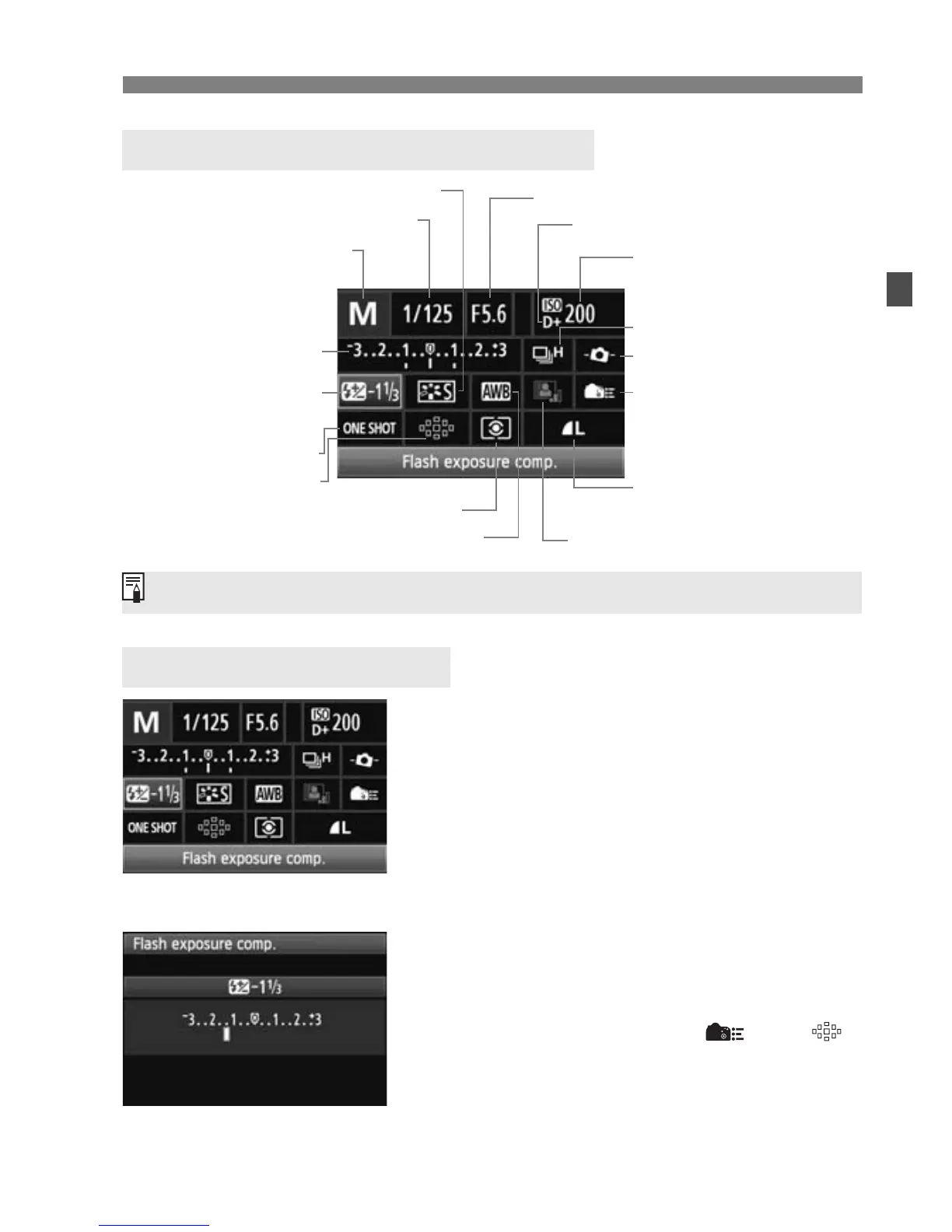
Quick Control Screen Nomenclature
Function Setting Display
Shutter speed (p.114)
Drive mode (p.81)
Electronic level (p.127)
AF mode (p.76)
White balance (p.96)
Shooting mode* (p.20)
Highlight tone priority* (p.255)
Auto Lighting Optimizer (p.101)
Metering mode (p.119)
AF point (p.78)
Picture Style (p.90)
Exposure compensation/
AEB setting
(p.121)
Flash exposure
compensation
(p.132)
ISO speed (p.88)
Custom Controls
(p.257)
Image-recording quality
(p.84)
Aperture (p.116)
Asterisked functions cannot be set with the Quick Control screen.
<0>
Ð







 To Next Page