RC-5
RC-1
-
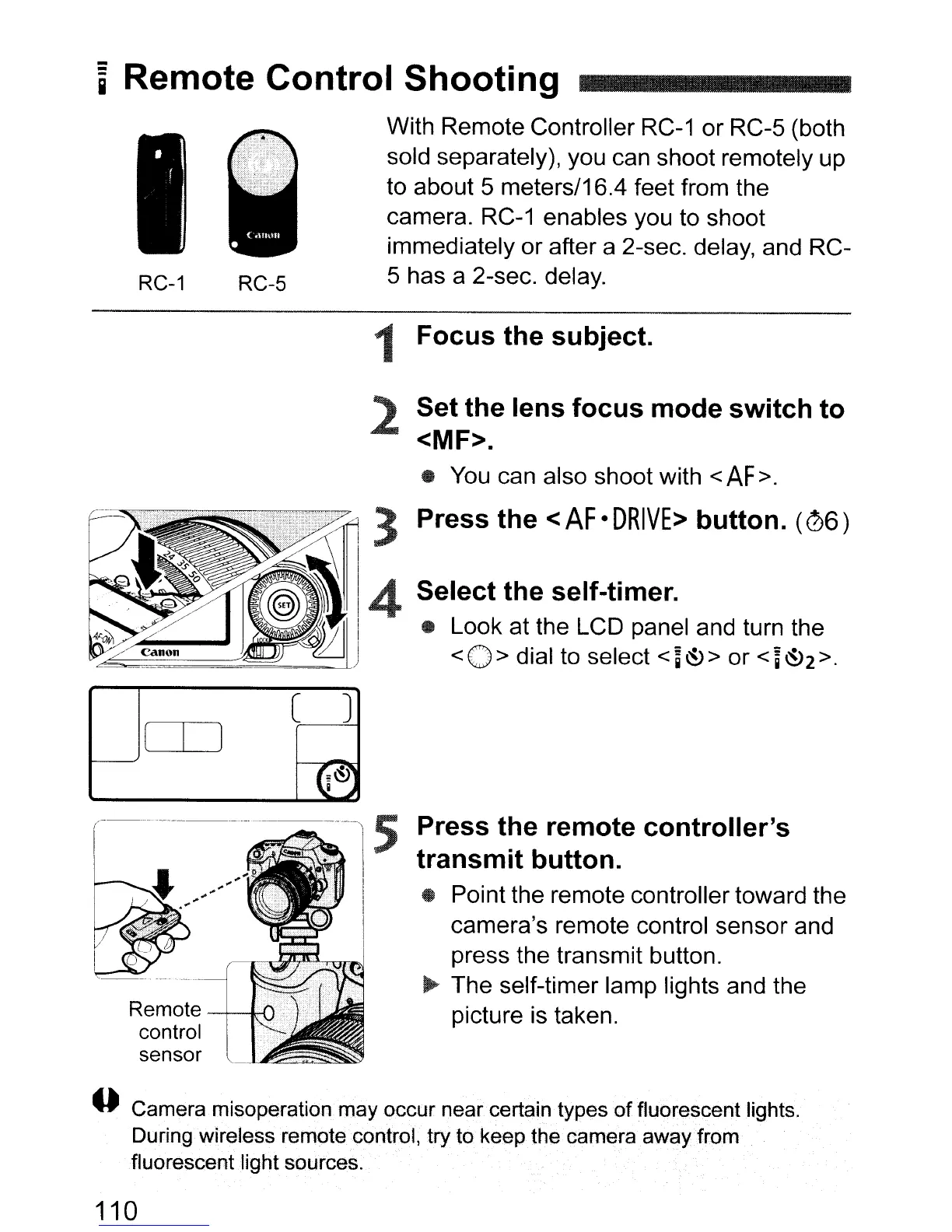
i Remote Control Shooting
With Remote Controller
RC-1
or RC-5 (both
sold separately), you can shoot remotely up
to about 5 meters/16.4 feet from the
camera.
RC-1
enables you to shoot
immediately or after a 2-sec. delay, and RC-
5 has a 2-sec. delay.
Set the lens focus mode switch to
<MF>.
..
You
can also shoot with
<AF>.
1 Focus the subject.
2
Press the <
AF
•
DRIVE>
button.
(06)
Select the self-timer.
..
Look at the LCD panel and turn the
<0>
dial to select
<~~>
or
<~~2>.
CD
C J
-
G~~
i..)
r~--'
----------.
-.--
Remote
-+--H
control
sensor
'---'-"~~~
Press the remote controller's
transmit button.
• Point the remote controller toward the
camera's remote control sensor and
press the transmit button.
~
The self-timer lamp lights and the
picture is taken.
4)
Camera misoperation may occur
near
certain types
of
fluorescent lights.
During wireless remote control,
try
to keep the cameraaway from
fluorescentlight sources.
110



 To Next Page