EasyManua.ls Logo

Canon EOS 70 - Reverting the Camera to the Default Settings

Canon EOS 70
311 pages
Print Icon
To Next Page IconTo Next Page
To Previous Page IconTo Previous Page
Loading...
Before You Start
I1I3mJReverting
the
Camera
to
the Default Settings*
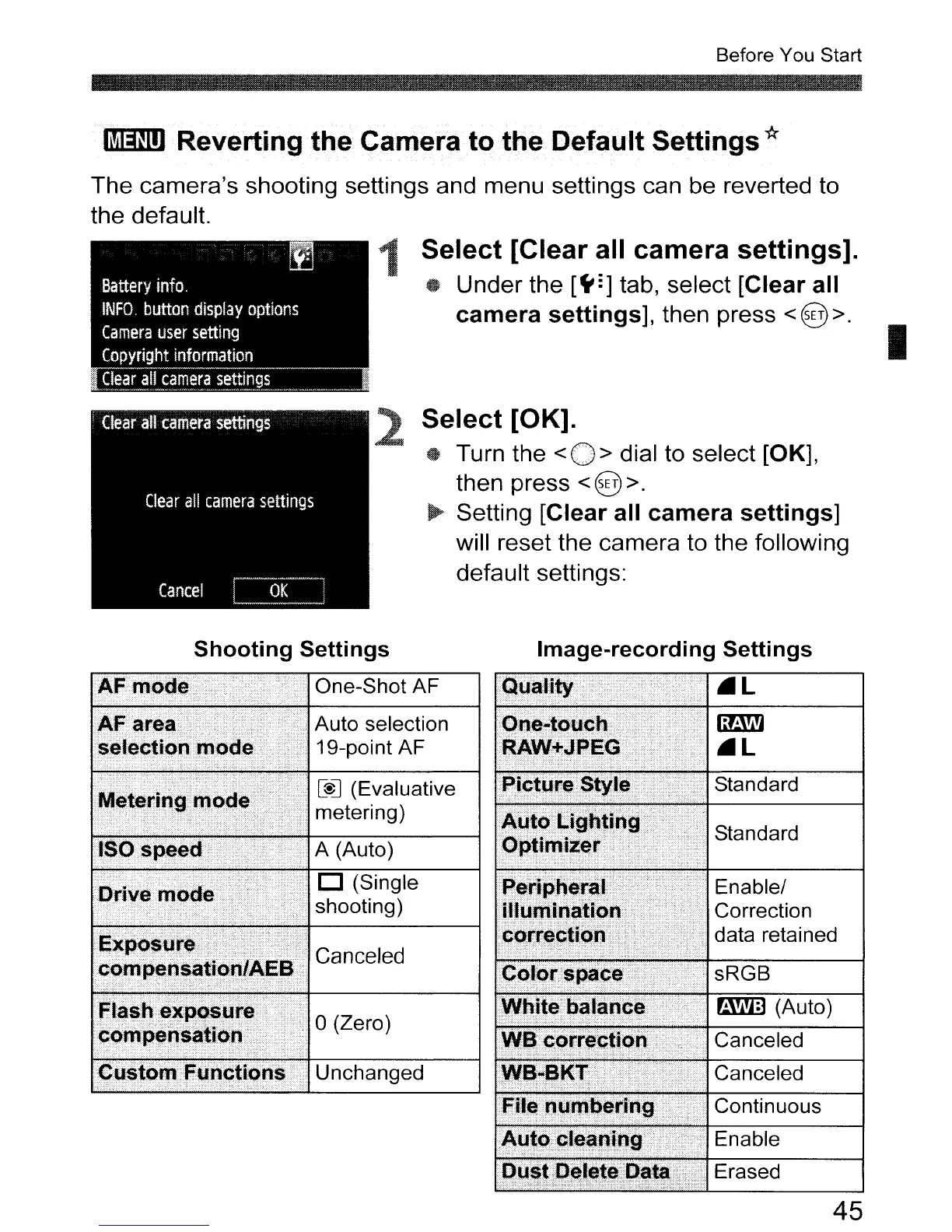
The camera's shooting settings and menu settings can be reverted to
the default.
1
Select
[Clear
all
camera
settings].
tt
Under the
[~=]
tab, select [Clear
all
camera
settings],
then press < @ >.
I
Select
[OK]
.
Turn the
<0>
dial to select [OK],
then press
<@ >.
~
Setting [Clear all
camera
settings]
will reset the camera to the following
default settings:
Shooting
Settings
Image-recording
Settings
AF
mode
One-Shot
AF
.
~...
_ Auto selection
" " 19-point AF
One-touch.
RAW+JPEG
r -
[@]
(Evaluative
t
. )
me
enng
ISO speed· A (Auto)
Picture
Style Standard
_.
:_..:..
11:1
11
.
Correction
data retained
Enable/
D (Single
shooting)
Drive mode
Exposure.
Canceled
compensation/AEB
. sRGB
Flash exposure
iI
m!ID
(Auto)
I-:c:-o_m
.....
p_e
.....
n_S,:,::,,8_ti_o
.....
n-:-
.......
__
.f-0-(z_e_ro_)
-1
-:::--:-:::~..:...--o~n
.....
_..:..-~_::C-a-n-ce~l-ed__:__-~
Custom Functions· Unchanged Canceled
File
numbering·
Continuous
Auto
cleaning
..
. Enable
Dust
Dc;tlete
Data . Erased
45

Table of Contents