Tv:
Shutter-Priority AE
Bllilill::rrRli.IIUIB::lilllJllill1rnmiRmll.·
·.1
;.I
•.
·.I.n.II
••
li
In
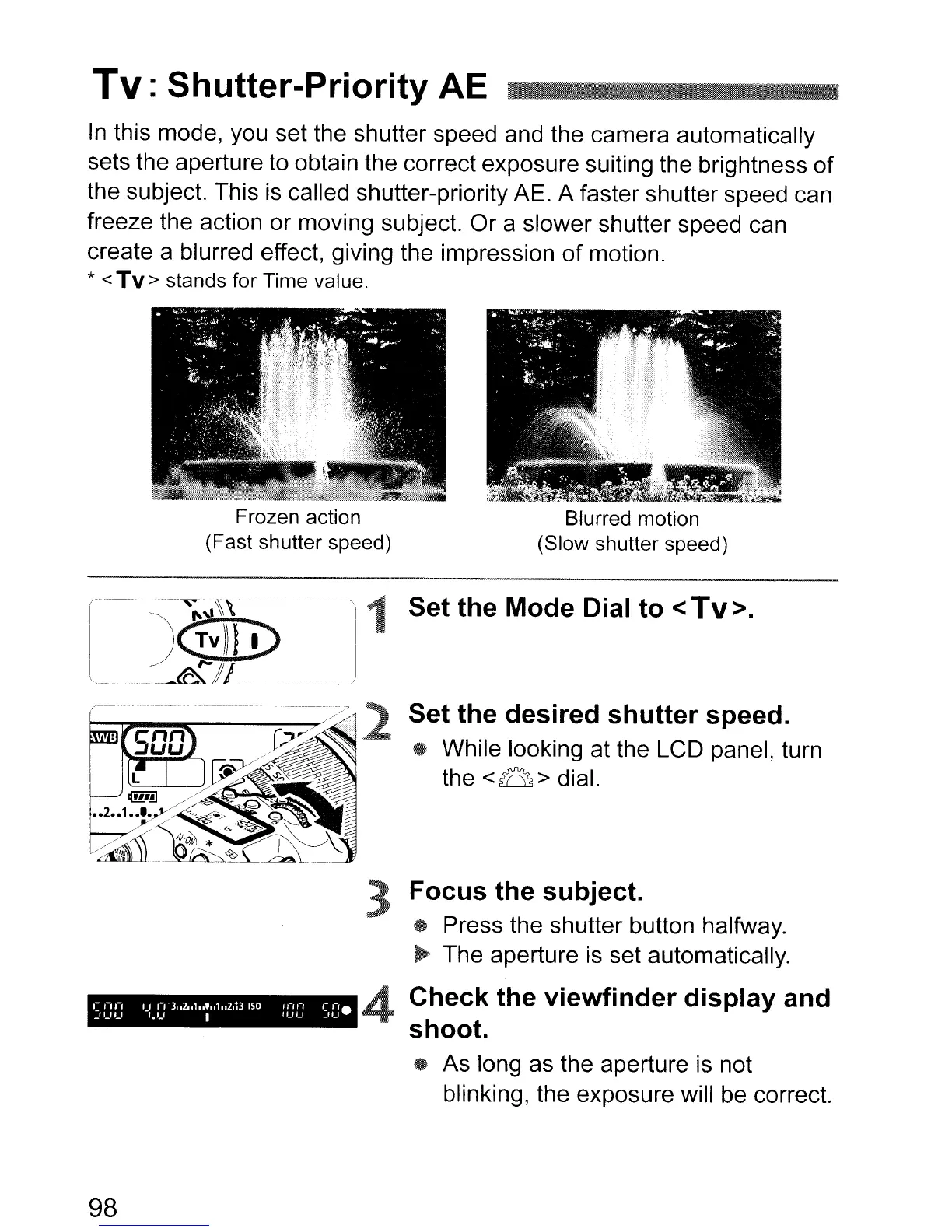
this mode, you set the shutter speed and the camera automatically
sets the aperture to obtain the correct exposure suiting the brightness of
the subject. This
is
called shutter-priority AE. A faster shutter speed can
freeze the action or moving subject. Or a slower shutter speed can
create a blurred effect, giving the impression
of
motion.
* < Tv> stands for Time value.
I
Frozen action
(Fast shutter speed)
:
~.
Blurred motion
(Slow shutter speed)
Set the
Mode
Dial to <Tv>.
Set the desired shutter speed.
~
While looking at the LCD panel, turn
the
<B > dial.
3 Focus the subject.
• Press the shutter button halfway.
...
The aperture
is
set automatically.
98
4
Check
the viewfinder display and
shoot.
..
As long as the aperture
is
not
blinking, the exposure will be correct.



 To Next Page