Displaying the Grid and Electronic Level
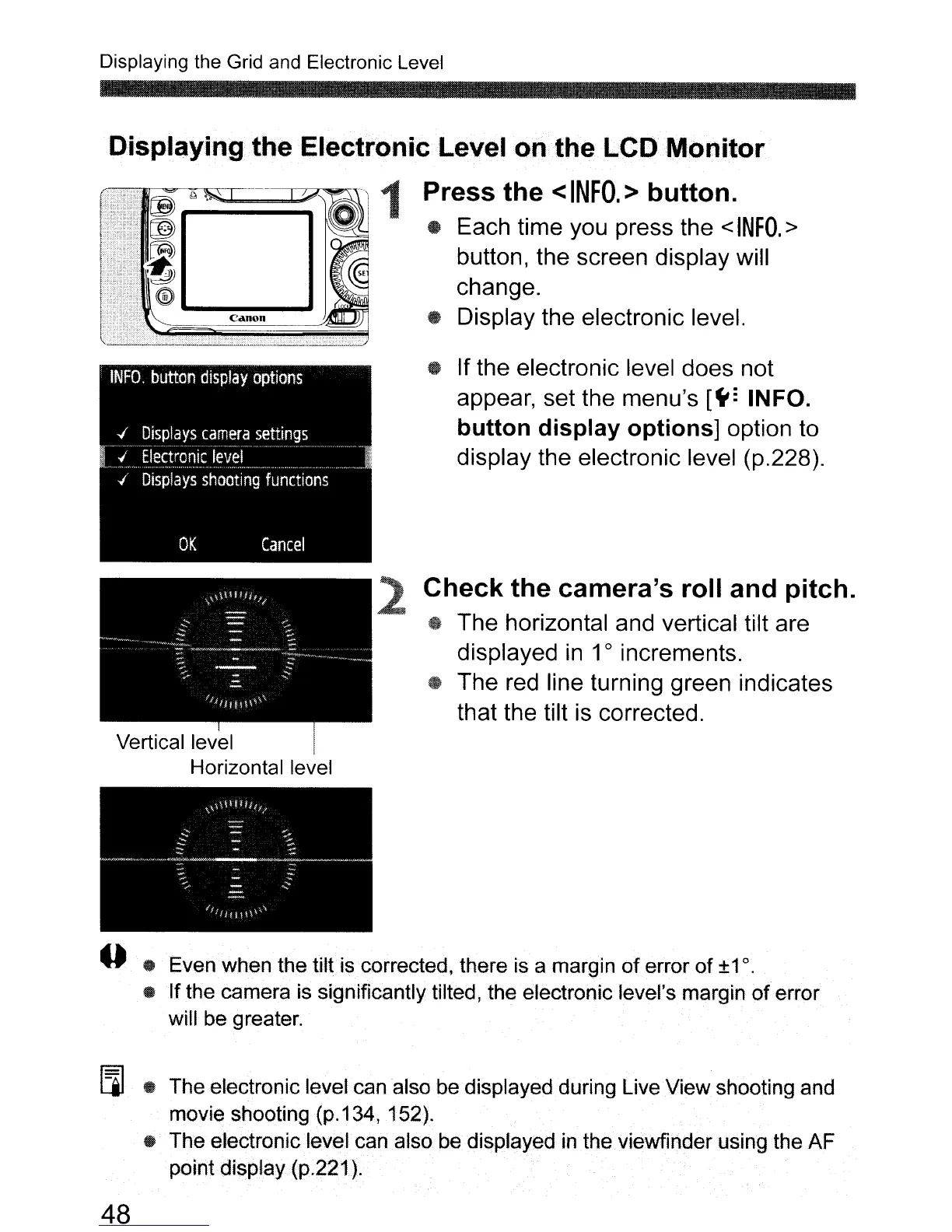
• If the electronic level does not
appear, set the menu's
[~:
INFO.
button
display
options]
option to
display the electronic level (p.228).
Check
the
camera's roll and
pitch.
• The horizontal and vertical tilt are
displayed
in
1
0
increments.
• The red line turning green indicates
that the tilt is corrected.
2
Displaying
the
Electronic
Level
on
the
LCD
Monitor
Press
the
<
INFO.
>
button.
• Each time you press the <
INFO.
>
button, the screen display will
change.
Canon
• Display the electronic level.
Vertical level I
Horizontal level
o • Even when the
tilt
is corrected, there is a margin of error of
±1
o.
• If the camera is significantly tilted, the electronic level's margin
of
error
will be greater.
[]]
• The electronic level can also be displayed during Live View shooting and
movie shooting (p.134, 152).
• The electronic level can also be displayed
in
the viewfinder using
the
AF
pointdisplay
(p.221).
48



 To Next Page