Parts and Their Functions
1-13
Before You Start Using This Machine
1
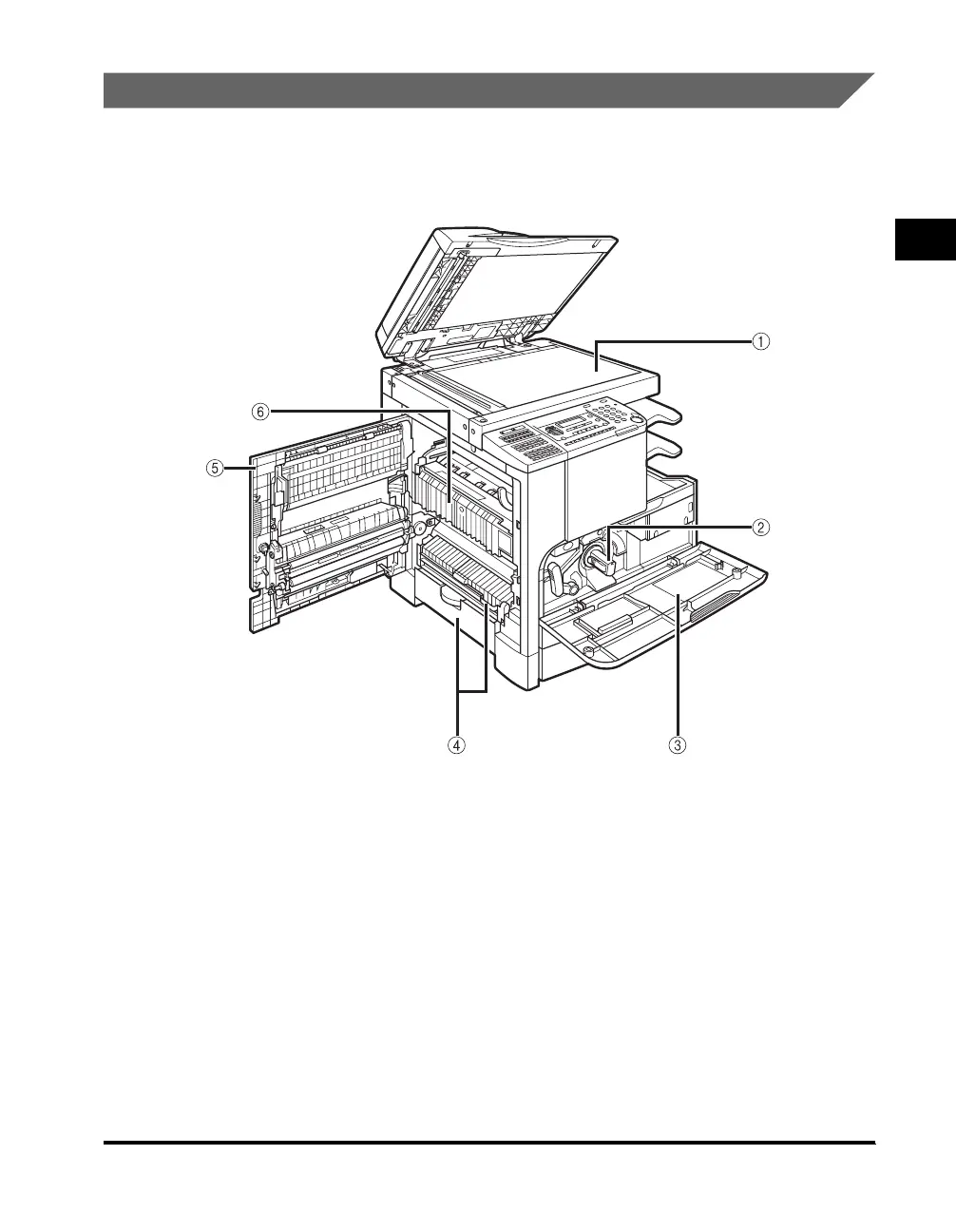
Internal View
a Platen Glass
Place originals here when scanning books,
heavyweight originals, thin originals,
transparencies, etc.
b Toner Cartridge
When toner runs out, pull out the toner cartridge,
and replace it with a new one. Toner cartridges
are sold separately (not standard equipment).
(See "Consumables," on p. 7-42.)
c Front Cover
Open this cover to replace the toner cartridge.
d Paper Drawer’s Left Cover
Open this cover to clear a paper jam in the paper
drawers.
e Left Cover
Open this cover to clear a paper jam inside the
main unit.
f Fixing Unit
If a paper jam occurs in the fixing unit, remove
jammed paper carefully. (See "Fixing Unit," on p.
8-6.)
The optional Fax Panel-A1 (with Super G3 FAX Board), Feeder
(DADF-P1), Finisher-U1, Additional Finisher Tray-C1, and Cassette
Feeding Module-J1 are attached.



 To Next Page