Parts and Their Functions
1-14
Before You Start Using This Machine
1
Control Panel Parts and Functions
Main Control Panel
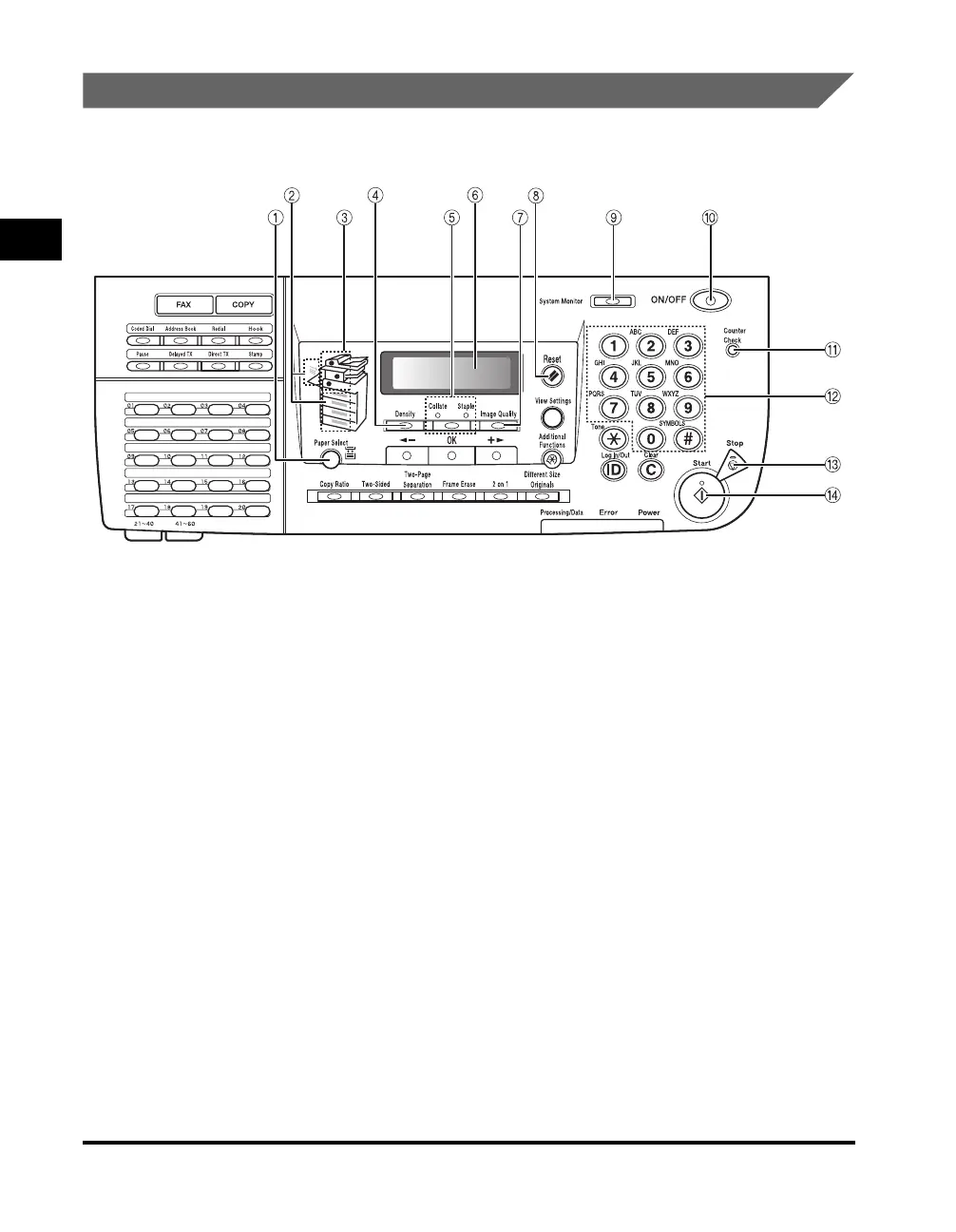
a Paper Select key
Press to select the desired paper source.
b Paper Select Indicator
Lights green to indicate the selected paper
source.
c Jam Location Indicator
Lights red to indicate the location of a paper jam.
d Density key
Press to darken or lighten the documents you
want to copy or send or receive via fax.
e Collate/Staple key
Press to switch between the Collate and Staple
modes.
f LCD Display
Displays messages, prompts, text, settings, and
numbers when operating the machine.
g Image Quality key
Press to select the image quality best suited to
the quality of your originals.
h Reset key
Press to cancel all settings and return to the
Standby display.
i System Monitor key
Press to check the status of the machine, print,
fax, or copy jobs.
j Control Panel Power Switch (Sub Power
Supply)
Press to turn the control panel ON or OFF. When
turned OFF, the machine is in the Sleep mode.
k Counter Check key
Press to display the copy and print totals on the
LCD display.
l Numeric keys
Use to enter alphanumeric characters.
m Stop key
Press to stop copying or scanning.
n Start key
Press to start an operation.



 To Next Page