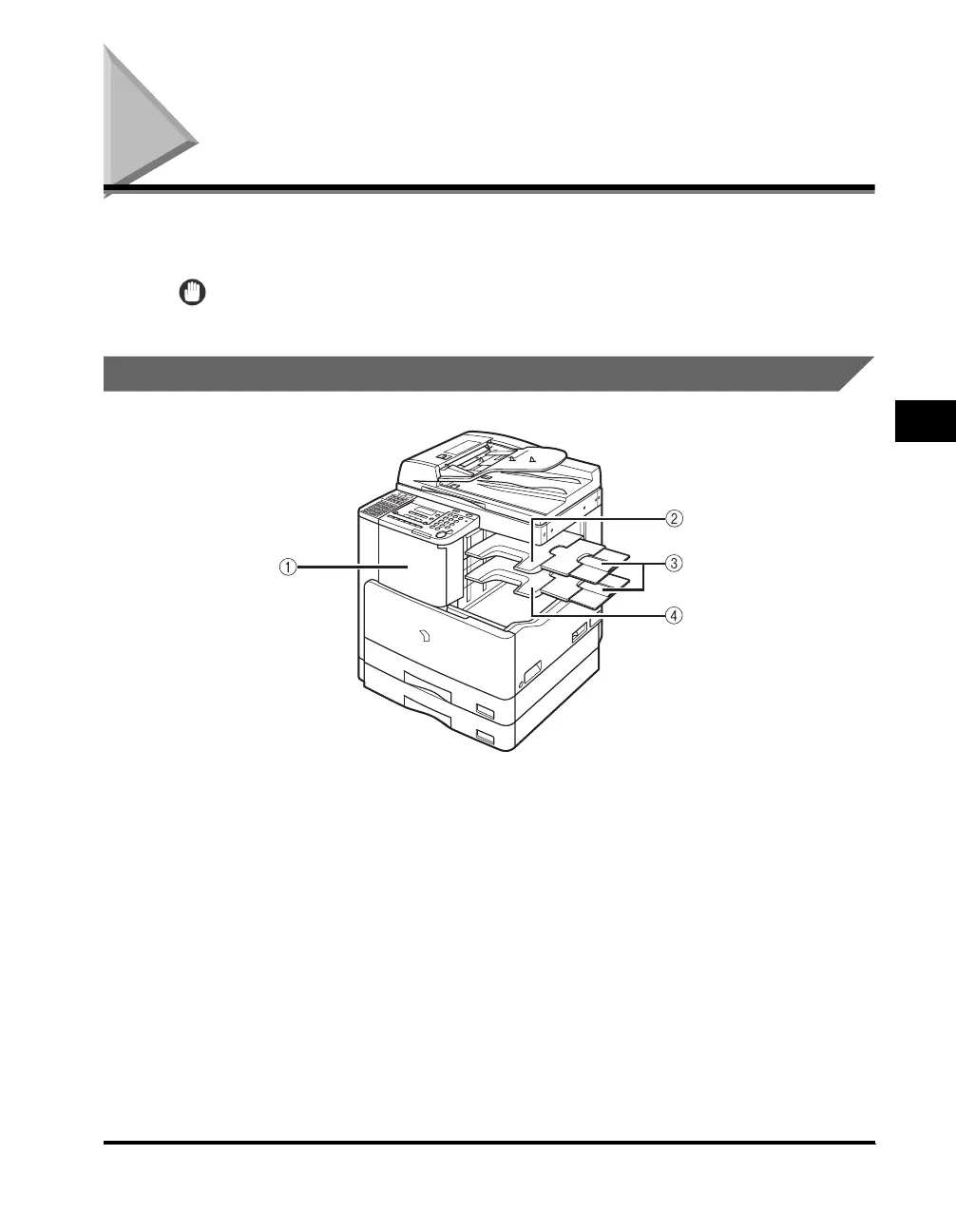
Finisher-U1
4-11
Optional Equipment
4
Finisher-U1
The Finisher-U1 is equipped with the following modes: Collate, Group, Offset, and
Staple. (See "Finishing Modes," on p. 4-12.)
IMPORTANT
The Finisher-U1 cannot be installed with the optional Inner 2 Way Tray-E1.
Parts and Their Functions
a Front Cover of the Finisher-U1
Open this cover to replace the staple cartridge in
the stapler unit, or to clear a staple jam. For
instructions on replacing the staple cartridge, see
"Replacing the Staple Cartridge," on p. 7-20. For
instructions on clearing a staple jam, see
"Clearing Staple Jams," on p. 8-32.
b Additional Finisher Tray-C1
The Additional Finisher Tray-C1 can be attached
to the optional Finisher-U1 to provide an
additional paper output tray.
c Auxiliary Tray
If you are printing on large size paper, such as
11" × 17", LGL, or LTRR, pull out the auxiliary
tray.
d Output Tray
Prints are output to this tray.



 To Next Page