Chapter 1
33
- Do not touch the top surface of the contact sensor.
- Be careful not to allow foreign objects to enter the
reader unit.
- Do not stain the stream reading glass.
- Be careful not to touch grease on the shaft, when
moving the contact sensor, etc.
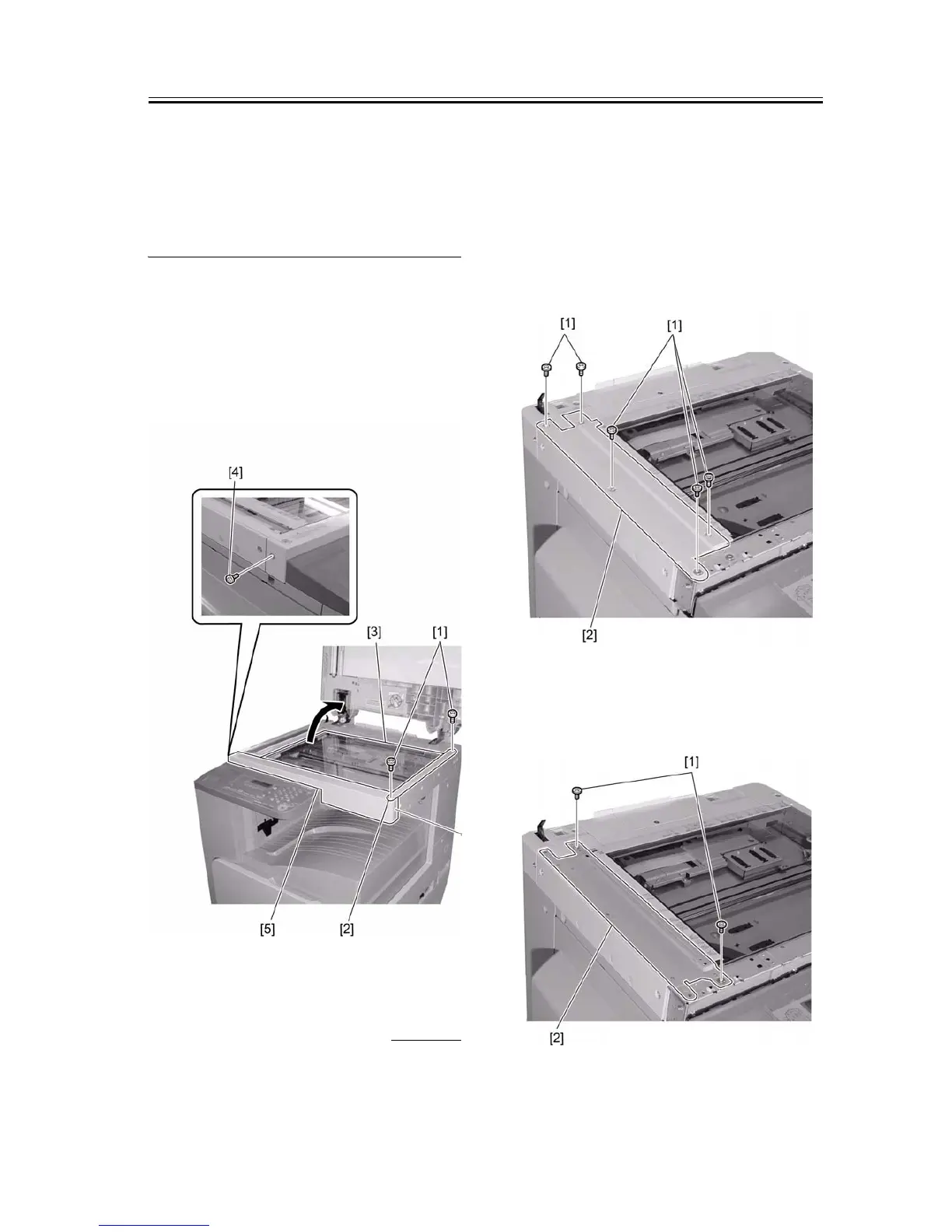
1) Open the ADF/copyboard cover.
2) Remove the two screws [1], and then the right glass
holder [2] of the reader.
3) Remove the document deck glass [3].
4) Remove the two screws [4], and then detach the
front cover [5] of the reader.
F-1-78
1.6.4 Removing Parts at
the Left of the Reader
0011-3376
iR2016J / iR2016 / iR2020 / / iR2016i / iR2020i
The work procedure for removing the parts at the left
of the reader differs between the machine with a copy-
board cover and the machine with a DADF. Follow
the appropriate procedure.
a. Machine with a Copyboard Cover
1) Remove the five screws [1], and then detach the up-
per-left cover [2] of the reader
F-1-79
2) Remove the two screws [1], and then detach the
blind plate [2].
F-1-80










 To Next Page