EasyManua.ls Logo

Canon PowerShot A310 - Page 39

Canon PowerShot A310
127 pages
Print Icon
To Next Page IconTo Next Page
To Previous Page IconTo Previous Page
Loading...
37
Shooting – The Basics
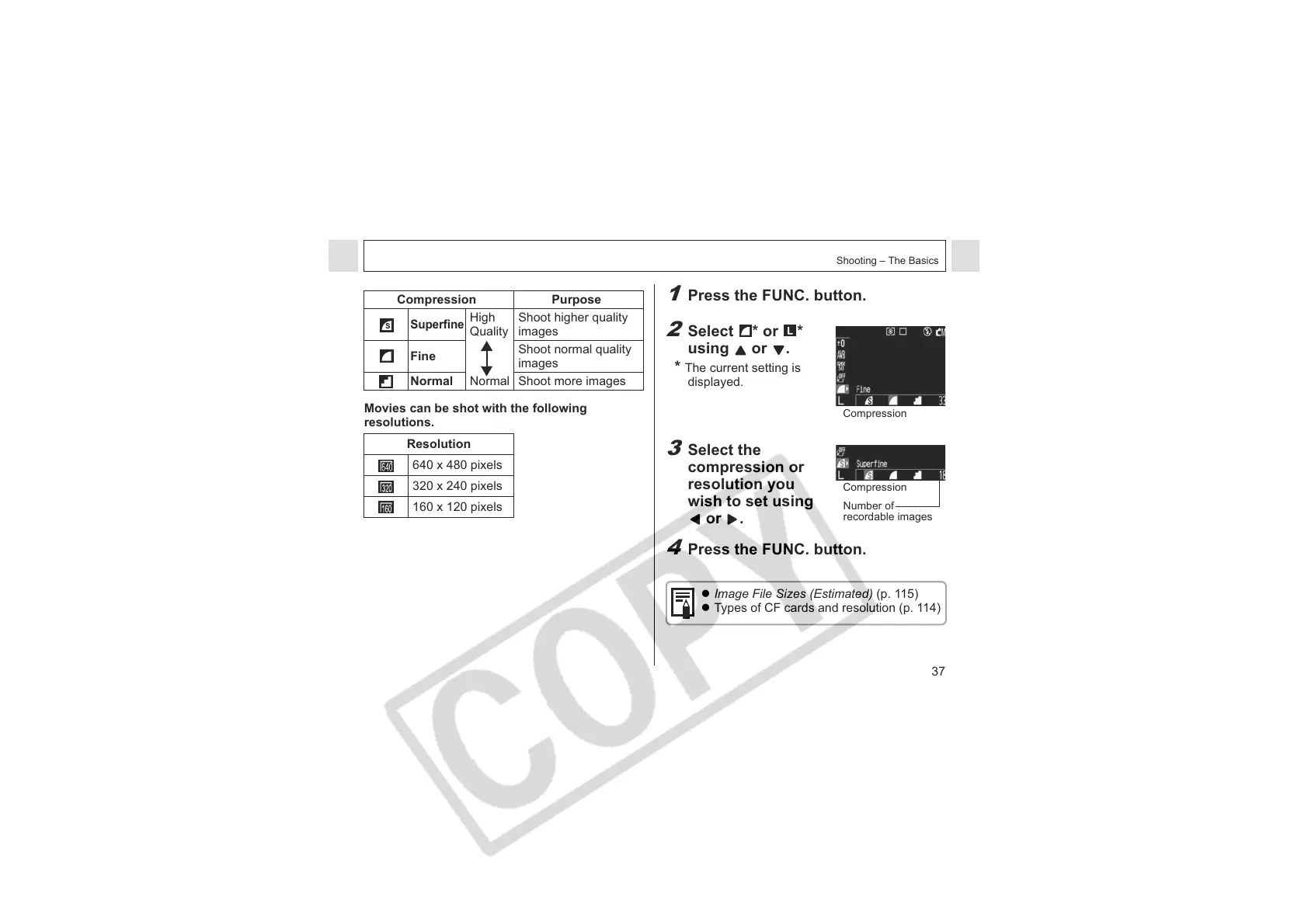
Movies can be shot with the following
resolutions.
Compression Purpose
Superfine
High
Quality
Normal
Shoot higher quality
images
Fine
Shoot normal quality
images
Normal Shoot more images
Resolution
640 x 480 pixels
320 x 240 pixels
160 x 120 pixels
1
Press the FUNC. button.
2
Select * or *
using or .
*
The current setting is
displayed.
3
Select the
compression or
resolution you
wish to set using
or .
4
Press the FUNC. button.
z Image File Sizes (Estimated) (p. 115)
z Types of CF cards and resolution (p. 114)
Compression
Compression
Number of
recordable images

Table of Contents

Other manuals for Canon PowerShot A310

Related product manuals