EasyManua.ls Logo

Canon UC800 - Writing and Adding Titles

Canon UC800
56 pages
Print Icon
To Next Page IconTo Next Page
To Previous Page IconTo Previous Page
Loading...
Advanced
Functions
Titles
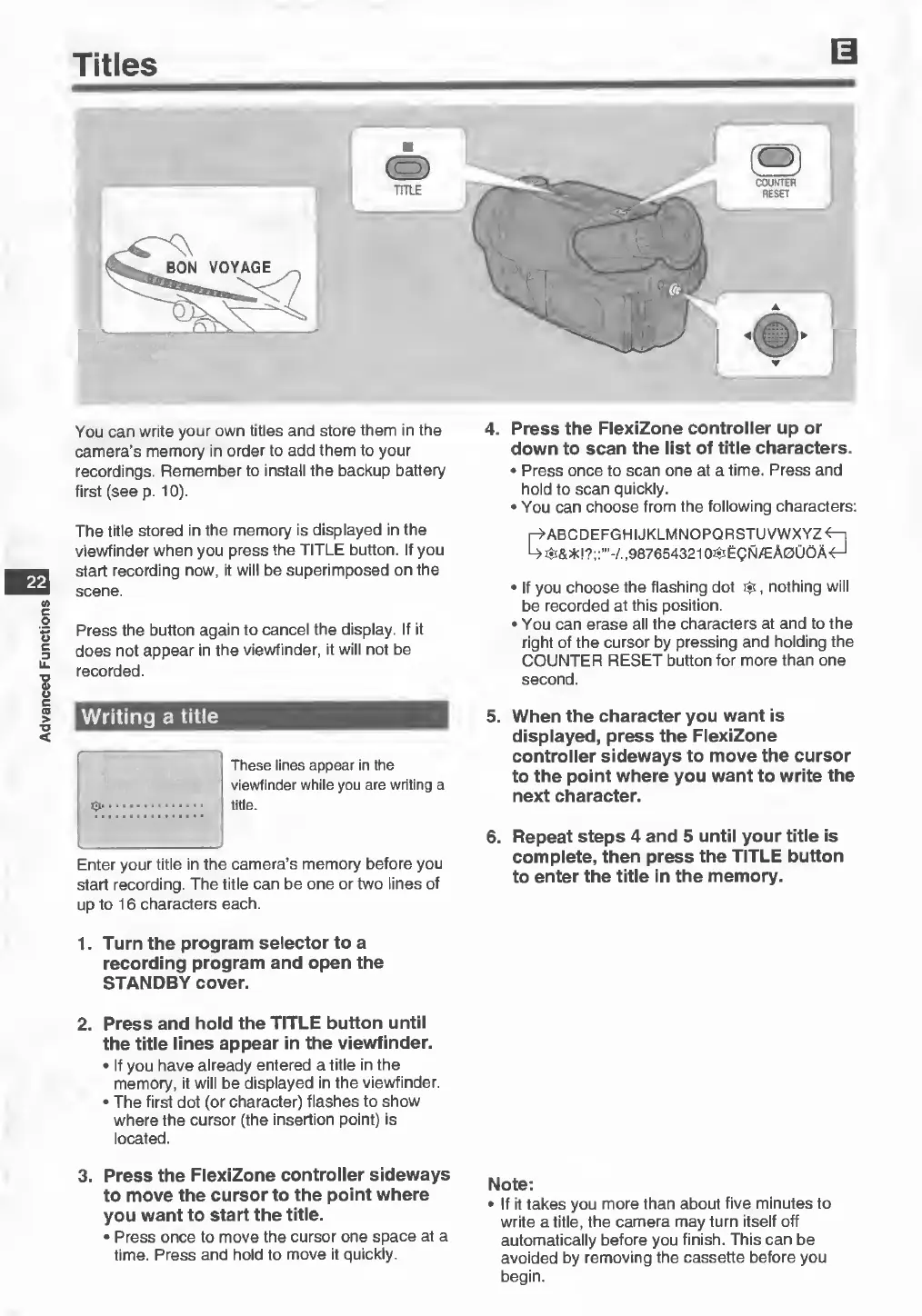
TITLE
You
can
write
your
own
titles
and
store
them
in
the
camera’s
memory
in
order
to
add
them
to
your
recordings.
Remember
to
install
the
backup
battery
first
(see
p.
10).
22
The
title
stored
in
the
memory
is
displayed
in
the
viewfinder
when
you
press
the
TITLE
button.
If
you
start
recording
now,
it
will
be
superimposed
on
the
scene.
Press
the
button
again
to
cancel
the
display.
If
it
does
not
appear
in
the
viewfinder,
it
will
not
be
recorded.
Writing
a
title
These
lines
appear
in
the
viewfinder
while
you
are
writing
a
title.
Enter
your
title
in
the
camera’s
memory
before
you
start
recording.
The
title
can
be
one
or
two
lines
of
up
to
16
characters
each.
1.
Turn
the
program
selector
to
a
recording
program
and
open
the
STANDBY
cover.
2.
Press
and
hold
the
TITLE
button
until
the
title
lines
appear
in
the
viewfinder.
•
If
you
have
already
entered
a
title
in
the
memory,
it
will
be
displayed
in
the
viewfinder.
•
The
first
dot
(or
character)
flashes
to
show
where
the
cursor
(the
insertion
point)
is
located.
3.
Press
the
FlexiZone
controller
sideways
to
move
the
cursor
to
the
point
where
you
want
to
start
the
title.
•
Press
once
to
move
the
cursor
one
space
at
a
time.
Press
and
hold
to
move
it
quickly.
4.
Press
the
FlexiZone
controller
up
or
down
to
scan
the
list
of
title
characters.
•
Press
once
to
scan
one
at
a
time.
Press
and
hold
to
scan
quickly.
•
You
can
choose
from
the
following
characters:
r-^ABCDEFGHIJKLMNOPQRSTUVWXYZ^—i
^
987654321
O^EQN/EA0U6A<H
•
If
you
choose
the
flashing
dot
$,
nothing
will
be
recorded
at
this
position.
•
You
can
erase
all
the
characters
at
and
to
the
right
of
the
cursor
by
pressing
and
holding
the
COUNTER
RESET
button
for
more
than
one
second.
5.
When
the
character
you
want
is
displayed,
press
the
FlexiZone
controller
sideways
to
move
the
cursor
to
the
point
where
you
want
to
write
the
next
character.
6.
Repeat
steps
4
and
5
until
your
title
is
complete,
then
press
the
TITLE
button
to
enter
the
title
in
the
memory.
Note:
•
If
it
takes
you
more
than
about
five
minutes
to
write
a
title,
the
camera
may
turn
itself
off
automatically
before
you
finish.
This
can
be
avoided
by
removing
the
cassette
before
you
begin.