EasyManua.ls Logo

Canon UC800 - SET Function for Scene Selection

Canon UC800
56 pages
Print Icon
To Next Page IconTo Next Page
To Previous Page IconTo Previous Page
Loading...
Editing
SET
Function
Choosing
a
scene
(SET
function)
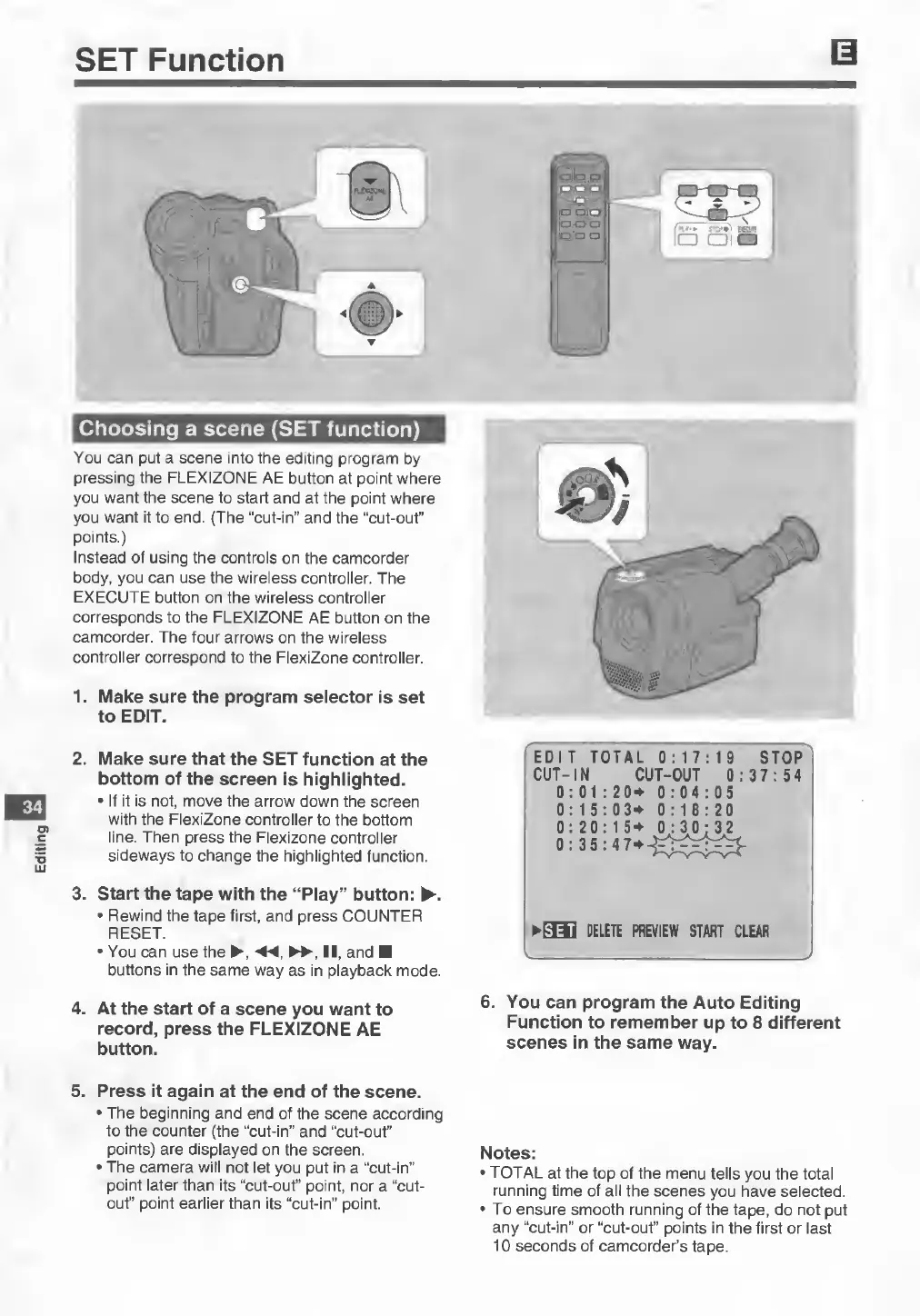
You
can
put
a
scene
into
the
editing
program
by
pressing
the
FLEXIZONE
AE
button
at
point
where
you
want
the
scene
to
start
and
at
the
point
where
you
want
it
to
end.
(The
“cut-in”
and
the
“cut-out”
points.)
Instead
of
using
the
controls
on
the
camcorder
body,
you
can
use
the
wireless
controller.
The
EXECUTE
button
on
the
wireless
controller
corresponds
to
the
FLEXIZONE
AE
button
on
the
camcorder.
The
four
arrows
on
the
wireless
controller
correspond
to
the
FlexiZone
controller.
1.
M
ake
sure
the
program
selector
is
set
to
EDIT.
34
2.
M
ake
sure
that
the
SET
function
at
the
bottom
of
the
screen
is
highlighted.
•
If
it
is
not,
move
the
arrow
down
the
screen
with
the
FlexiZone
controller
to
the
bottom
line.
Then
press
the
Flexizone
controller
sideways
to
change
the
highlighted
function.
3.
S
tart
the
tape
with
the
“Play”
button:
►.
•
Rewind
the
tape
first,
and
press
COUNTER
RESET.
•
You
can
use
the
►
,
II,
and
■
buttons
in
the
same
way
as
in
playback
mode.
4.
A
t
the
start
of
a
scene
you
want
to
record,
press
the
FLEXIZONE
AE
button.
EDIT
TOTAL
0:17:19
STOP
CUT-IN
CUT-OUT
0:37:54
0:01:20*
0:04:05
0:15:03*
0:18:20
►
SH
DELETE
PREVIEW
START
CLEAR
6.
You
can
program
the
Auto
Editing
Function
to
remember
up
to
8
different
scenes
in
the
same
way.
5.
P
ress
it
again
at
the
end
of
the
scene.
•
The
beginning
and
end
of
the
scene
according
to
the
counter
(the
“cut-in”
and
“cut-out"
points)
are
displayed
on
the
screen.
•
The
camera
will
not
let
you
put
in
a
“cut-in”
point
later
than
its
“cut-out”
point,
nor
a
“cut¬
out"
point
earlier
than
its
“cut-in”
point.
Notes:
•
TOTAL
at
the
top
of
the
menu
tells
you
the
total
running
time
of
all
the
scenes
you
have
selected.
•
To
ensure
smooth
running
of
the
tape,
do
not
put
any
“cut-in”
or
“cut-out”
points
in
the
first
or
last
10
seconds
of
camcorder’s
tape.