EasyManua.ls Logo

Canon UC800 - Cautions and Camera Maintenance

Canon UC800
56 pages
Print Icon
To Next Page IconTo Next Page
To Previous Page IconTo Previous Page
Loading...
Additional
Information
Cautions
and
Maintenance
Cautions
Maintenance
Avoid
high
temperatures
and
high
humidity.
•
Do
not
leave
the
camera
inside
a
car
in
hot
weather,
for
example.
•
Be
careful
of
heat
radiating
from
video
lighting
equipment.
•
Do
not
take
the
camera
into
a
humid
room.
Avoid
sudden
changes
in
temperature.
•
If
you
take
the
camera
from
a
cold
place
to
a
warm
place,
condensation
may
form
on
the
lens
and
internal
parts
(see
p.
47).
Do
not
point
the
lens
or
viewfinder
at
strong
light
sources.
•
Never
point
it
at
the
sun,
and
do
not
leave
it
aimed
at
a
bright
subject.
•
Be
especially
careful
when
leaving
the
camera
on
a
tripod.
Avoid
magnetic
or
electric
fields.
•
Do
not
use
the
camera
close
to
TV
transmitters,
portable
communication
devices
or
other
sources
of
electric
or
magnetic
radiation.
They
may
cause
picture
interference,
or
permanently
damage
the
camera.
Do
not
expose
the
camera
to
water.
•
Cover
the
camera
when
you
are
recording
in
light
rain
or
mist.
•
There
is
a
risk
of
electric
shock
if
water
gets
inside
the
camera
—
contact
qualified
service
personnel
as
soon
as
possible.
Protect
the
lens.
•
Sand
and
dust
can
damage
the
lens
—
be
especially
careful
on
windy
days.
46
Handle
the
camera
gently.
•
Vibration
or
shock
can
cause
damage.
•
Do
not
use
the
viewfinder
as
a
carrying
handle.
Keep
the
camera
the
right
way
up.
•
Try
to
keep
your
camcorder
the
right
way
up
and
horizontal
during
use.
When
a
cassette
is
loaded,
if
you
lay
the
camcorder
on
its
side
or
upside
down
the
tape
position
may
change.
This
could
result
in
lower
performance
or
even
malfunction.
•
Be
especially
careful
when
the
tape
is
moving
-
Handling
the
camera
with
respect,
so
that
you
can
use
it
trouble
free.
Do
not
disassemble
the
camera.
•
This
is
very
dangerous
as
there
is
a
risk
of
electric
shock
—
if
the
camera
does
not
function
properly,
take
it
to
qualified
service
personnel.
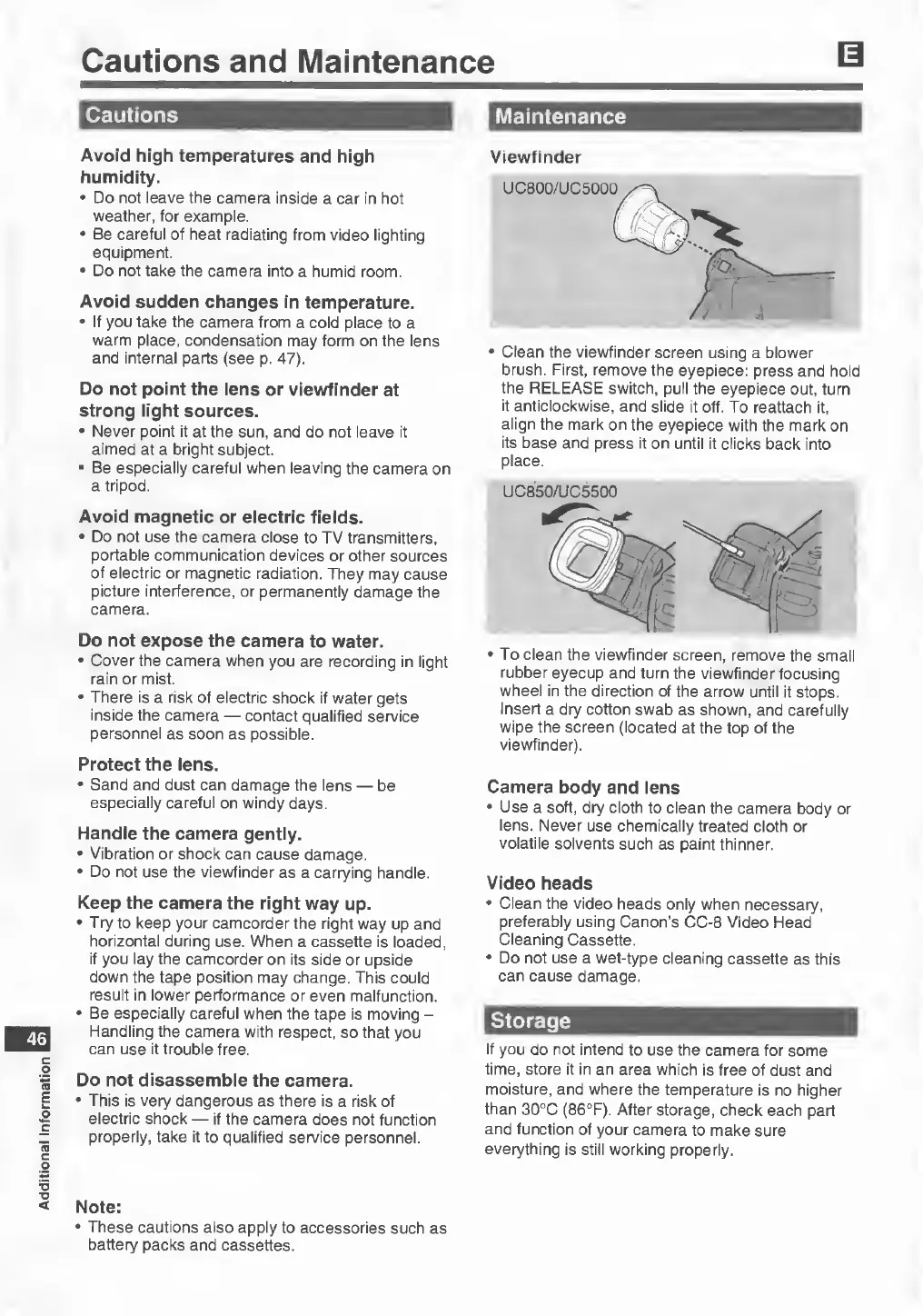
Viewfinder
•
Clean
the
viewfinder
screen
using
a
blower
brush.
First,
remove
the
eyepiece:
press
and
hold
the
RELEASE
switch,
pull
the
eyepiece
out,
turn
it
anticlockwise,
and
slide
it
off.
To
reattach
it,
align
the
mark
on
the
eyepiece
with
the
mark
on
its
base
and
press
it
on
until
it
clicks
back
into
place.
UC850/UC5500
•To
clean
the
viewfinder
screen,
remove
the
small
rubber
eyecup
and
turn
the
viewfinder
focusing
wheel
in
the
direction
of
the
arrow
until
it
stops.
Insert
a
dry
cotton
swab
as
shown,
and
carefully
wipe
the
screen
(located
at
the
top
of
the
viewfinder).
Camera
body
and
lens
•
Use
a
soft,
dry
cloth
to
clean
the
camera
body
or
lens.
Never
use
chemically
treated
cloth
or
volatile
solvents
such
as
paint
thinner.
Video
heads
•
Clean
the
video
heads
only
when
necessary,
preferably
using
Canon’s
CC-8
Video
Head
Cleaning
Cassette.
•
Do
not
use
a
wet-type
cleaning
cassette
as
this
can
cause
damage.
Storage
If
you
do
not
intend
to
use
the
camera
for
some
time,
store
it
in
an
area
which
is
free
of
dust
and
moisture,
and
where
the
temperature
is
no
higher
than
30°C
(86°F).
After
storage,
check
each
part
and
function
of
your
camera
to
make
sure
everything
is
still
working
properly.
Note:
•
These
cautions
also
apply
to
accessories
such
as
battery
packs
and
cassettes.