EasyManua.ls Logo

Canon UC800 - Viewfinder Display Icons and Meanings

Canon UC800
56 pages
Print Icon
To Next Page IconTo Next Page
To Previous Page IconTo Previous Page
Loading...
Additional
Information
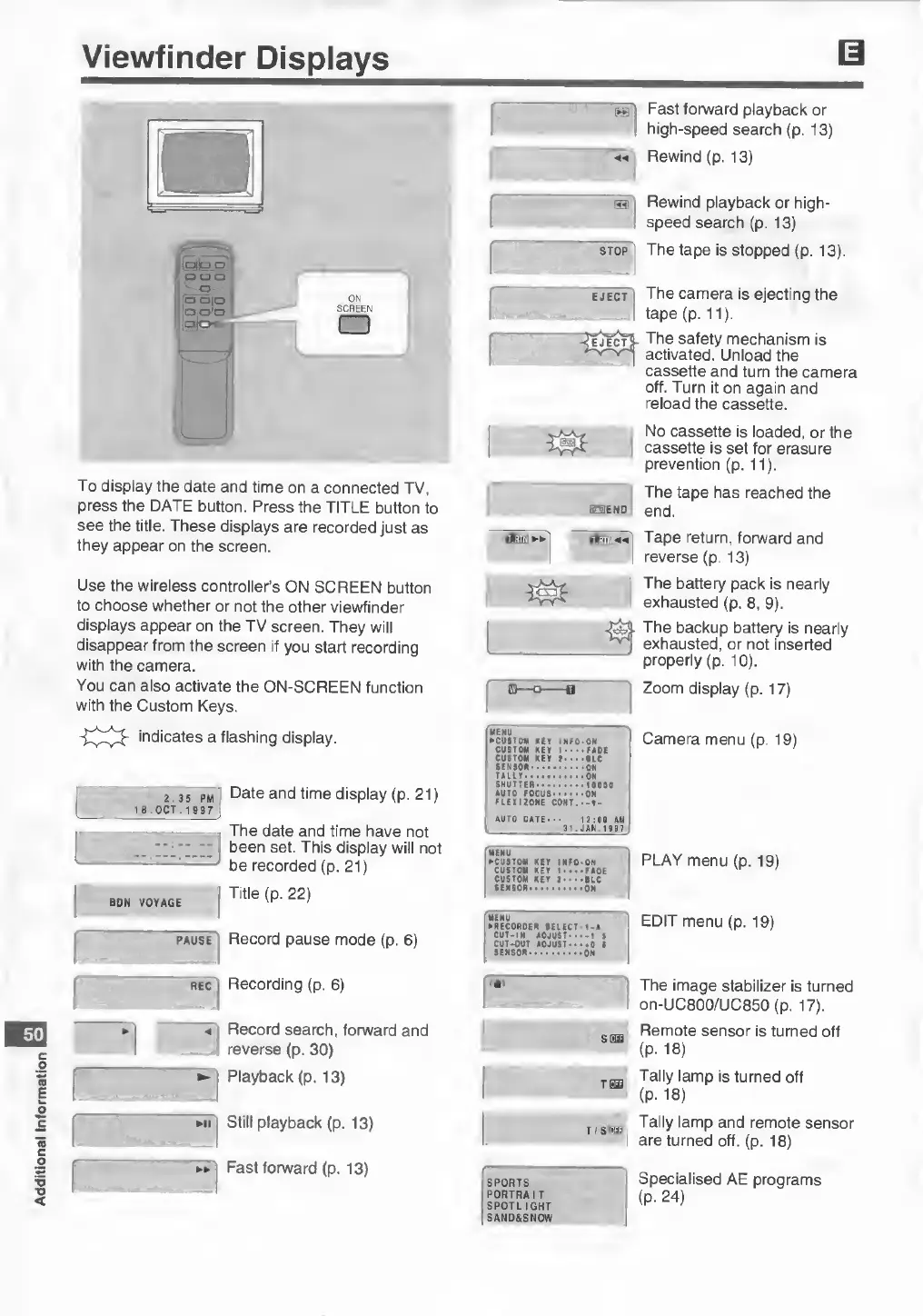
Viewfinder
Displays
50
To
display
the
date
and
time
on
a
connected
TV,
press
the
DATE
button.
Press
the
TITLE
button
to
see
the
title.
These
displays
are
recorded
just
as
they
appear
on
the
screen.
Use
the
wireless
controller’s
ON
SCREEN
button
to
choose
whether
or
not
the
other
viewfinder
displays
appear
on
the
TV
screen.
They
will
disappear
from
the
screen
if
you
start
recording
with
the
camera.
You
can
also
activate
the
ON-SCREEN
function
with
the
Custom
Keys.
indicates
a
flashing
display.
2:35
pm
|
Date
and
time
display
(p.
21)
18
.
O
CT
.
1
9
9
7
pause
Record
pause
mode
(p.
6
)
icslEND
Willi]
►►
I'
MENU
►
CUSTOM
KEY
INFO
•ON
CUSTOM
KEY
1
•
•
•FADE
CUSTOM
KEY
j.
.
•BIC
SENSOR-
•
■
•
•
ON
TALLY.
•ON
SHUTTER-••
•10000
AUTO
FOCUS
•ON
FLEX
120NE
CONT
AUTO
DATE-
12:00
AM
[
31
.
J
AN
1997
_-;
been
set.
This
display
will
not
MENU
►
CUSTOM
KEY
INFO-ON
CUSTOM
KEY
1
••••FAOE
CUSTOM
KEY
2
•
•
•
•BLC
be
recorded
(p.
21
)
Title
(p.
22)
ROM
VrtVAftC
t
-
t
-/
SENSOR..
•
•
ON
MENU
►
RECORDER
SELECT•1-A
CUT-IN
AOJUST*
CUT-OUT
ADJUST
■
SENSOR.
•-1
S
••0
I
•ON
rec
|
Recording
(p.
6
)
«a»
<
Record
search,
forward
and
i
reverse
(p.
30)
►
Playback
(p.
13)
►
n
Still
playback
(p.
13)
►►
!
Fast
forward
(p.
13)
SPORTS
PORTRAIT
SPOTLIGHT
SAND&SNOW
T
/SEE
Fast
forward
playback
or
high-speed
search
(p.
13)
Rewind
(p.
13)
Rewind
playback
or
high¬
speed
search
(p.
13)
The
tape
is
stopped
(p.
13).
The
camera
is
ejecting
the
tape
(p.
11
)
.
The
safety
mechanism
is
activated.
Unload
the
cassette
and
turn
the
camera
off.
Turn
it
on
again
and
reload
the
cassette.
No
cassette
is
loaded,
or
the
cassette
is
set
for
erasure
prevention
(p.
11
)
.
The
tape
has
reached
the
end.
Tape
return,
forward
and
reverse
(p.
13)
The
battery
pack
is
nearly
exhausted
(p.
8
,
9).
The
backup
battery
is
nearly
exhausted,
or
not
inserted
properly
(p.
10
).
Zoom
display
(p.
17)
Camera
menu
(p.
19)
PLAY
menu
(p.
19)
EDIT
menu
(p.
19)
The
image
stabilizer
is
turned
on-UC800/UC850
(p.
17).
Remote
sensor
is
turned
off
(P-
18)
Tally
lamp
is
turned
off
(p.
18)
Tally
lamp
and
remote
sensor
are
turned
off.
(p.
18)
Specialised
AE
programs
(p.
24)