EasyManua.ls Logo

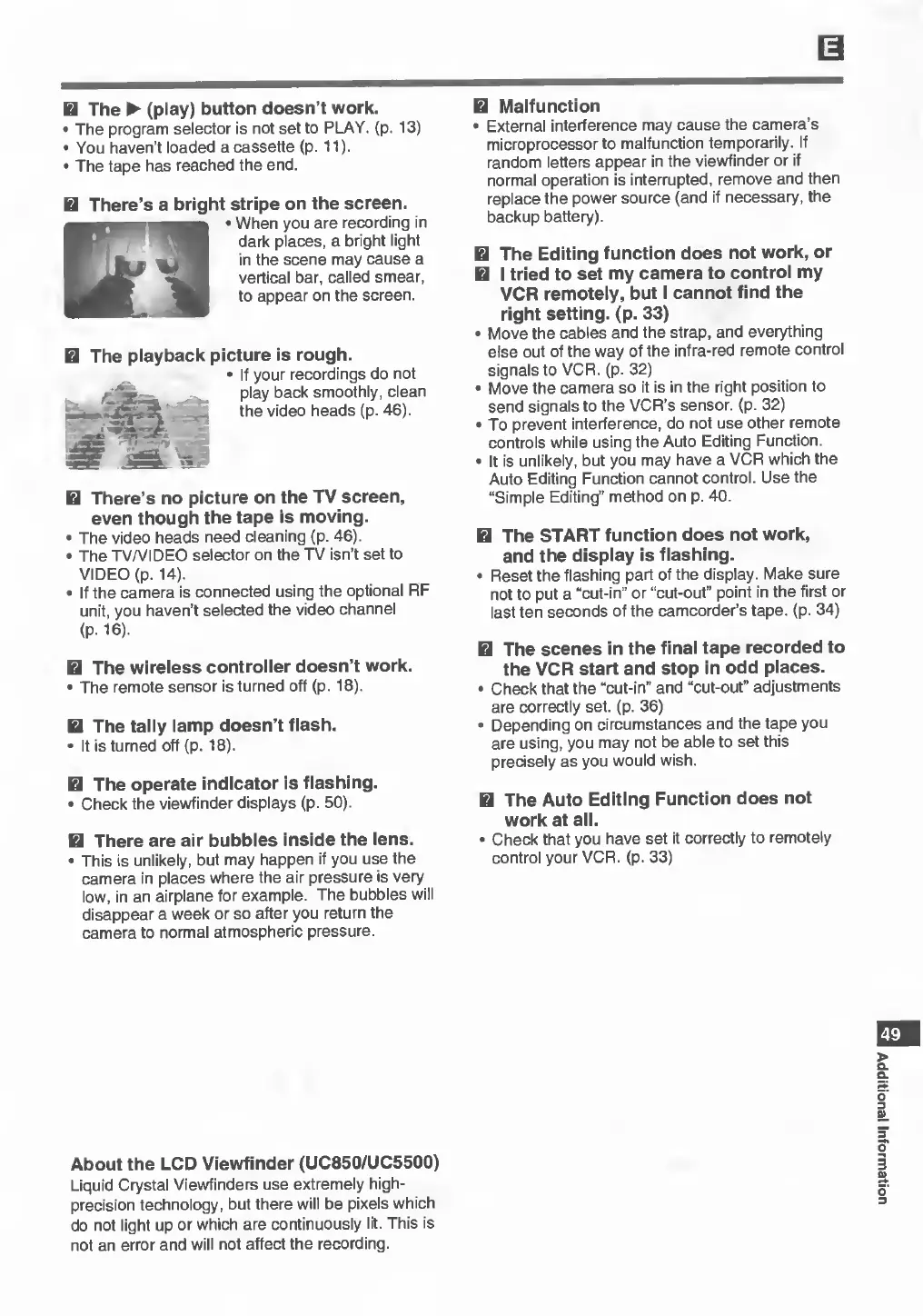
Canon UC800 - Troubleshooting: Playback and Editing Issues

Canon UC800
56 pages
Print Icon
To Next Page IconTo Next Page
To Previous Page IconTo Previous Page
Loading...
H
The
►
(play)
button
doesn’t
work.
•
The
program
selector
is
not
set
to
PLAY.
(p.
13)
•
You
haven’t
loaded
a
cassette
(p.
11).
•
The
tape
has
reached
the
end.
H
There’s
a
bright
stripe
on
the
screen.
•
When
you
are
recording
in
dark
places,
a
bright
light
in
the
scene
may
cause
a
vertical
bar,
called
smear,
to
appear
on
the
screen.
H
The
playback
picture
is
rough.
•
If
your
recordings
do
not
/
■
y
..
<
play
back
smoothly,
clean
the
video
heads
(p.
46).
H
There’s
no
picture
on
the
TV
screen,
even
though
the
tape
is
moving.
•
The
video
heads
need
cleaning
(p.
46).
•
The
TV/VIDEO
selector
on
the
TV
isn’t
set
to
VIDEO
(p.
14).
•
If
the
camera
is
connected
using
the
optional
RF
unit,
you
haven’t
selected
the
video
channel
(P-16).
H
The
wireless
controller
doesn’t
work.
•
The
remote
sensor
is
turned
off
(p.
18).
H
The
tally
lamp
doesn’t
flash.
•
It
is
turned
off
(p.
18).
H
The
operate
indicator
is
flashing.
•
Check
the
viewfinder
displays
(p.
50).
H
There
are
air
bubbles
inside
the
lens.
•
This
is
unlikely,
but
may
happen
if
you
use
the
camera
in
places
where
the
air
pressure
is
very
low,
in
an
airplane
for
example.
The
bubbles
will
disappear
a
week
or
so
after
you
return
the
camera
to
normal
atmospheric
pressure.
H
Malfunction
•
External
interference
may
cause
the
camera’s
microprocessor
to
malfunction
temporarily.
If
random
letters
appear
in
the
viewfinder
or
if
normal
operation
is
interrupted,
remove
and
then
replace
the
power
source
(and
if
necessary,
the
backup
battery).
H
The
Editing
function
does
not
work,
or
H
I
tried
to
set
my
camera
to
control
my
VCR
remotely,
but
I
cannot
find
the
right
setting,
(p.
33)
•
Move
the
cables
and
the
strap,
and
everything
else
out
of
the
way
of
the
infra-red
remote
control
signals
to
VCR.
(p.
32)
•
Move
the
camera
so
it
is
in
the
right
position
to
send
signals
to
the
VCR’s
sensor,
(p.
32)
•
To
prevent
interference,
do
not
use
other
remote
controls
while
using
the
Auto
Editing
Function.
•
It
is
unlikely,
but
you
may
have
a
VCR
which
the
Auto
Editing
Function
cannot
control.
Use
the
“Simple
Editing”
method
on
p.
40.
H
The
START
function
does
not
work,
and
the
display
is
flashing.
•
Reset
the
flashing
part
of
the
display.
Make
sure
not
to
put
a
“cut-in”
or
“cut-out”
point
in
the
first
or
last
ten
seconds
of
the
camcorder’s
tape.
(p.
34)
H
The
scenes
in
the
final
tape
recorded
to
the
VCR
start
and
stop
in
odd
places.
•
Check
that
the
“cut-in"
and
“cut-out”
adjustments
are
correctly
set.
(p.
36)
•
Depending
on
circumstances
and
the
tape
you
are
using,
you
may
not
be
able
to
set
this
precisely
as
you
would
wish.
H
The
Auto
Editing
Function
does
not
work
at
all.
•
Check
that
you
have
set
it
correctly
to
remotely
control
your
VCR.
(p.
33)
49
About
the
LCD
Viewfinder
(UC850/UC5500)
Liquid
Crystal
Viewfinders
use
extremely
high-
precision
technology,
but
there
will
be
pixels
which
do
not
light
up
or
which
are
continuously
lit.
This
is
not
an
error
and
will
not
affect
the
recording.
Additional
Information