EasyManua.ls Logo

Canon UC800 - Basic Recording

Canon UC800
56 pages
Print Icon
To Next Page IconTo Next Page
To Previous Page IconTo Previous Page
Loading...
Basic
Operation
Basic
Recording
Before
you
start
recording
Complete
the
following
steps:
•
Attach
a
power
source
(p.
7).
•
Load
a
cassette
(p.
11).
•
Adjust
the
viewfinder,
fasten
the
grip
belt
and
take
off
the
lens
cap.
(p.
12).
You
may
also
want
to
install
the
backup
battery
(p.
10)
in
order
to
set
the
date
and
time
display
(P-
21).
To
record
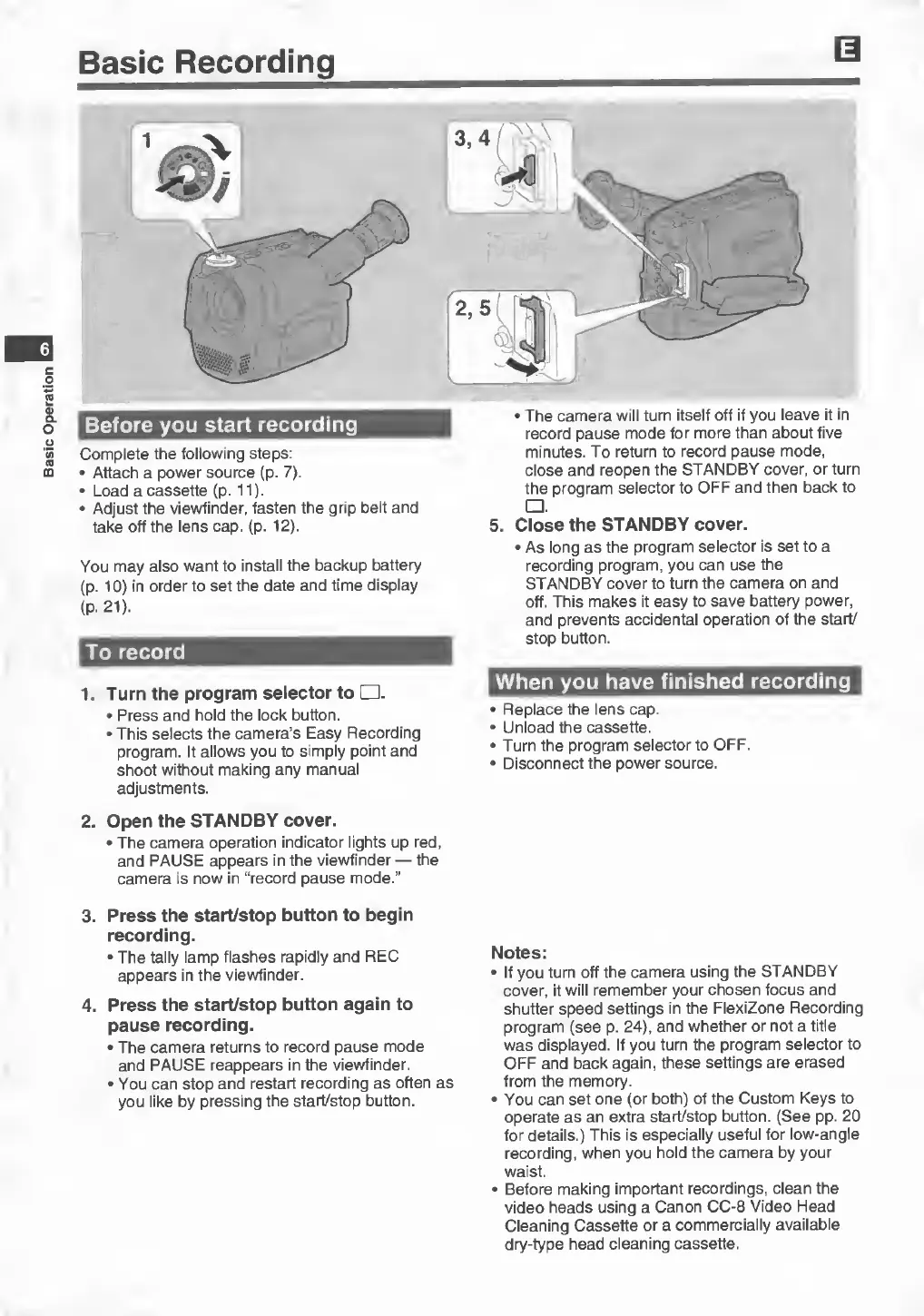
1.
Turn
the
program
selector
to
□
.
•
Press
and
hold
the
lock
button.
•
This
selects
the
camera’s
Easy
Recording
program.
It
allows
you
to
simply
point
and
shoot
without
making
any
manual
adjustments.
2.
Open
the
STANDBY
cover.
•
The
camera
operation
indicator
lights
up
red,
and
PAUSE
appears
in
the
viewfinder
—
the
camera
is
now
in
“record
pause
mode.”
3.
Press
the
start/stop
button
to
begin
recording.
•
The
tally
lamp
flashes
rapidly
and
REC
appears
in
the
viewfinder.
4.
Press
the
start/stop
button
again
to
pause
recording.
•
The
camera
returns
to
record
pause
mode
and
PAUSE
reappears
in
the
viewfinder.
•
You
can
stop
and
restart
recording
as
often
as
you
like
by
pressing
the
start/stop
button.
•
The
camera
will
turn
itself
off
if
you
leave
it
in
record
pause
mode
for
more
than
about
five
minutes.
To
return
to
record
pause
mode,
close
and
reopen
the
STANDBY
cover,
or
turn
the
program
selector
to
OFF
and
then
back
to
□
.
5.
C
lose
the
STANDBY
cover.
•
As
long
as
the
program
selector
is
set
to
a
recording
program,
you
can
use
the
STANDBY
cover
to
turn
the
camera
on
and
off.
This
makes
it
easy
to
save
battery
power,
and
prevents
accidental
operation
of
the
start/
stop
button.
When
you
have
finished
recording
•
Replace
the
lens
cap.
•
Unload
the
cassette.
•
Turn
the
program
selector
to
OFF.
•
Disconnect
the
power
source.
Notes:
•
If
you
turn
off
the
camera
using
the
STANDBY
cover,
it
will
remember
your
chosen
focus
and
shutter
speed
settings
in
the
FlexiZone
Recording
program
(see
p.
24),
and
whether
or
not
a
title
was
displayed.
If
you
turn
the
program
selector
to
OFF
and
back
again,
these
settings
are
erased
from
the
memory.
•
You
can
set
one
(or
both)
of
the
Custom
Keys
to
operate
as
an
extra
start/stop
button.
(See
pp.
20
for
details.)
This
is
especially
useful
for
low-angle
recording,
when
you
hold
the
camera
by
your
waist.
•
Before
making
important
recordings,
clean
the
video
heads
using
a
Canon
CC-8
Video
Flead
Cleaning
Cassette
or
a
commercially
available
dry-type
head
cleaning
cassette.