EasyManua.ls Logo

Canon UC800 - Charging and Attaching Battery Pack

Canon UC800
56 pages
Print Icon
To Next Page IconTo Next Page
To Previous Page IconTo Previous Page
Loading...
Basic
Operation
8
Charging
and
attaching
the
battery
pack
You
will
have
to
charge
the
battery
pack
before
you
can
use
it.
A
brand
new
battery
pack
must
be
charged
twice
before
use.
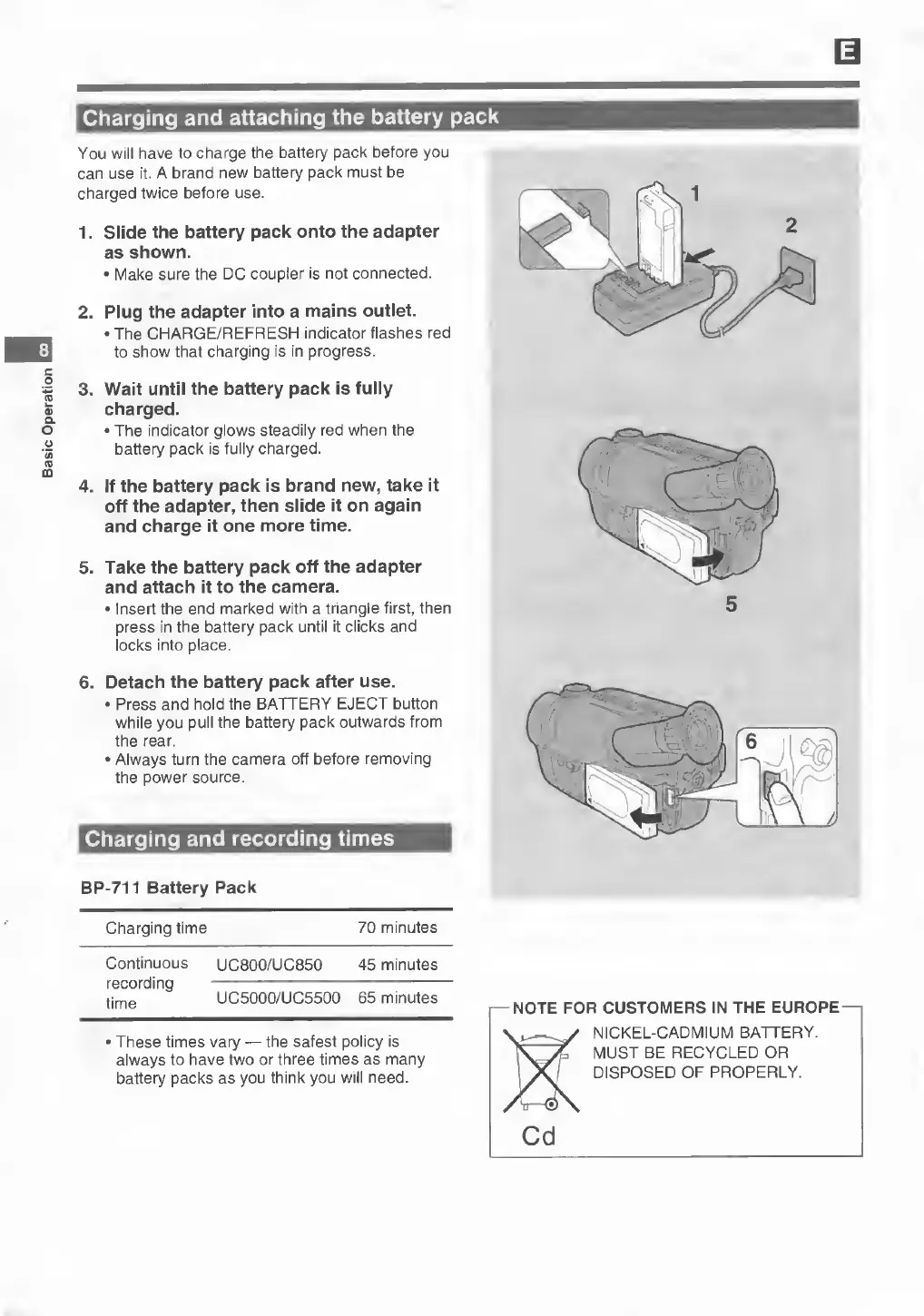
1.
Slide
the
battery
pack
onto
the
adapter
as
shown.
Make
sure
the
DC
coupler
is
not
connected.
2.
Plug
the
adapter
into
a
mains
outlet.
The
CHARGE/REFRESH
indicator
flashes
red
to
show
that
charging
is
in
progress.
3.
Wait
until
the
battery
pack
is
fully
charged.
The
indicator
glows
steadily
red
when
the
battery
pack
is
fully
charged.
4.
If
the
battery
pack
is
brand
new,
take
it
off
the
adapter,
then
slide
it
on
again
and
charge
it
one
more
time.
5.
Take
the
battery
pack
off
the
adapter
and
attach
it
to
the
camera.
Insert
the
end
marked
with
a
triangle
first,
then
press
in
the
battery
pack
until
it
clicks
and
locks
into
place.
6.
Detach
the
battery
pack
after
use.
Press
and
hold
the
BATTERY
EJECT
button
while
you
pull
the
battery
pack
outwards
from
the
rear.
Always
turn
the
camera
off
before
removing
the
power
source.
Charging
and
recording
times
BP-711
Battery
Pack
Charging
time
70
minutes
Continuous
UC800/UC850
45
minutes
recording
-
imp
UC5000/UC5500
65
minutes
These
times
vary
the
safest
policy
is
always
to
have
two
or
three
times
as
many
battery
packs
as
you
think
you
will
need.
I—NOTE
FOR
CUSTOMERS
IN
THE
EUROPE
NICKEL-CADMIUM
BATTERY.
MUST
BE
RECYCLED
OR
DISPOSED
OF
PROPERLY.
Cd

Related product manuals