36
English
CONNECTION VIA BLUETOOTH
®
WIRELESS TECHNOLOGY
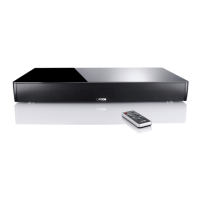
You can conveniently connect the Smart speakers to your (mobile) device via
Bluetooth
®
wireless technology using the Smart remote. Please proceed as
follows:
Establish Bluetooth
®
connection
1
Select the input [BT] by repeatedly pressing the up and down arrows
( , )
on the Smart remote.
2
Now press the (blue) button „Bluetooth Pairing“ on the Smart-remote.
3
Start the search on your (mobile) device.
4
Select Smart XXX as the playback device.
5
After confirmation, the connection is established automatically and the
message [CON] / [BT CON] appears on the display of the Smart speaker.
6
Start a title on your (mobile) device and the sound is automatically output
via the Smart speakers.
7
If the connection has failed, you receive the message [FAI].
8
If the (mobile) device requires a code, enter „0000“.
9
If [DIS] appears on the display, your (mobile) device is out of range or
logged off.
FURTHER FUNCTIONS AND NOTES
The Smart loudspeakers also contain a multitude of other great functions. All
setting options can be found in the detailed operating instructions.
This can be found at: www.canton.de


 To Next Page