Maintenance
-40-
5
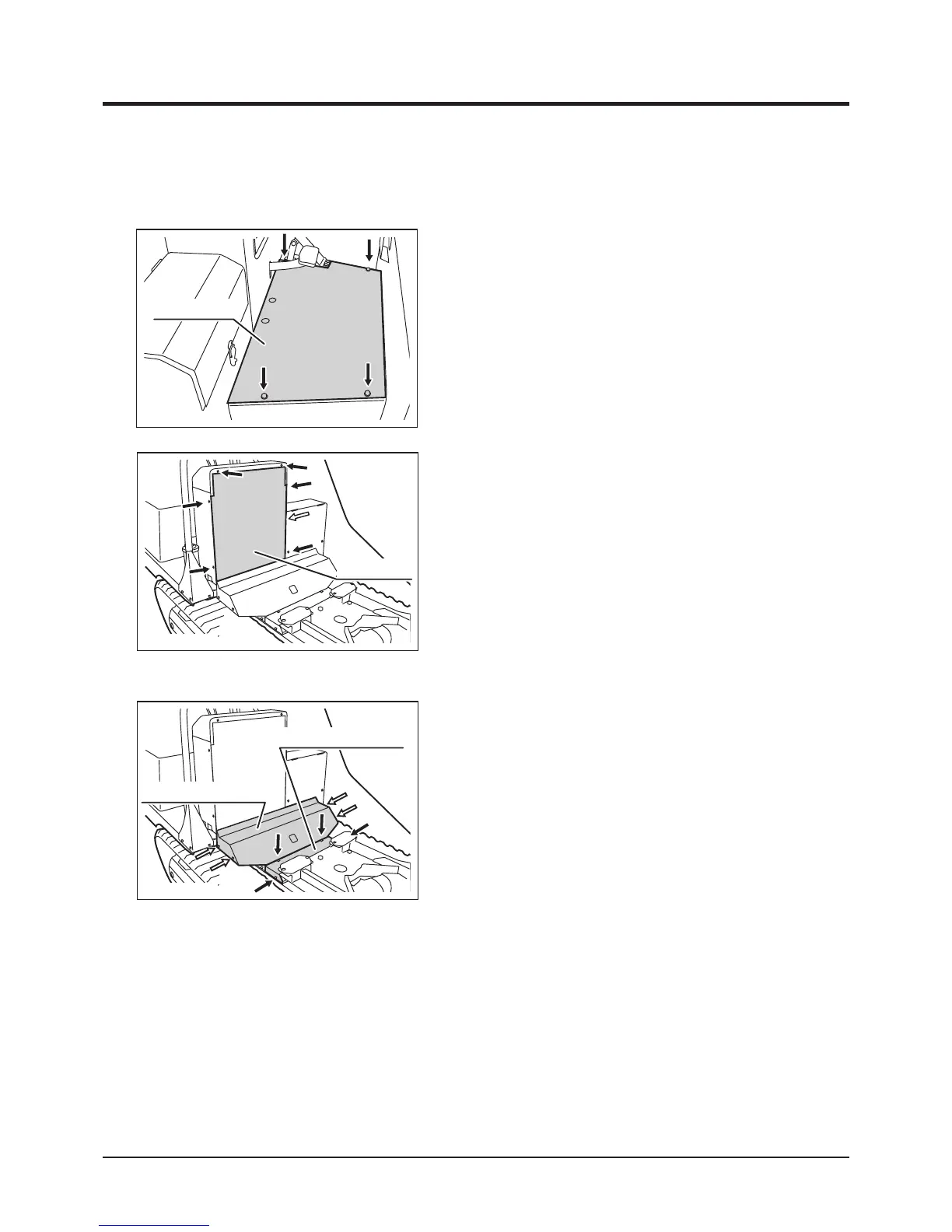
Removing Control Box Back Panel
1. Raise bucket.
2. Hold bucket with safety prop.
3. Unfasten (7) bolts (one is in the battery box)
to remove back panel.
Installing Control Box Back Panel
1. Place back panel and fasten bolts to install.
2. Undo the safety prop and lower bucket.
3683M-0505-020E
Back Panel
Removing Floor Panel
1. Unfasten (4) bolts to remove oor panel.
Installing Floor Panel
1. Place oor panel and fasten bolts to install.
3683M-0505-010E
Floor Panel
Step and Control Box
Removing Tank Cover Panels
1. Raise bucket.
2. Hold bucket with safety prop.
3. Unfasten (4) bolts that secure tank cover
panel 1 and remove the panel.
4. Unfasten (4) bolts that secure tank cover
panel 2 and remove the panel.
Installing Tank Cover Panels
1. Place tank cover panel 2 and fasten bolts to
install.
2. Place tank cover panel 1 and fasten bolts to
install.
3. Undo safety prop and lower bucket.
3683M-0505-030E
Tank Cover Panel 2
Tank Cover Panel 1



 To Next Page