
 Need help?
Do you have a question about the Cardo Systems Scala-rider FM and is the answer not in the manual?
Highlights hands-free operation, battery life, charger, and warranty for motorcycle helmets.
Defines Bluetooth (BT) and Control Button (CTRL) for headset operation.
Discusses potential interference with pacemakers, hearing aids, and other medical devices.
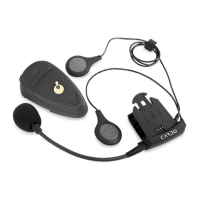
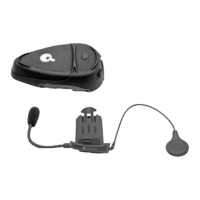
Lists headset, clamp, wall charger, allen wrench, velcro pad, travel pouch, and extension pad.
Explains headset control via buttons and volume controls for overall operation.
Details the process of pairing the headset with a cellular phone via Bluetooth.
Provides methods to re-establish a lost Bluetooth connection between headset and phone.
Guides users on securely mounting the headset unit onto their motorcycle helmet.
Describes how to make calls using the phone's keypad and the headset's talk/send function.
Explains how to use voice commands to initiate calls by speaking the contact's name.
Details how to answer calls via button press or voice command within a time limit.
Instructs users on how to end an active call using the headset's button or voice command.
Explains automatic volume adjustment (AGC) and manual volume control via headset buttons.
Covers methods to reject calls and redial the last number using headset buttons.
Guides on enabling/disabling VC and answering calls via voice command.
Explains how to reject calls by remaining silent for a specified duration.
Instructions for turning the FM radio on/off, switching stations, and searching for new ones.
Instructions on how to save found radio stations into the headset's memory.
Explains the meaning of different LED light patterns indicating headset status.
Describes the confirmation tones and alerts provided by the headset for various actions.
Quick reference for phone call handling and FM radio operations.
Answers common questions about using Bluetooth phones and adapters.
Addresses questions on interference, rain usage, and multiple phone connections.
Solutions for unsuccessful Bluetooth pairing and general connectivity problems.
Troubleshooting steps for issues with calls, voice commands, and redial functionality.
Solutions for crackling noises, poor sound, and FM radio reception problems.
Details technology, power, link distance, talk time, and weight specifications.
Explains FCC rules, warnings, and potential interference issues for the device.
Outlines how to obtain warranty service and the conditions for coverage.
Details warranty exclusions, limitations, and user's legal rights waiver.
Covers warranty exclusions, disclaimers, and limitations of liability for the product.
Information on returning the device for a refund within a specific timeframe and conditions.
Provides the form for product registration to activate warranty and customer service support.
Optional questionnaire for rating product features and providing feedback to Cardo Systems.
 General
| Connectivity Technology | Bluetooth |
|---|---|
| Radio System | FM Radio |
| Water Resistance | Yes |
| Recommended Use | Motorcycle |
| Charging Time | 3 h |
| Intercom Functionality | Yes |







 To Next Page