26
4.6 TECHNICAL MENU
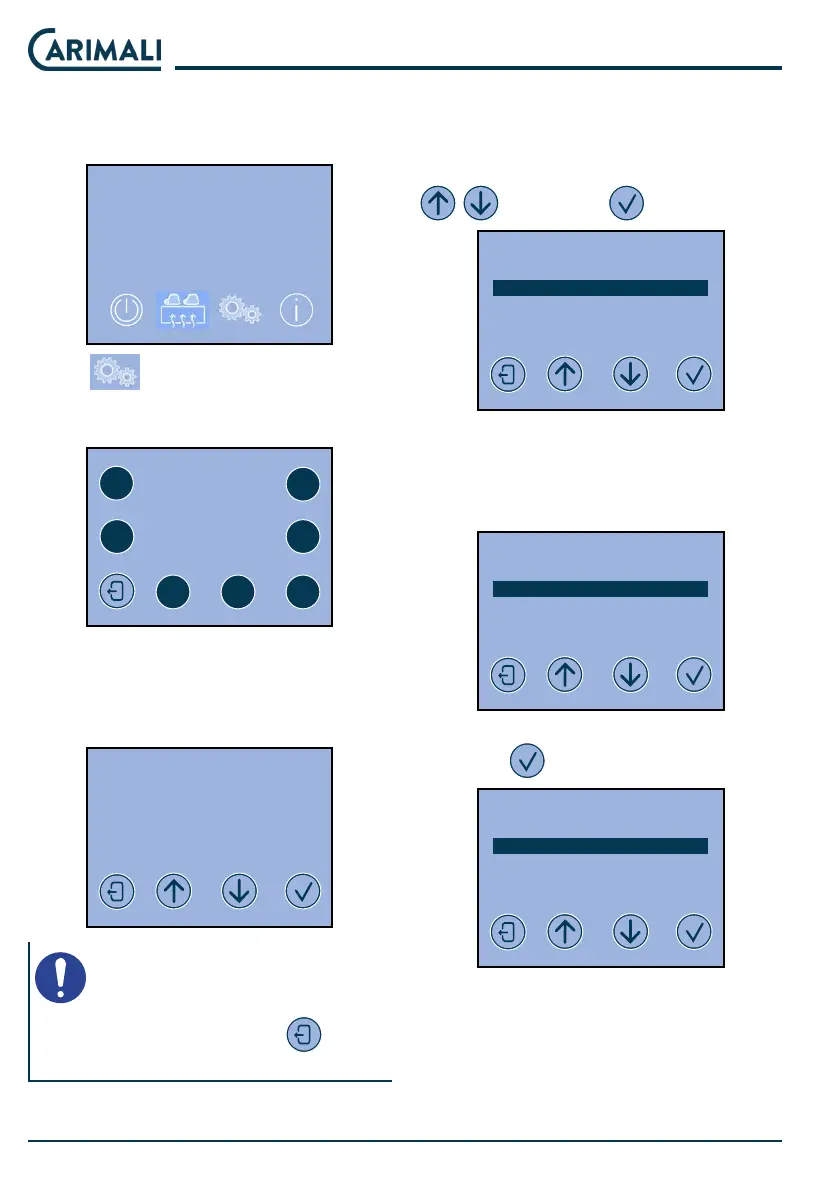
The technical menu can be accessed
when the machine is turned o.
2020-MAR-30 MON 09:34
OFF
Press to access the menu.
You are prompted to enter the pass-
word.
INSERT PASSWORD
- - - - -
1
3 4
5 6 7
2
Enter the password 22222 to access
the functions:
● Info Reset
● Programming of doses
2020-MAR-30 MON 09:34
SELECT
INFO RESET
DOSES PROGRAMMING
SYSTEM MANAGER
NOTE
From any screen, press to re-
turn to the home menu.
4.6.1 INFO RESET
This menu allows reading the coun-
ters.
Select the INFO RESET menu with
and press to access.
2020-MAR-30 MON 09:34
SELECT
INFO RESET
DOSES PROGRAMMING
SYSTEM MANAGER
There are two options in the INFO
RESET menu:
● Read doses data
● Syem data (not accessible)
2020-MAR-30 MON 09:34
SELECT
READ DOSES DATA
SYSTEM DATA
Access READ DOSES DATA by
pressing
and view the counters.
2020-MAR-30 MON 09:34
READ DOSES DATA
DOSES COUNTER A
DOSES COUNTER B
RESET DOSES COUNTER A
RESET DOSES COUNTER B
The partial counter reset functions
can also be accessed.










 To Next Page