35
5.4 WASHING THE MILKER
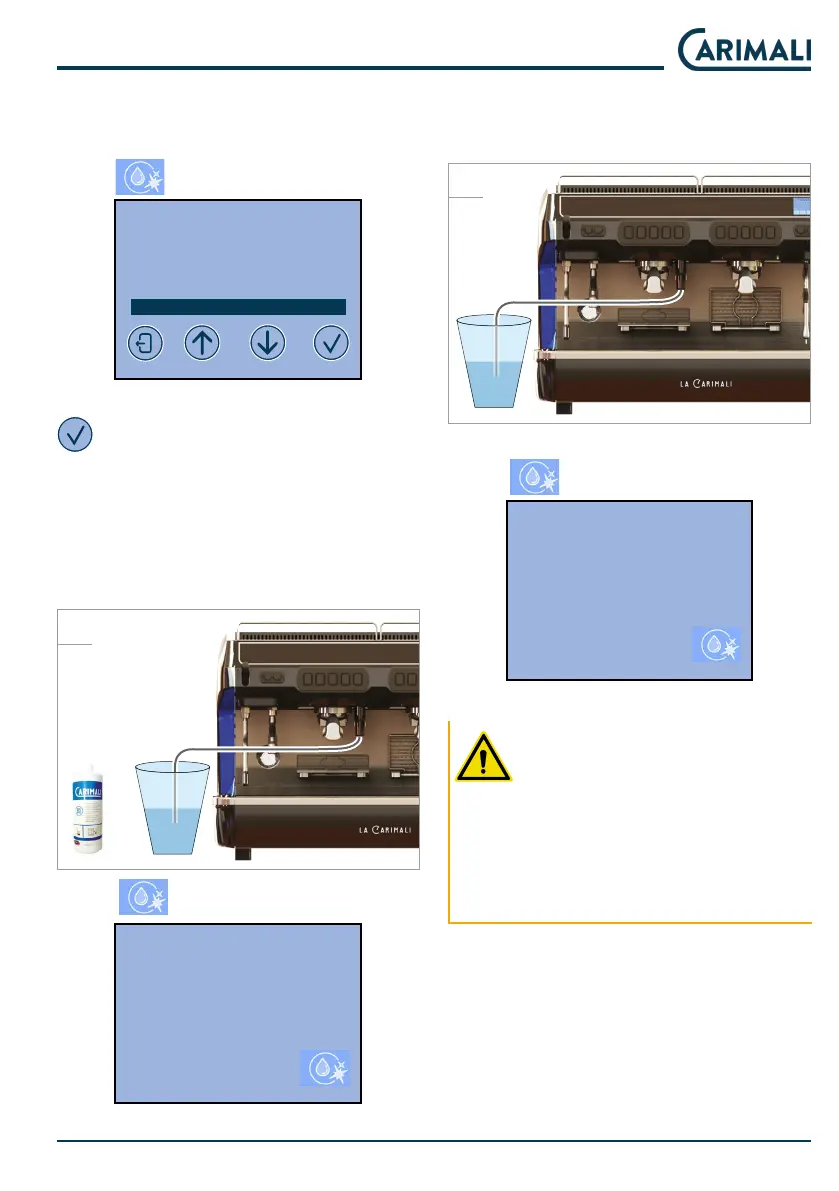
On the display, from the main menu,
press
to access the wash menu.
2020-MAR-30 MON 09:34
CLEANING
GROUP 1 CLEANING
GROUP 2 CLEANING
GROUP 3 CLEANING
MILKER CLEANING
Select the Milker cleaning and press
.
Connect the Milker circuit to a con-
tainer with CARIMALI water and san-
itiser (06.00136). Follow the inruc-
tions on the sanitiser package for
correct dilution.
H2O+
2828
Press to art washing.
2020-MAR-30 MON 09:34
MILKER CLEANING
INSERT DETERGENT
At the end of the r washing phase,
connect the Milker circuit to a contain-
er with clean water for rinsing.
H2O
2929
Press to art washing.
2020-MAR-30 MON 09:34
MILKER CLEANING
REPEAT CLEANING
USING FRESH WATER
PRESS CLEANING TO START
Wait for the Milker rinse to complete.
ATTENTION
If the washing cycle is interrupted
before it is nished, the procedure
mu be repeated from the begin-
ning, making sure that the rinsing
phase is performed.
Te dispensing a few times after
cleaning.











 To Next Page