Manual
14
In normal status of printer it is possible to carry out settings or to release functions.
If you press and at the same time hold the Feed key, then the status LED changes its colour every 2
seconds (selection of function).
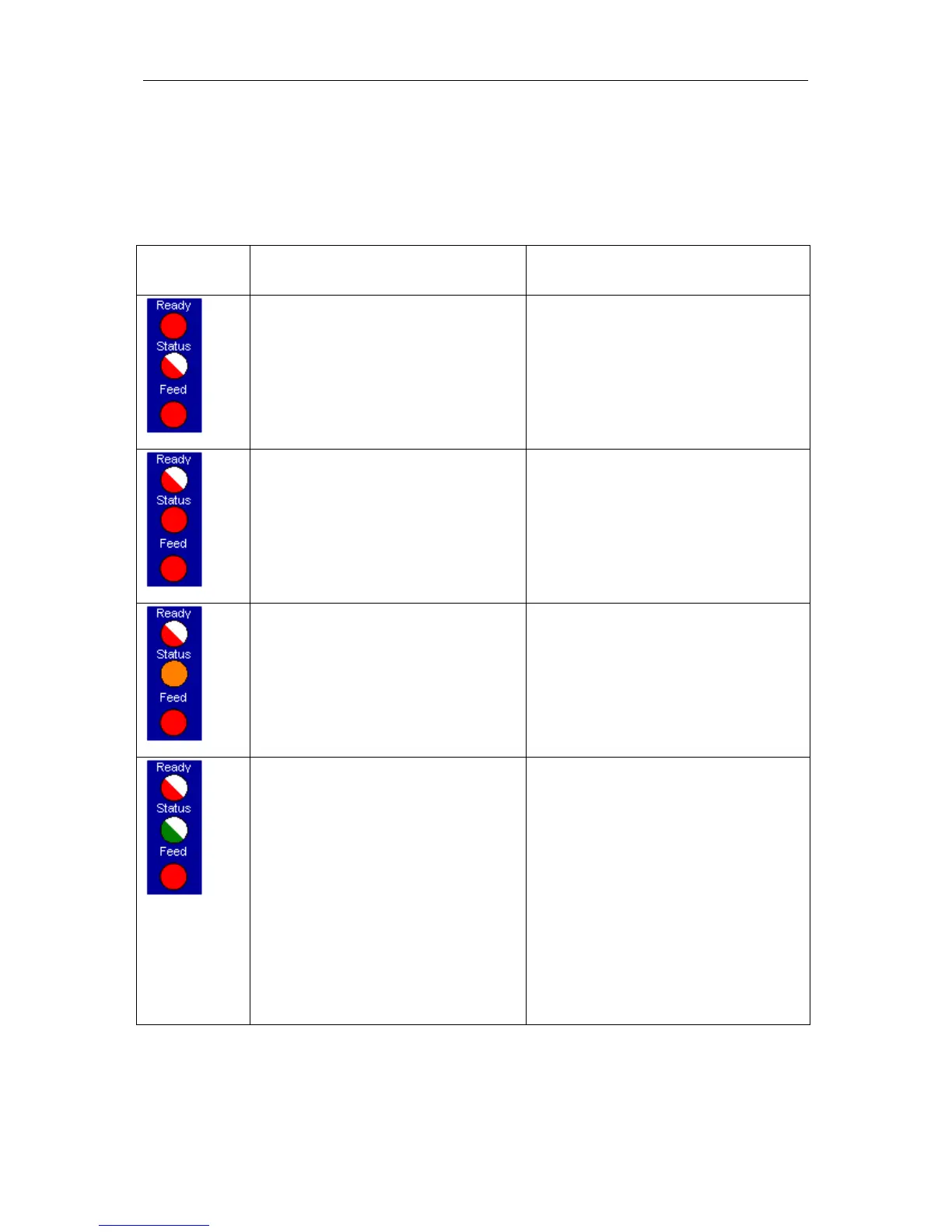
Control panel Procedure Function
Press and hold Feed key as long as
Ready LED is red and Status LED
flashes red. Release the Feed key.
Test print
3 successive printer blips
Press and hold Feed key as long as
Ready LED flashed red and Status LED
is red. Release the Feed key.
Status print
1 printer blip
By means of this function, a status print
is released. This print contains existing
print parameter e.g. print speed.
Press and hold Feed key as long as
Ready LED flashes red and Status LED
is yellow. Release the Feed key.
Measure label
2 printer blips
By means of this function the measuring
procedure is started and approx. 3 labels
are fed forward. It is recommended to
start the measuring procedure after each
change of label roll.
Press and hold Feed key as long as
Ready LED flashes red and Status LED
flashes green. Release the Feed key.
Transfer ribbon control
3 printer blips
By means of this function the transfer
ribbon control can be activated or not:
It is checked if the ribbon roll is to end or
if the ribbon was tore at the unwinding
roll. It is possible to select one of the
three functions.
Off: The ribbon control is deselected, i.e.
the printer continues without an error
message.
On: The ribbon control is selected, i.e.
the current print order is interrupted and
an error message appears at the printer
display.


 To Next Page