Page | 29
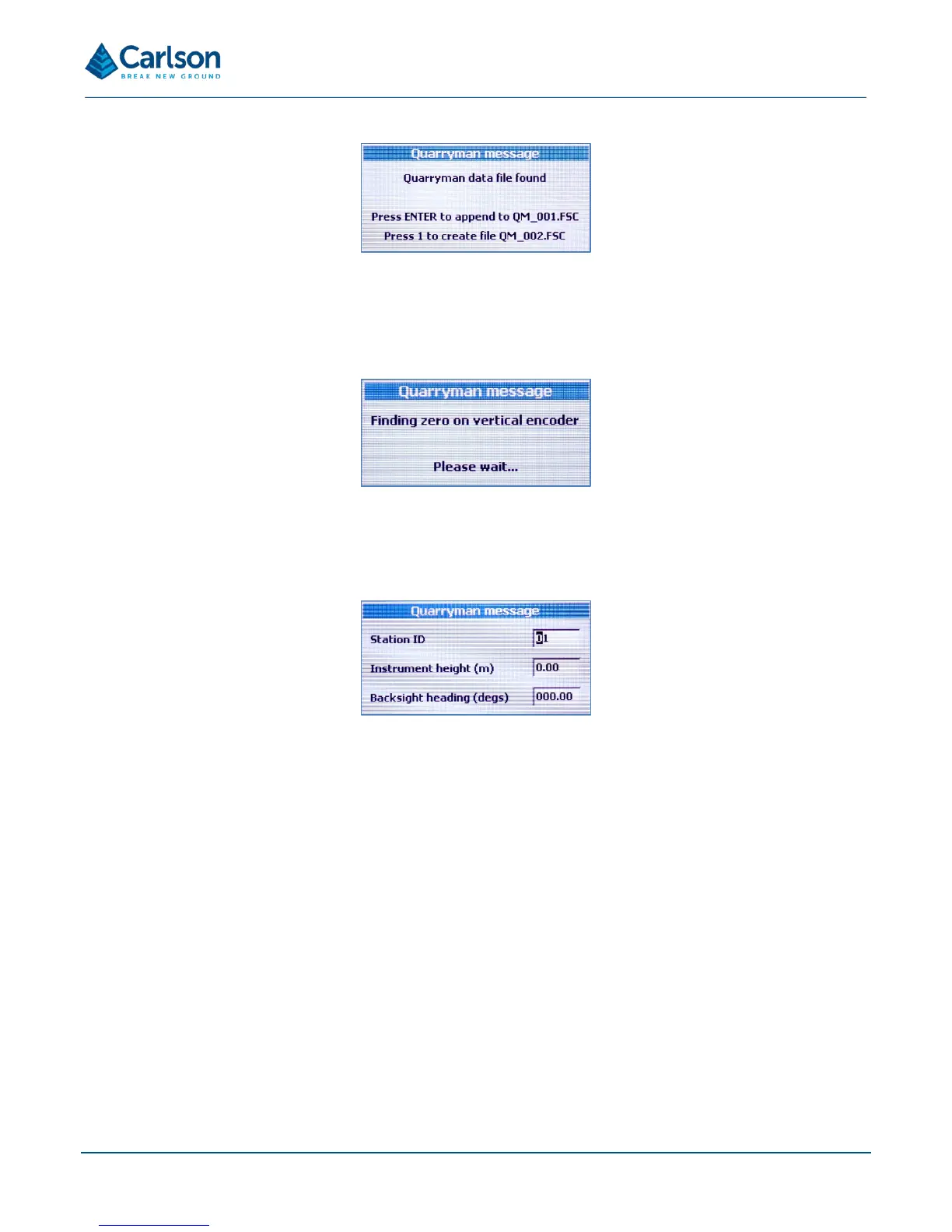
To append to this file, press ENTER. To start a new file – QM_002.FSC – press 1.
Once the current FSC file is determined, the laser module moves vertically to find the zero mark on the vertical
encoder.
Note that the battery indicator is not active until the main menu screen is reached.
A window appears prompting for initial values:
• Station ID: the identification number of the instrument setup.
• Instrument height: the vertical height from the ground beneath the Quarryman Pro to the embossed cross
on the side panel of the instrument.
• Backsight heading (degs): by default, this will be 00.00°. Usually when using data from the Quarryman
Pro in blast design packages, this value should be left at 00.00°.
These values cannot be entered again without shutting the unit down first.
As with all data entry windows, use the ENTER button to confirm each value, to progress to the next value and to
continue to the next screen. Use the SCROLL button to move the cursor to the left. Use the HOME button to move
the cursor to the right. Use the FUNCTION button to move the cursor up to the previous data entry box.
Having entered the initial parameters, the instrument prompts you to shoot to the back-sight or reference object.


 To Next Page