Page | 30
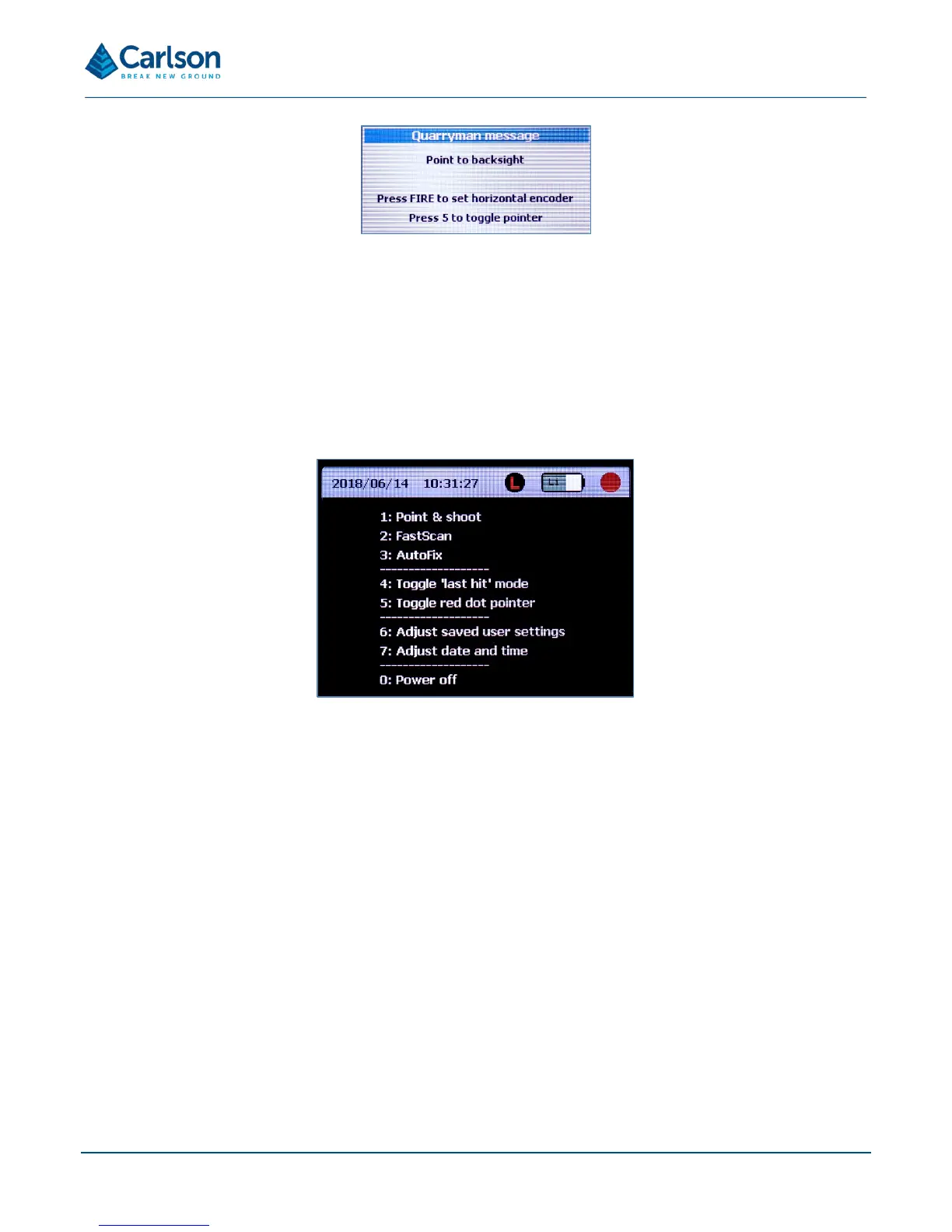
Sight the laser manually, or using the motorised controls, and press FIRE. This determines the initial 0.00° (or other
value entered as the Backsight heading) position of the horizontal encoder. No point is recorded.
The main menu appears.
6.3 Main menu
From the main menu, all functions of the Quarryman Pro are accessible.
1. Point and shoot: single shot operations. See section 6.4.
2. FastScan: scanning operations. See section 6.5.
3. AutoFix: manual rapid fire mode. See section 6.6.
4. Toggle last hit mode on and off. See section 7.4.
5. Toggle the red dot pointer: turns the visible pointer on and off.
6. Adjust saved user settings. See section 6.7.
7. Adjust date and time. See section 6.8.
0. Power off: the unit is powered OFF from the main menu. Press 0 and you will be offered the choice of either
continuing the shut down process or aborting and remaining on the main menu screen. Press ENTER to
continue or HOME to abort.
6.3.1 Status bar
The status bar can be seen at the top of the main menu and is present during all survey operations. The status
bar shows:



 To Next Page