Page | 31
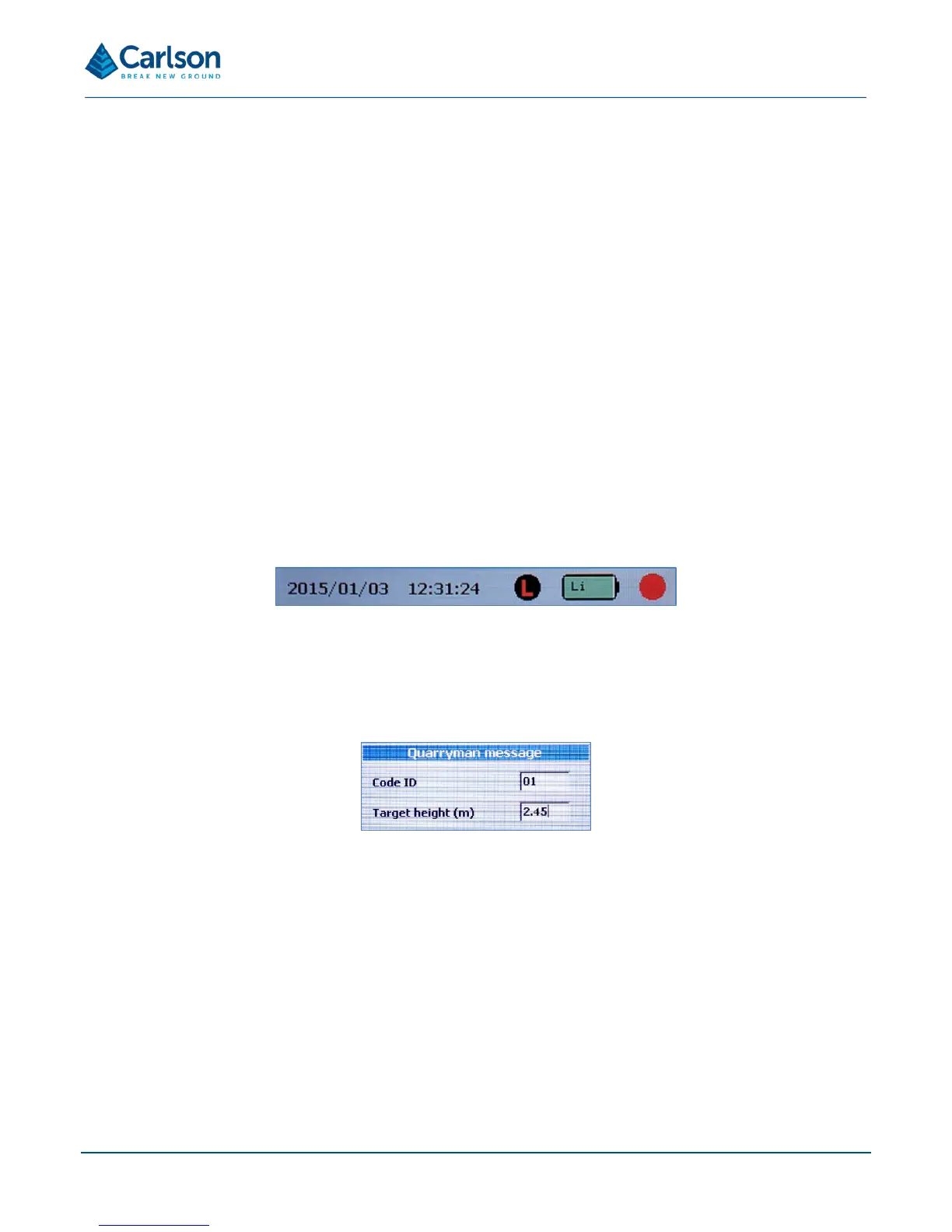
• Date: the date is set in the factory but can be reset by the user: see section 6.8. The date and time are
displayed in the international standard notation: YYYY MM DD / HH:MM:SS.
• Time: the time is set in the factory but can be reset by the user: see section 6.8. The time is displayed in
the 24 hour format.
• Last-hit mode status: A greyed out ‘L’ symbol indicates that last-hit mode is turned off; a red ‘L’ on a black
background indicates that last-hit mode is turned on.
• Battery status: gives a colour-coded representation of the battery status.
o Green: more than 50% charge
o Orange: more than 15% charge
o Red: less than 15% charge. You should consider changing the battery, as the time remaining will
be unpredictable. The instrument shuts down when the voltage from the lithium-ion battery drops
to approximately 12.5 V (if a lead acid battery is being used, this figure will be approximately 10.8
V).
The battery status also shows ‘Li’ or ‘Pb’, depending on whether a lithium-ion or lead acid battery is being
used.
• Red dot pointer status: a black circle indicates that the red dot pointer is turned off; a red circle indicates
that the red dot pointer is turned on.
6.4 Point and shoot mode
On selecting Point and shoot mode, the user input screen appears.
Enter these values as required, then press ENTER.
The Point and shoot survey screen appears.


 To Next Page