Page | 35
a chord distance, the shot will provide the distance necessary to calculate the angle required between each scan
line.
The scan will commence immediately after the reference shot has been taken.
6.5.2 During a scan
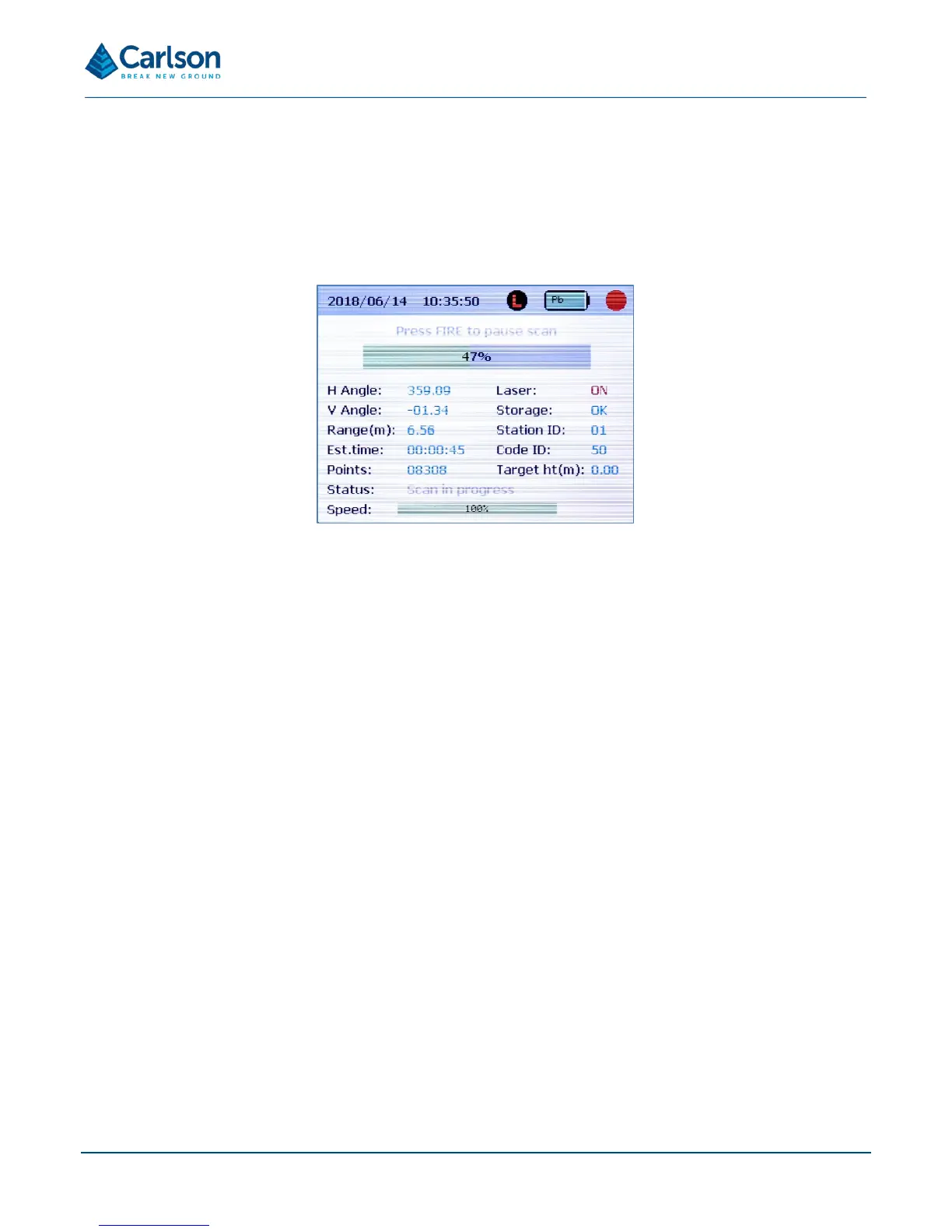
During a scan, the FastScan survey screen displays the following information. All details are continuously updated.
• Time remaining graphic: a green bar illustrates the percentage of the scan that is complete.
• H Angle: horizontal encoder angle
• V Angle: vertical encoder angle
• Range(m)
• Est time: time remaining – in hours, minutes and seconds.
• Points: displays the total number of points collected during the current scan.
• Laser: displays ON while laser is firing.
• Storage: displays OK if the USB drive is present and has at least 100 MB free memory.
• Station ID: as chosen at the start-up phase.
• Code ID: as selected in the FastScan settings screen.
• Target ht(m): automatically set to 0.00 for FastScan operations.
• Status: Scan in progress.
At any stage while the scan is in progress, you can pause the scan by pressing the FIRE button. The Quarryman
Pro completes the current scan line and then pauses. The Status label reads ‘Scan Paused’.
Press the FIRE button again to resume the scan, or press the FUNCTION button to abort the scan. An aborted scan
is acknowledged with a ‘Scan Complete’ dialog box.
When a scan is complete or is aborted, the data collected is stored on the USB drive and the display returns to the
main menu.



 To Next Page