27
26
?
?
?
?
?
?
?
?
@@@@@@@@@@@@g?
@@@@@@@@@@@@g?
@@@@@@@@@@@@g?
@@@@@@@@@@@@g?
@@@@@@@@@@@@g?
@@@@@@@@@@@@g?
@@@@@@@@@@@@g?
@@@@@@@@@@@@g?
@@@@@@@@@@@@g?
@@@@@@@@@@@@g?
@@@@@@@@@@@@g?
@@@@@@@@@@@@g?
?
?
?
?
?
?
?
Simple Interface Program(Language C)
#include <bios.h>
#include <conio.h>
#define COM1 0
#define DATA_READY 0 100
#define TRUE 1
#define FALSE 0
#define SETTINGS 0 E3
int main(void)
{
int in, out, status, DONE = FALSE;
bioscom(0, SETTINGS, COM1);
cprintf(“... BIOSCOM [ESC] to exit ... n”);
while (!DONE)
{
status = bioscom(3, 0, COM1);
if (status & DATA_READY)
if ((out = bioscom(2, 0, COM1) & 0 7F) != 0)
putch(out);
if (kbhit( ))
{
if ((in = getch( )) == ‘ 1B’)
DONE = TRUE;
bioscom(1, in, COM1);
}
}
return 0;
}
?
?
?
?
?
?
?
?
@@@@@@@@@@@@g?
@@@@@@@@@@@@g?
@@@@@@@@@@@@g?
@@@@@@@@@@@@g?
@@@@@@@@@@@@g?
@@@@@@@@@@@@g?
@@@@@@@@@@@@g?
@@@@@@@@@@@@g?
@@@@@@@@@@@@g?
@@@@@@@@@@@@g?
@@@@@@@@@@@@g?
@@@@@@@@@@@@g?
?
?
?
?
?
?
?
ND Series serial printer connection
RXD
TXD
GND
3 Transmit Data
2 Receive Data
7 Signal Ground
9pin port(Female)
ND Series serial printer port
RS-232C COM1 port of
CI-2001AS/BS
?
?
?
?
?
?
?
?
@@@@@@@@@@@@g?
@@@@@@@@@@@@g?
@@@@@@@@@@@@g?
@@@@@@@@@@@@g?
@@@@@@@@@@@@g?
@@@@@@@@@@@@g?
@@@@@@@@@@@@g?
@@@@@@@@@@@@g?
@@@@@@@@@@@@g?
@@@@@@@@@@@@g?
@@@@@@@@@@@@g?
@@@@@@@@@@@@g?
?
?
?
?
?
?
?
Transmit mode: Same as RS-232C interface COM1
?
?
?
?
?
?
?
?
@@@@@@@@@@@@g?
@@@@@@@@@@@@g?
@@@@@@@@@@@@g?
@@@@@@@@@@@@g?
@@@@@@@@@@@@g?
@@@@@@@@@@@@g?
@@@@@@@@@@@@g?
@@@@@@@@@@@@g?
@@@@@@@@@@@@g?
@@@@@@@@@@@@g?
@@@@@@@@@@@@g?
@@@@@@@@@@@@g?
?
?
?
?
?
?
?
Data format: Same as RS-232C interface COM1
?
?
?
?
?
?
?
?
@@@@@@@@@@@@g?
@@@@@@@@@@@@g?
@@@@@@@@@@@@g?
@@@@@@@@@@@@g?
@@@@@@@@@@@@g?
@@@@@@@@@@@@g?
@@@@@@@@@@@@g?
@@@@@@@@@@@@g?
@@@@@@@@@@@@g?
@@@@@@@@@@@@g?
@@@@@@@@@@@@g?
@@@@@@@@@@@@g?
?
?
?
?
?
?
?
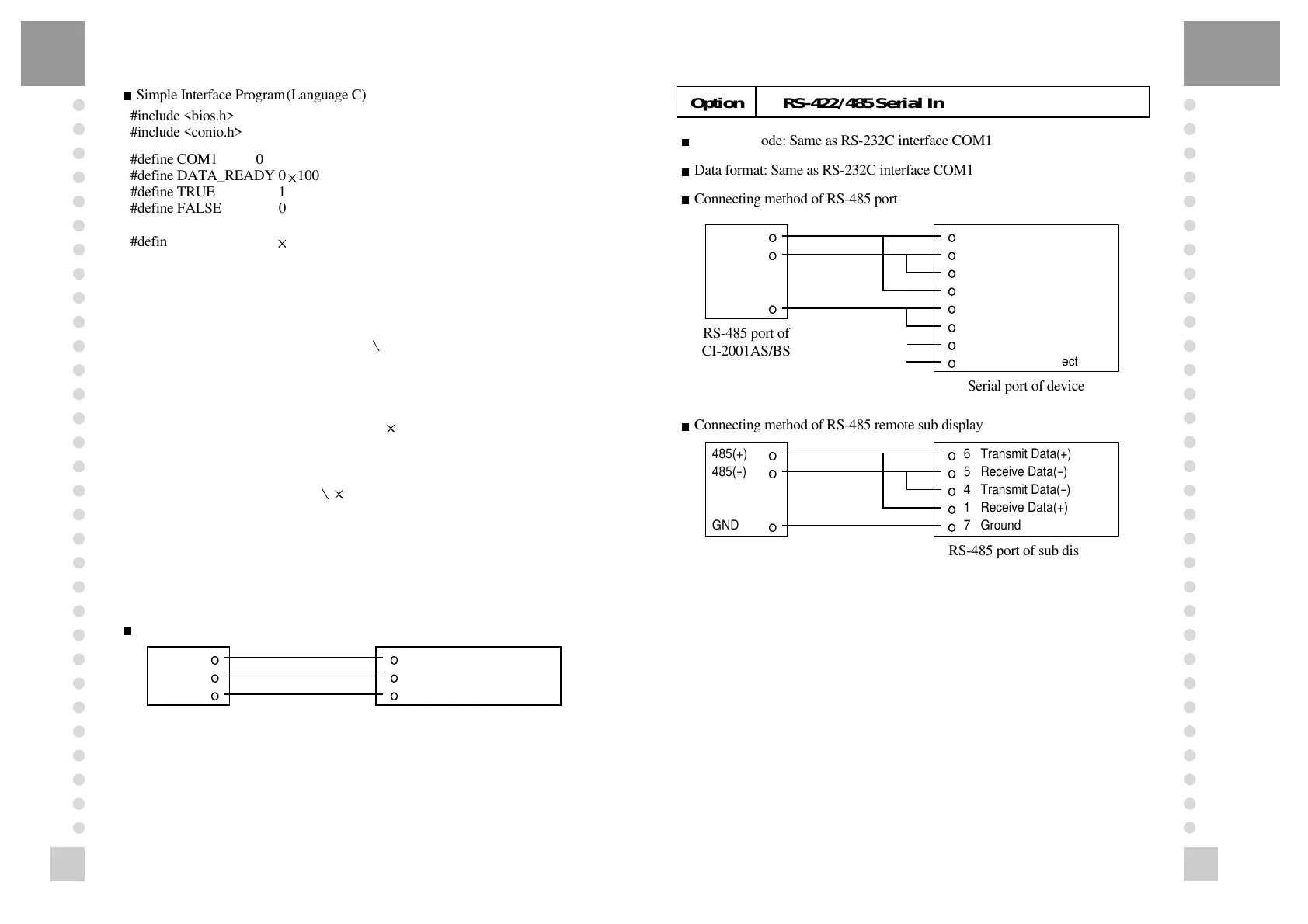
Connecting method of RS-485 port
?
?
?
?
?
?
?
?
@@@@@@@@@@@@g?
@@@@@@@@@@@@g?
@@@@@@@@@@@@g?
@@@@@@@@@@@@g?
@@@@@@@@@@@@g?
@@@@@@@@@@@@g?
@@@@@@@@@@@@g?
@@@@@@@@@@@@g?
@@@@@@@@@@@@g?
@@@@@@@@@@@@g?
@@@@@@@@@@@@g?
@@@@@@@@@@@@g?
?
?
?
?
?
?
?
Connecting method of RS-485 remote sub display
Option RS-422/485 Serial Interface(COM1)
485(+)
485(
-
)
GND
2 Transmit Data(+)
15 Receive Data(
-
)
14 Transmit Data(
-
)
3 Receive Data(+)
1 Ground
7 Ground
4, 5 Wire connect
16, 17 Wire connect
Serial port of device
RS-485 port of
CI-2001AS/BS
485(+)
485(
-
)
GND
6 Transmit Data(+)
5 Receive Data(
-
)
4 Transmit Data(
-
)
1 Receive Data(+)
7 Ground
RS-485 port of sub display
RS-485 port of
CI-2001AS/BS



 To Next Page