11
10
Display gross and net weight by turn.
GROSS lamp on - gross weight
NET lamp on - net weight
In case tare weight is REGISTERED, tare and item’s total weight is G. weight
and only item’s weight is N. weight.
(CI-2001AS kg only version)
?
?
?
?
?
?
?
?
@@@@@@@@@@@@g?
@@@@@@@@@@@@g?
@@@@@@@@@@@@g?
@@@@@@@@@@@@g?
@@@@@@@@@@@@g?
@@@@@@@@@@@@g?
@@@@@@@@@@@@g?
@@@@@@@@@@@@g?
@@@@@@@@@@@@g?
@@@@@@@@@@@@g?
@@@@@@@@@@@@g?
@@@@@@@@@@@@g?
?
?
?
?
?
?
?
PRINT key
?
?
?
?
?
?
?
?
@@@@@@@@@@@@g?
@@@@@@@@@@@@g?
@@@@@@@@@@@@g?
@@@@@@@@@@@@g?
@@@@@@@@@@@@g?
@@@@@@@@@@@@g?
@@@@@@@@@@@@g?
@@@@@@@@@@@@g?
@@@@@@@@@@@@g?
@@@@@@@@@@@@g?
@@@@@@@@@@@@g?
@@@@@@@@@@@@g?
?
?
?
?
?
?
?
Total Print key
(by pressing “PTINT” key more than 3 second.)
(CI-2001AS kg/lb conversion version)
Toggles between lb and kg units
?
?
?
?
?
?
?
?
@@@@@@@@@@@@g?
@@@@@@@@@@@@g?
@@@@@@@@@@@@g?
@@@@@@@@@@@@g?
@@@@@@@@@@@@g?
@@@@@@@@@@@@g?
@@@@@@@@@@@@g?
@@@@@@@@@@@@g?
@@@@@@@@@@@@g?
@@@@@@@@@@@@g?
@@@@@@@@@@@@g?
@@@@@@@@@@@@g?
?
?
?
?
?
?
?
PRINT key(CI-2001AS kg only version)
- Total Print key
(by pressing “PRINT” key more than 3 second.)
?
?
?
?
?
?
?
?
@@@@@@@@@@@@g?
@@@@@@@@@@@@g?
@@@@@@@@@@@@g?
@@@@@@@@@@@@g?
@@@@@@@@@@@@g?
@@@@@@@@@@@@g?
@@@@@@@@@@@@g?
@@@@@@@@@@@@g?
@@@@@@@@@@@@g?
@@@@@@@@@@@@g?
@@@@@@@@@@@@g?
@@@@@@@@@@@@g?
?
?
?
?
?
?
?
Total PRINT key(CI-2001AS kg/lb conversion version)
?
?
?
?
?
?
?
?
@@@@@@@@@@@@g?
@@@@@@@@@@@@g?
@@@@@@@@@@@@g?
@@@@@@@@@@@@g?
@@@@@@@@@@@@g?
@@@@@@@@@@@@g?
@@@@@@@@@@@@g?
@@@@@@@@@@@@g?
@@@@@@@@@@@@g?
@@@@@@@@@@@@g?
@@@@@@@@@@@@g?
@@@@@@@@@@@@g?
?
?
?
?
?
?
?
HOLD key
?
?
?
?
?
?
?
?
@@@@@@@@@@@@g?
@@@@@@@@@@@@g?
@@@@@@@@@@@@g?
@@@@@@@@@@@@g?
@@@@@@@@@@@@g?
@@@@@@@@@@@@g?
@@@@@@@@@@@@g?
@@@@@@@@@@@@g?
@@@@@@@@@@@@g?
@@@@@@@@@@@@g?
@@@@@@@@@@@@g?
@@@@@@@@@@@@g?
?
?
?
?
?
?
?
In CALIBRATION, TEST, SET mode.
: Store current condition and exit.
3. How to enter TEST mode
?
?
?
?
?
?
?
?
@@@@@@@@@@@@g?
@@@@@@@@@@@@g?
@@@@@@@@@@@@g?
@@@@@@@@@@@@g?
@@@@@@@@@@@@g?
@@@@@@@@@@@@g?
@@@@@@@@@@@@g?
@@@@@@@@@@@@g?
@@@@@@@@@@@@g?
@@@@@@@@@@@@g?
@@@@@@@@@@@@g?
@@@@@@@@@@@@g?
?
?
?
?
?
?
?
Press the “On/Off” key while pressing the “PRINT” key and TEST mode starts.
(CI-2001AS kg only version)
?
?
?
?
?
?
?
?
@@@@@@@@@@@@g?
@@@@@@@@@@@@g?
@@@@@@@@@@@@g?
@@@@@@@@@@@@g?
@@@@@@@@@@@@g?
@@@@@@@@@@@@g?
@@@@@@@@@@@@g?
@@@@@@@@@@@@g?
@@@@@@@@@@@@g?
@@@@@@@@@@@@g?
@@@@@@@@@@@@g?
@@@@@@@@@@@@g?
?
?
?
?
?
?
?
Press the “On/Off” key while pressing the “kg/lb” key and TEST mode starts.
(CI-2001AS kg/lb conversion version)
4. How to enter SET mode
?
?
?
?
?
?
?
?
@@@@@@@@@@@@g?
@@@@@@@@@@@@g?
@@@@@@@@@@@@g?
@@@@@@@@@@@@g?
@@@@@@@@@@@@g?
@@@@@@@@@@@@g?
@@@@@@@@@@@@g?
@@@@@@@@@@@@g?
@@@@@@@@@@@@g?
@@@@@@@@@@@@g?
@@@@@@@@@@@@g?
@@@@@@@@@@@@g?
?
?
?
?
?
?
?
Press the “On/Off” key while pressing the “ENTER” key and SET mode starts.
5. How to enter CAL mode
?
?
?
?
?
?
?
?
@@@@@@@@@@@@g?
@@@@@@@@@@@@g?
@@@@@@@@@@@@g?
@@@@@@@@@@@@g?
@@@@@@@@@@@@g?
@@@@@@@@@@@@g?
@@@@@@@@@@@@g?
@@@@@@@@@@@@g?
@@@@@@@@@@@@g?
@@@@@@@@@@@@g?
@@@@@@@@@@@@g?
@@@@@@@@@@@@g?
?
?
?
?
?
?
?
Press the “On/Off” key while pressing the CAL switch on the rear panel of the
indicator and CAL mode starts.
GROSS/NET
PRINT
ENTER
kg/lb
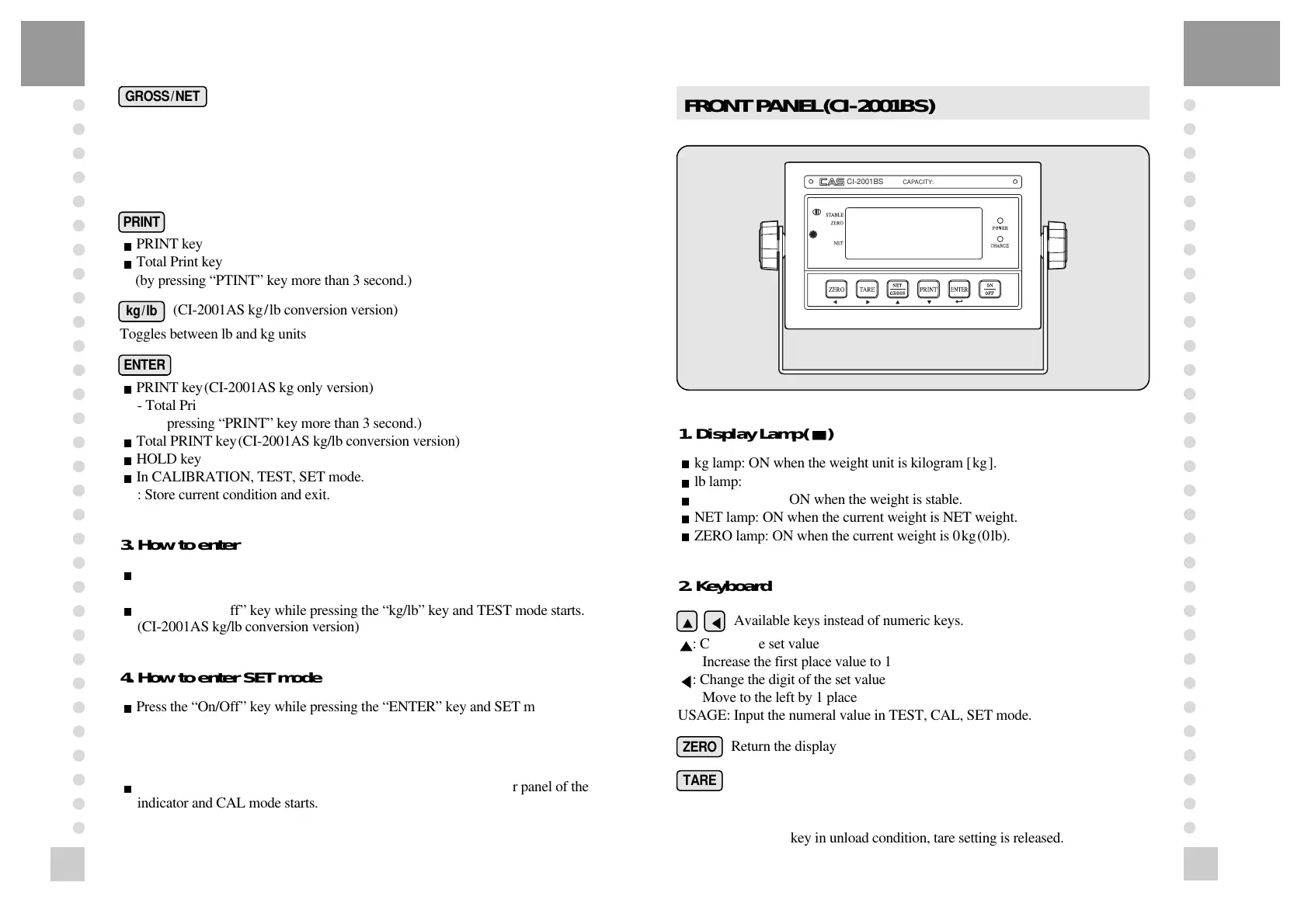
FRONT PANEL(CI-2001BS)
1. Display Lamp( )
?
?
?
?
?
?
?
?
@@@@@@@@@@@@g?
@@@@@@@@@@@@g?
@@@@@@@@@@@@g?
@@@@@@@@@@@@g?
@@@@@@@@@@@@g?
@@@@@@@@@@@@g?
@@@@@@@@@@@@g?
@@@@@@@@@@@@g?
@@@@@@@@@@@@g?
@@@@@@@@@@@@g?
@@@@@@@@@@@@g?
@@@@@@@@@@@@g?
?
?
?
?
?
?
?
kg lamp: ON when the weight unit is kilogram [kg].
?
?
?
?
?
?
?
?
@@@@@@@@@@@@g?
@@@@@@@@@@@@g?
@@@@@@@@@@@@g?
@@@@@@@@@@@@g?
@@@@@@@@@@@@g?
@@@@@@@@@@@@g?
@@@@@@@@@@@@g?
@@@@@@@@@@@@g?
@@@@@@@@@@@@g?
@@@@@@@@@@@@g?
@@@@@@@@@@@@g?
@@@@@@@@@@@@g?
?
?
?
?
?
?
?
lb lamp: ON when the weight unit is pound [lb].
?
?
?
?
?
?
?
?
@@@@@@@@@@@@g?
@@@@@@@@@@@@g?
@@@@@@@@@@@@g?
@@@@@@@@@@@@g?
@@@@@@@@@@@@g?
@@@@@@@@@@@@g?
@@@@@@@@@@@@g?
@@@@@@@@@@@@g?
@@@@@@@@@@@@g?
@@@@@@@@@@@@g?
@@@@@@@@@@@@g?
@@@@@@@@@@@@g?
?
?
?
?
?
?
?
STABLE lamp: ON when the weight is stable.
?
?
?
?
?
?
?
?
@@@@@@@@@@@@g?
@@@@@@@@@@@@g?
@@@@@@@@@@@@g?
@@@@@@@@@@@@g?
@@@@@@@@@@@@g?
@@@@@@@@@@@@g?
@@@@@@@@@@@@g?
@@@@@@@@@@@@g?
@@@@@@@@@@@@g?
@@@@@@@@@@@@g?
@@@@@@@@@@@@g?
@@@@@@@@@@@@g?
?
?
?
?
?
?
?
NET lamp: ON when the current weight is NET weight.
?
?
?
?
?
?
?
?
@@@@@@@@@@@@g?
@@@@@@@@@@@@g?
@@@@@@@@@@@@g?
@@@@@@@@@@@@g?
@@@@@@@@@@@@g?
@@@@@@@@@@@@g?
@@@@@@@@@@@@g?
@@@@@@@@@@@@g?
@@@@@@@@@@@@g?
@@@@@@@@@@@@g?
@@@@@@@@@@@@g?
@@@@@@@@@@@@g?
?
?
?
?
?
?
?
ZERO lamp: ON when the current weight is 0kg(0lb).
2. Keyboard
Available keys instead of numeric keys.
: Change the set value
Increase the first place value to 1
: Change the digit of the set value
Move to the left by 1 place
USAGE: Input the numeral value in TEST, CAL, SET mode.
Return the display to 0.
Use container in weighing.
Current weight is memorized as tare weight.
If you press TARE key in unload condition, tare setting is released.
ZERO
TARE



 To Next Page
 Loading...




