15
14
TEST MODE
1. How to Enter
Press the power while pressing the “PRINT” key and TEST menu starts.
(CI-2001AS/BS kg only version)
Press the power while pressing the “kg/lb” key and TEST menu starts.
(CI-2001AS/BS kg/lb conversion version)
2. Available Keys
Increase the first place set value to 1.
Move to the left by 1 place of the set value.
Initial(‘0’) of the set value. (CI-2001AS/BS kg type)
Initial(‘0’) of the set value. (CI-2001AS/BS kg/lb)
Move into next menu.
3. TEST Menu(TEST 1 - TEST 5)
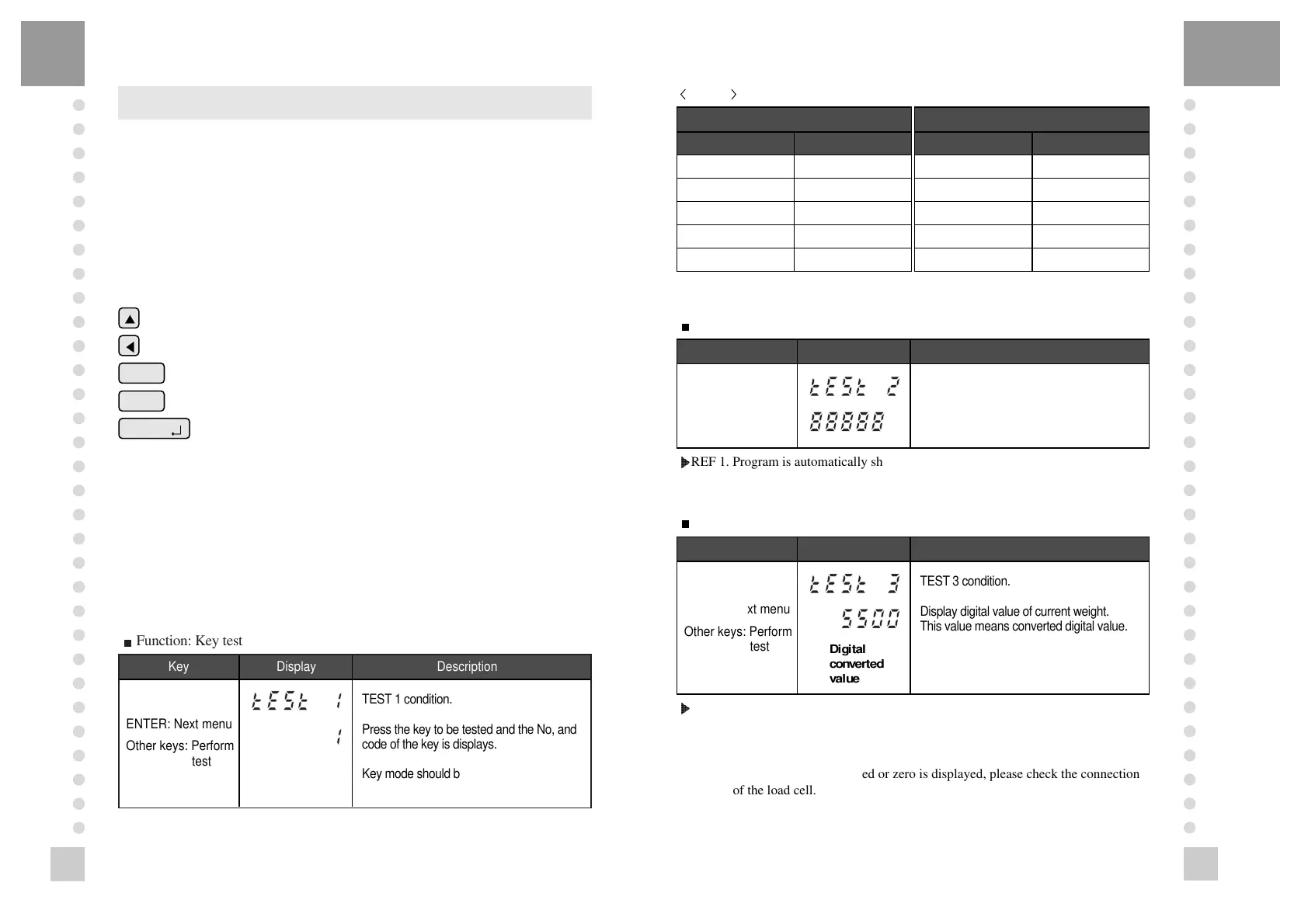
TEST 1 : Key test
TEST 2 : LED/LCD display test
TEST 3 : Load cell test and A/D conversion test
TEST 4 : Serial interface test(RS-232)
TEST 5 : Printer test
TEST 1
?
?
?
?
?
?
?
?
@@@@@@@@@@@@g?
@@@@@@@@@@@@g?
@@@@@@@@@@@@g?
@@@@@@@@@@@@g?
@@@@@@@@@@@@g?
@@@@@@@@@@@@g?
@@@@@@@@@@@@g?
@@@@@@@@@@@@g?
@@@@@@@@@@@@g?
@@@@@@@@@@@@g?
@@@@@@@@@@@@g?
@@@@@@@@@@@@g?
?
?
?
?
?
?
?
Function: Key test
Key Display Description
ENTER: Next menu
Other keys: Perform
test
TEST 1 condition.
Press the key to be tested and the No, and
code of the key is displays.
Key mode should be identify with code of
key like above.
PRINT
ENTER
( )
kg/lb
CI-2001AS/BS kg only version
Key Code
ZERO 2
TARE 3
G/N 4
PRINT 5
ENTER 6
CI-2001AS/BS kg/lb version
Key Code
ZERO 2
TARE 3
G/N 4
kg/lb 5
ENTER 6
Key list
TEST 2
?
?
?
?
?
?
?
?
@@@@@@@@@@@@g?
@@@@@@@@@@@@g?
@@@@@@@@@@@@g?
@@@@@@@@@@@@g?
@@@@@@@@@@@@g?
@@@@@@@@@@@@g?
@@@@@@@@@@@@g?
@@@@@@@@@@@@g?
@@@@@@@@@@@@g?
@@@@@@@@@@@@g?
@@@@@@@@@@@@g?
@@@@@@@@@@@@g?
?
?
?
?
?
?
?
Function: LED/LCD display test
Key Display Description
Displaying all lamps
of key
TEST 2 condition.
TEST 2 is performed automatically after
3 seconds or so.
Key Display Description
ENTER: Next menu
Other keys: Perform
test
Digital
converted
value
TEST 3 condition.
Display digital value of current weight.
This value means converted digital value.
@6K?
@@@6X?hg
@@@@)Khg
@@@@@@6Xhf
@@@@@@@)K?he
@@@@@@@@@6K?h
@@@@@@@@@@@6X?g
@@@@@@@@@@@@)Kg
@@@@@@@@@@@@@@6Xf
@@@@@@@@@@@@@@@,f
@@@@@@@@@@@@@@0Yf
@@@@@@@@@@@@(Mg
@@@@@@@@@@@0Y?g
@@@@@@@@@0M?h
@@@@@@@(M?he
@@@@@@0Yhf
@@@@(Mhg
@@@0Y?hg
@0M?
REF 1. Program is automatically shifted to test 3 after completing Test 2.
TEST 3
?
?
?
?
?
?
?
?
@@@@@@@@@@@@g?
@@@@@@@@@@@@g?
@@@@@@@@@@@@g?
@@@@@@@@@@@@g?
@@@@@@@@@@@@g?
@@@@@@@@@@@@g?
@@@@@@@@@@@@g?
@@@@@@@@@@@@g?
@@@@@@@@@@@@g?
@@@@@@@@@@@@g?
@@@@@@@@@@@@g?
@@@@@@@@@@@@g?
?
?
?
?
?
?
?
Function: A/D converter test(L/C test)
@6K?
@@@6X?hg
@@@@)Khg
@@@@@@6Xhf
@@@@@@@)K?he
@@@@@@@@@6K?h
@@@@@@@@@@@6X?g
@@@@@@@@@@@@)Kg
@@@@@@@@@@@@@@6Xf
@@@@@@@@@@@@@@@,f
@@@@@@@@@@@@@@0Yf
@@@@@@@@@@@@(Mg
@@@@@@@@@@@0Y?g
@@@@@@@@@0M?h
@@@@@@@(M?he
@@@@@@0Yhf
@@@@(Mhg
@@@0Y?hg
@0M?
REF 1. A/D converter test is automatically completed by displaying converted
digital value of current weight.
REF 2. L/C test is also completed by loading the weight on the platform.
Check whether digital value is changing.
If the digital value is fixed or zero is displayed, please check the connection
of the load cell.



 To Next Page