17
16
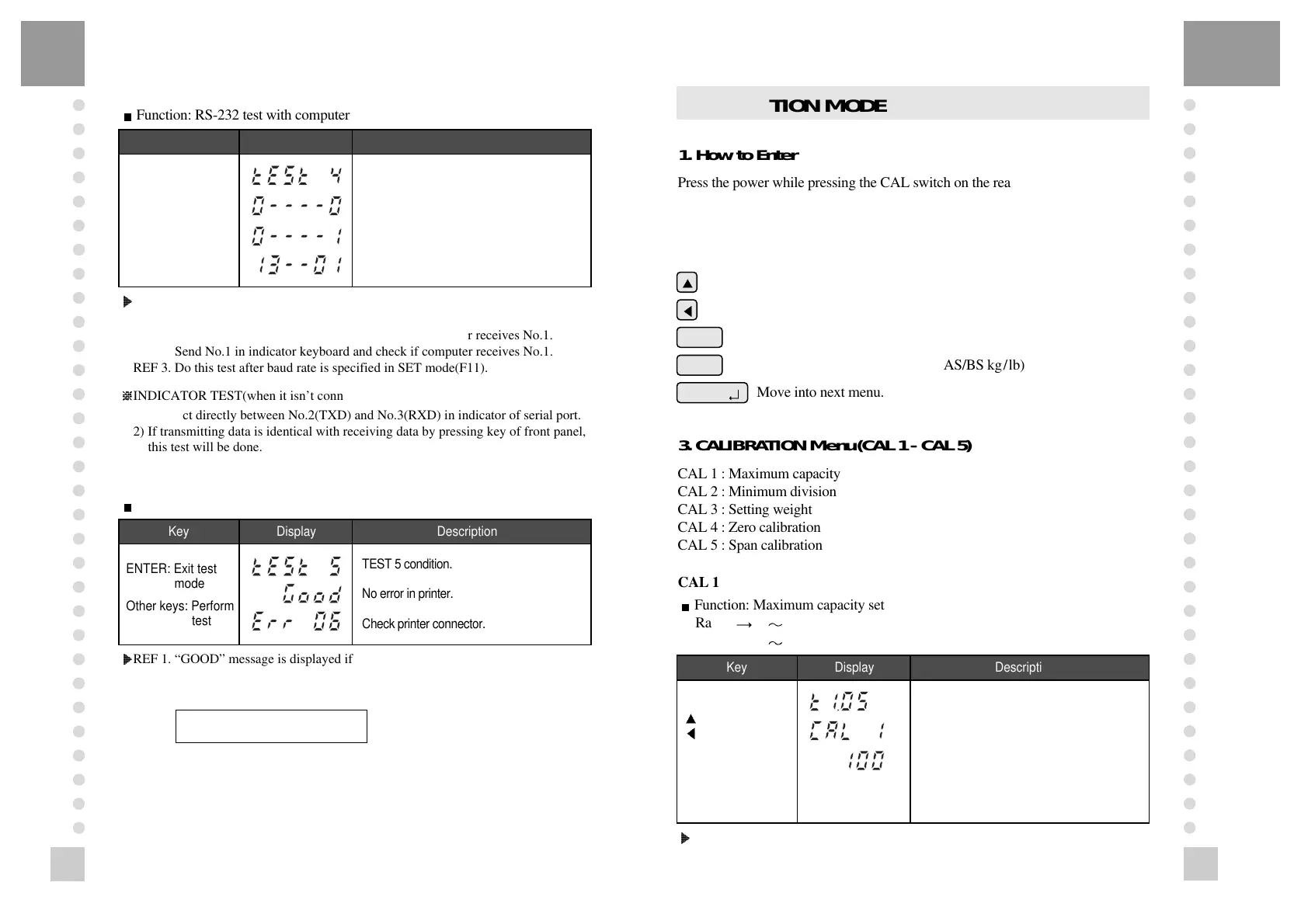
Key Display Description
ZERO: Transmit ‘1’
TARE: Transmit ‘2’
G/N: Transmit ‘3’
PRINT: Transmit ‘4’
ENTER: Next menu
TEST 4 condition.
Wait for transmission and reception.
Receive: 1, Transmit: none
Receive: 1, Transmit: 13
TEST 4
?
?
?
?
?
?
?
?
@@@@@@@@@@@@g?
@@@@@@@@@@@@g?
@@@@@@@@@@@@g?
@@@@@@@@@@@@g?
@@@@@@@@@@@@g?
@@@@@@@@@@@@g?
@@@@@@@@@@@@g?
@@@@@@@@@@@@g?
@@@@@@@@@@@@g?
@@@@@@@@@@@@g?
@@@@@@@@@@@@g?
@@@@@@@@@@@@g?
?
?
?
?
?
?
?
Function: RS-232 test with computer
Key Display Description
ENTER: Exit test
mode
Other keys: Perform
test
TEST 5 condition.
No error in printer.
Check printer connector.
Key Display Description
: Increase of no.
: Shift of digit
ENTER:
Store and move into
next menu
Program version.
CAL 1 condition.
100kg(lb)
TEST 5
?
?
?
?
?
?
?
?
@@@@@@@@@@@@g?
@@@@@@@@@@@@g?
@@@@@@@@@@@@g?
@@@@@@@@@@@@g?
@@@@@@@@@@@@g?
@@@@@@@@@@@@g?
@@@@@@@@@@@@g?
@@@@@@@@@@@@g?
@@@@@@@@@@@@g?
@@@@@@@@@@@@g?
@@@@@@@@@@@@g?
@@@@@@@@@@@@g?
?
?
?
?
?
?
?
Function: Printer test
@6K?
@@@6X?hg
@@@@)Khg
@@@@@@6Xhf
@@@@@@@)K?he
@@@@@@@@@6K?h
@@@@@@@@@@@6X?g
@@@@@@@@@@@@)Kg
@@@@@@@@@@@@@@6Xf
@@@@@@@@@@@@@@@,f
@@@@@@@@@@@@@@0Yf
@@@@@@@@@@@@(Mg
@@@@@@@@@@@0Y?g
@@@@@@@@@0M?h
@@@@@@@(M?he
@@@@@@0Yhf
@@@@(Mhg
@@@0Y?hg
@0M?
REF 1. Do this test after the connection between serial port of computer and serial
port of indicator.
REF 2. Send No.1 in computer keyboard and check if indicator receives No.1.
Send No.1 in indicator keyboard and check if computer receives No.1.
REF 3. Do this test after baud rate is specified in SET mode(F11).
?/X?@@?W&?e
?V/T@@T&5?e
S@UV@@f
?@@R@@@@1?e
?@@X@@T@@?e
S@@S@Uf
?W&@@@R/X?e
?&0?4@?V/?e
INDICATOR TEST(when it isn’t connected with PC)
1) Connect directly between No.2(TXD) and No.3(RXD) in indicator of serial port.
2) If transmitting data is identical with receiving data by pressing key of front panel,
this test will be done.
@6K?
@@@6X?hg
@@@@)Khg
@@@@@@6Xhf
@@@@@@@)K?he
@@@@@@@@@6K?h
@@@@@@@@@@@6X?g
@@@@@@@@@@@@)Kg
@@@@@@@@@@@@@@6Xf
@@@@@@@@@@@@@@@,f
@@@@@@@@@@@@@@0Yf
@@@@@@@@@@@@(Mg
@@@@@@@@@@@0Y?g
@@@@@@@@@0M?h
@@@@@@@(M?he
@@@@@@0Yhf
@@@@(Mhg
@@@0Y?hg
@0M?
REF 1. “GOOD” message is displayed if the printer connection and specification is
done correctly. If or not, “ERR 06” message is displayed.
REF 2. The test output format of printer is like follows.
If you press the enter key, it will be returned to NORMAL MODE.
However, only when it is connected with printer, this test can be performed.
TEST OK
CALIBRATION MODE
1. How to Enter
Press the power while pressing the CAL switch on the rear panel of the indicator
and CAL mode starts.
2. Available Keys
Increase the first place set value to 1.
Move to the left by 1 place of the set value.
Initial(‘0’) of the set value. (CI-2001AS/BS kg type)
Initial(‘0’) of the set value. (CI-2001AS/BS kg/lb)
Move into next menu.
3. CALIBRATION Menu(CAL 1 - CAL 5)
CAL 1 : Maximum capacity
CAL 2 : Minimum division
CAL 3 : Setting weight
CAL 4 : Zero calibration
CAL 5 : Span calibration
CAL 1
?
?
?
?
?
?
?
?
@@@@@@@@@@@@g?
@@@@@@@@@@@@g?
@@@@@@@@@@@@g?
@@@@@@@@@@@@g?
@@@@@@@@@@@@g?
@@@@@@@@@@@@g?
@@@@@@@@@@@@g?
@@@@@@@@@@@@g?
@@@@@@@@@@@@g?
@@@@@@@@@@@@g?
@@@@@@@@@@@@g?
@@@@@@@@@@@@g?
?
?
?
?
?
?
?
Function: Maximum capacity set
Range 1 999,999kg/lb(CI-2001AS)
1 99,999kg/lb(CI-2001BS)
PRINT
ENTER
( )
kg/lb
Maximum capacity
value
@6K?
@@@6X?hg
@@@@)Khg
@@@@@@6Xhf
@@@@@@@)K?he
@@@@@@@@@6K?h
@@@@@@@@@@@6X?g
@@@@@@@@@@@@)Kg
@@@@@@@@@@@@@@6Xf
@@@@@@@@@@@@@@@,f
@@@@@@@@@@@@@@0Yf
@@@@@@@@@@@@(Mg
@@@@@@@@@@@0Y?g
@@@@@@@@@0M?h
@@@@@@@(M?he
@@@@@@0Yhf
@@@@(Mhg
@@@0Y?hg
@0M?
REF 1. The maximum capacity means the maximum weight that scale can measure.



 To Next Page