21 | Page
CONTROL PANEL OVERVIEW
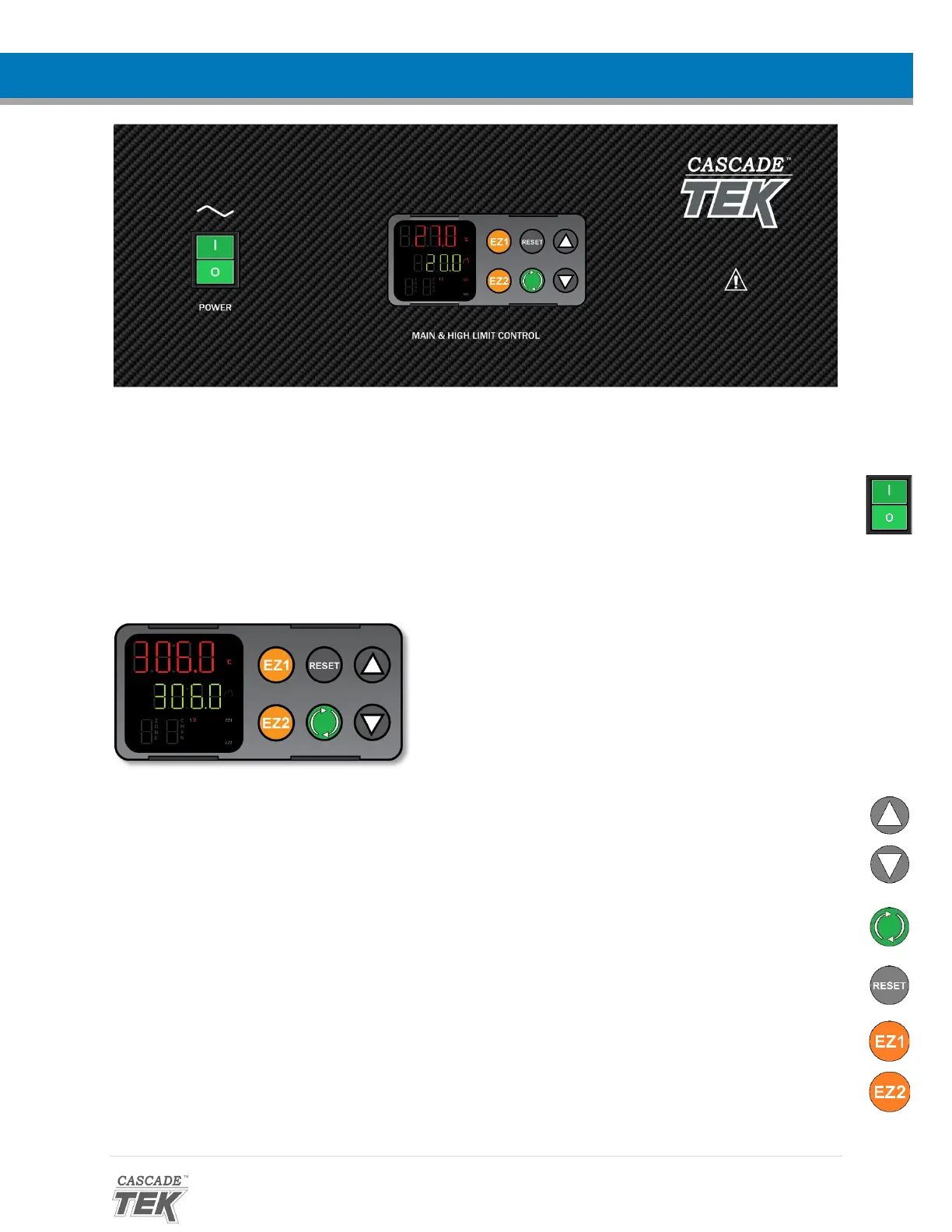
Figure 8: Control Panel and Controller
Power Switch
The self-illuminating main power switch controls all power to the oven and its systems. The switch
must be in the ( I ) on position for the unit to function.
Temperature Controller - Display on Homepage
While on the Homepage, the Up and Down arrow buttons adjust the constant temperature set point.
Pressing and holding both buttons navigates from the homepage to the Operations menu, if the controller
has been unlocked to perform a calibration.
The green Advance button navigates forward through menus and parameters lists when programming
heating recipe profiles or performing a temperature calibration. On the homepage, it scrolls through
operating parameters such as the unit of temperature display (°C or °F) or profile start.
The gray Reset button navigates the display back to the previous page or menu. Pressing the Reset button
repeatedly returns the display to the homepage.
The EZ1 button launches heating Profile 1. Pressing EZ1 again while running aborts Profile 1.
The EZ2 button launches heating Profile 2 (Step 11). Pressing EZ2 again while running aborts Profile 2.
Top Line (Red): Present chamber air
temperature
Middle Line (Green): Active temperature
set point (constant or profile)
Bottom Line: “2” indicates the
controller is calling for power to the
heating elements


 To Next Page