27 | Page
OPERATION
SET THE HIGH TEMPERATURE LIMIT
Note: Test the high limit system once per year for functionality.
The high temperature limit is set by the operator at least 10°C above the highest temperature the
oven will run at during your recipe profile or constant-temperature application.
End of Procedure
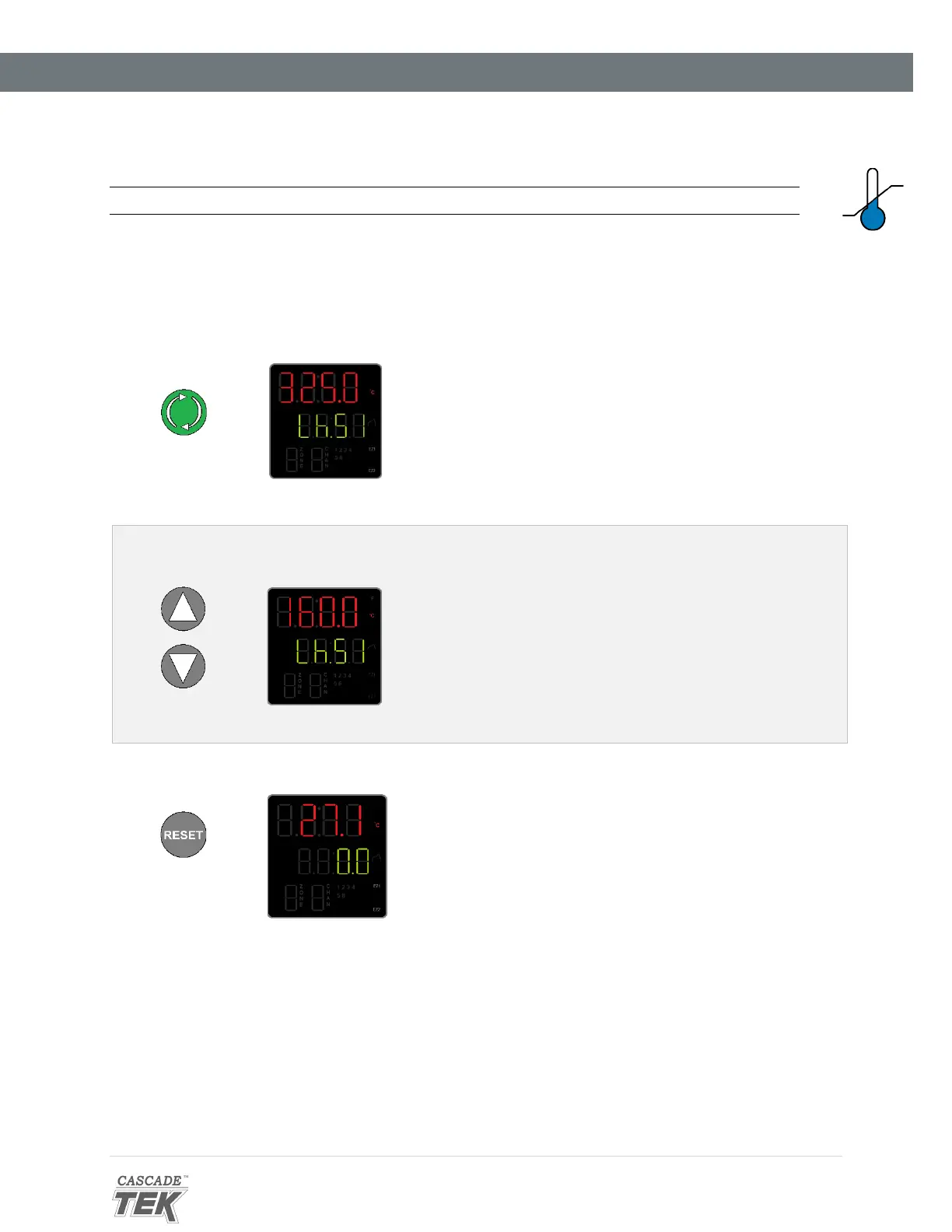
Advance to the Limit High Set Point, starting on the Homepage
Push Advance
• Push the Advance button repeatedly until “Lh.S1”
(Limit High Set Point) shows in the green mid-
level display line.
2. Adjust the high limit to at least 10°C above the highest temperature of your application
Adjust
• The oven will automatically save and apply the
new High Limit setting after you have stopped
adjusting.
Note: If you are just checking the current high
temperature limit setting, push the Reset button to
exit the High Set Point menu and return to the
homepage without saving any changes.
3. Return to the Homepage
Push Reset
•
Returned to Homepage


 To Next Page