CEL-712 Microdust Pro Real-time Dust Monitor
19 Casella Measurement
IMPORTANT
Press the Menu soft key from a measurement screen in Stop mode to use the
instrument’s settings screens as instructed below.
System tools
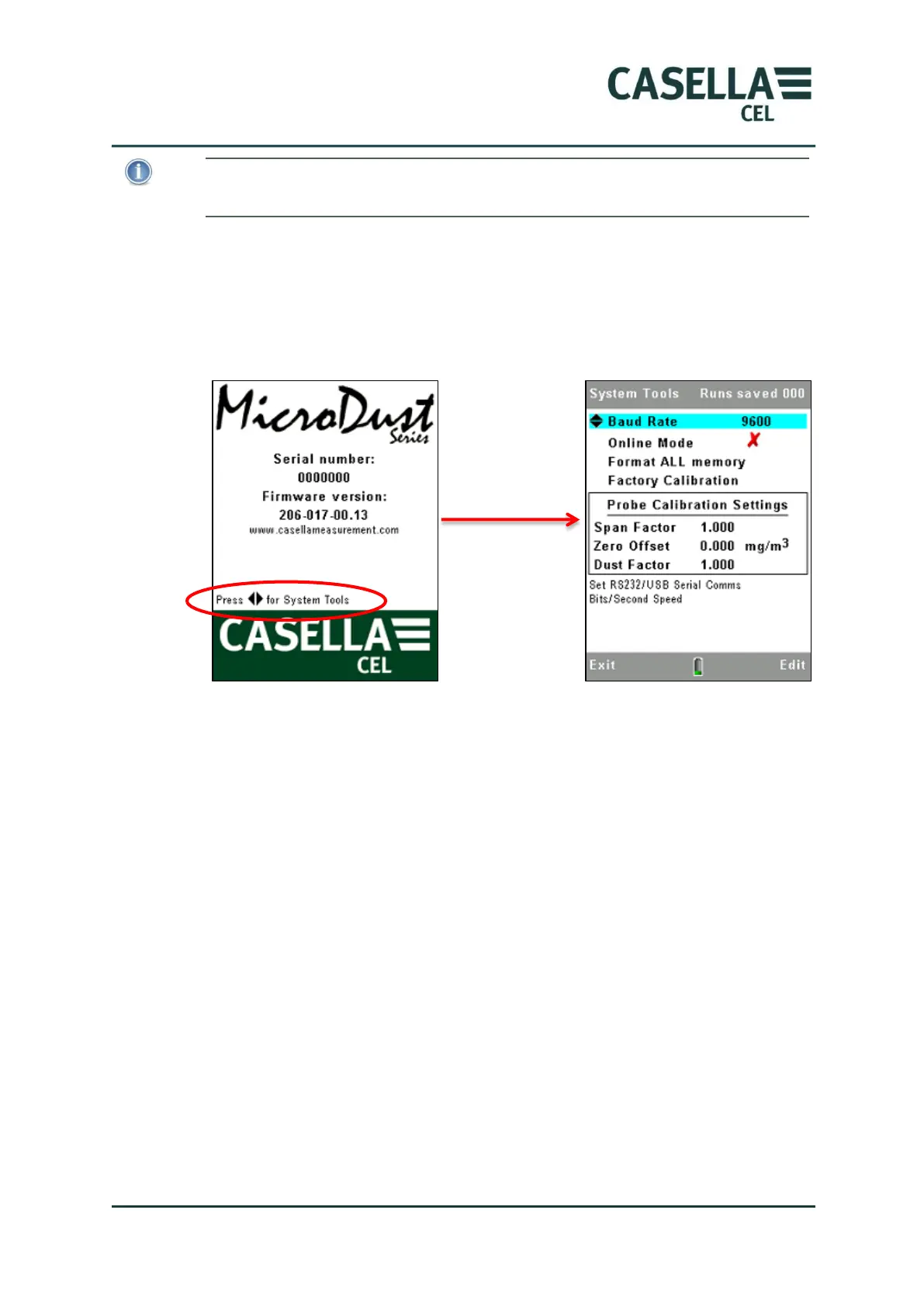
If you simultaneously press the left and right navigation keys at power up,
the instrument displays the System Tools screen.
Figure 6 System Tools screen
The System Tools screen should only be used for diagnostics or to configure
the instrument for specialised applications. This screen allows you to do the
following:-
Reformat the internal memory. (This will delete any measurement
results or corrupt files saved in memory)
Set the serial data communication rate.
Read the instruments internal Span and Zero calibration settings. These
may be used for fault diagnosis purposes
Reset the calibration values. This sets the internal span factor to 1.0 and
Offset value to Zero. It is useful to restore these values during fault
diagnosis. After restoring the default values and with the probe in a
clean air condition, the displayed concentration should typically be <0.7
mg/m3. Higher values may suggest probe contamination.
Enable ‘Online’ mode. This is used in telemetry and specialised data
logging applications. The instrument automatically starts a data logging
Run when powered and provides RS232 serial interfacing of
measurements to other products. A cable, part number 206094B



 To Next Page