PAGE
88
88
8
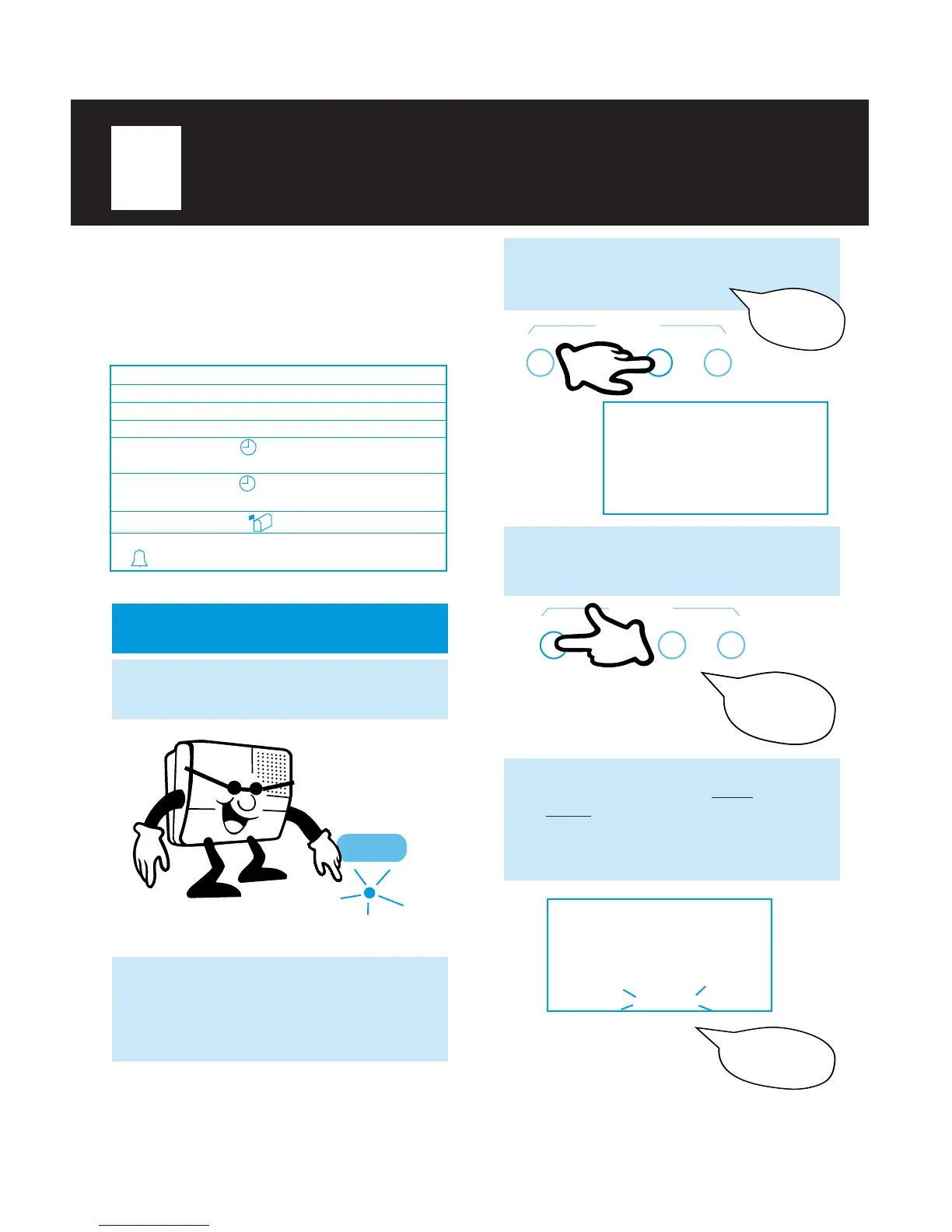
TO RECORD GREETING
Be sure the
MESSAGE ON/OFF
INDICATOR
is lit or flashing.
GREETING RECORD
Record one, two or three greetings to answer
your calls. For example, select GREETING
1 for home or family use, GREETING 2 for home
office use, and GREETING 3 for personal use.
When programming greeting modes, the TA-150
will provide voice confirmation of each mode.
3
Press
GREETING SELECT
(under
the lid) until “GREETING 1” appears in
the display and you hear:
RECORD CHECK SELECT TIME SET
GREETING
4
GREETING 1
12:30
PM
5
When “RECORDING” flashes in the
display, begin speaking loudly and
clearly, about 6-8" from the microphone
(located in lower left corner of TA-150).
You can record a greeting of unlimited
length for any greeting.
12:30
PM
RECORDING
Greeting
one.
Hello, you have
reached...
2
Slide the
VOLUME CONTROL
switch to midpoint (located on the right
side). The sound level is automatically
adjusted when the greeting is played to
callers over the phone line.
1
GREETING 1
GREETING 2
GREETING 3
GREETING 1
GREETING 2
GREETING 1
GREETING 1 2 3
Greeting 1
Greeting 2
Greeting 3
Timer-Select 1
1st Programmed Time
Timer-Select 2
2nd Programmed Time
Caller Greeting-Select
Ring-Pattern Select
Display shows:
Greeting Mode:
MESSAGE FILE
PLAY/
PAUSE
Press
GREETING RECORD
(under
the lid). You will hear a confirmation tone
and:
RECORD CHECK SELECT TIME SET
GREETING
Record a new
greeting.



 To Next Page