EasyManua.ls Logo

Cassida Cube - User Manual

Cassida Cube
28 pages
Print Icon
To Next Page IconTo Next Page
Loading...
Moving money forward
®
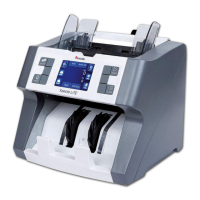
CASSIDA CUBE MIXED BILL COUNTER

Questions and Answers

  • M
    Michael AdamsSep 2, 2025
    How to fix upper and lower sensor errors on my Cassida Cash Counter?
    • S
      Suzanne TerrellSep 2, 2025
      If the Cassida Cash Counter displays errors related to the upper or lower sensors (IRA, IRB, IRC, IRD, IRF, IRG, IRH, color, spectrum), remove all bills and clean any sensors.
  • S
    Sarah JohnsonAug 31, 2025
    How to fix PassA, PassB, PassC, or PassD counting sensor errors on my Cassida Cube Cash Counter?
    • A
      Amanda Sanders PhDAug 31, 2025
      If your Cassida Cash Counter displays errors related to the PassA, PassB, PassC, or PassD counting sensors, remove all bills and clean the counting sensor.
  • P
    Paige PattonAug 29, 2025
    What to do if my Cassida Cash Counter displays 'Passing error'?
    • J
      Jamie WardAug 29, 2025
      If the Cassida Cash Counter shows 'Passing error', press START. Open the bill transport path to remove the bill, and then recount all the bills.
  • E
    Ernest SchneiderAug 27, 2025
    What to do if my Cassida Cube Cash Counter displays 'Denomination different'?
    • M
      Megan ThompsonAug 27, 2025
      If the Cassida Cash Counter displays a 'Denomination different' error, remove the bill from the stacker and press START to continue counting.
  • A
    Adam MartinAug 26, 2025
    What to do if my Cassida Cube Cash Counter displays 'Slant notes'?
    • D
      Deborah WelchAug 27, 2025
      If your Cassida Cash Counter is showing 'Slant notes', it means the bill is tilted. Press START to continue counting. If this occurs frequently, adjust the adjusting screw toward the counter-clockwise direction.
  • R
    Ricardo WilliamsAug 25, 2025
    What to do if my Cassida Cash Counter displays an 'Incomplete notes' error?
    • R
      Rebecca MaldonadoAug 25, 2025
      If your Cassida Cash Counter displays 'Incomplete notes' error, it means that a half or incomplete bill was detected. Remove the partial bill from the stacker. Then, press the START button to resume counting.
  • D
    Dr. Leslie Johnson DDSAug 22, 2025
    What to do if my Cassida Cash Counter displays 'Double notes Chained notes'?
    • P
      Paula PughAug 22, 2025
      If the Cassida Cash Counter displays a 'Double notes Chained notes' error, it means that some bills are stuck together or overlapped. Remove all bills from the hopper and recount them. If these errors occur frequently, adjust the adjusting screw slightly clockwise.

Summary

Introduction

Control Panel Functions

Explanation of the control panel buttons (CUR, MODE, ADD, BATCH, etc.) and their respective functions.

Specifications

Technical specifications including counting speed, capacity, power, dimensions, and weight of the Cassida Cube.

Important Safety Notes

Crucial safety guidelines for operating the Cassida Cube, including electrical safety and environmental considerations.

Loading Bills

Operation

Troubleshooting

Self-test Error Message Display and Solutions

Troubleshooting guide for self-test errors, including sensor cleaning and restarting procedures.

Defective Bill Error Message Display and Solutions

Solutions for error messages related to defective bills like incomplete, magnetic feature fail, slant, double, or passing errors.

Maintenance, Warranty and Contact Info

Maintenance

Regular maintenance procedures to ensure optimal performance and prolong the service life of the Cassida Cube.

Cassida Cube Specifications

General IconGeneral
BrandCassida
ModelCube
CategoryCash Counter
LanguageEnglish

Related product manuals