3
4
1
Appendix
SET
2
When using the
computer for the
first time, configure
the initial settings.
5
MODE
MODE
AC
MODE
MENU
AC
Battery case
cover
Dot section
Short press
Long press
(2 sec.)
1
Clear all data.
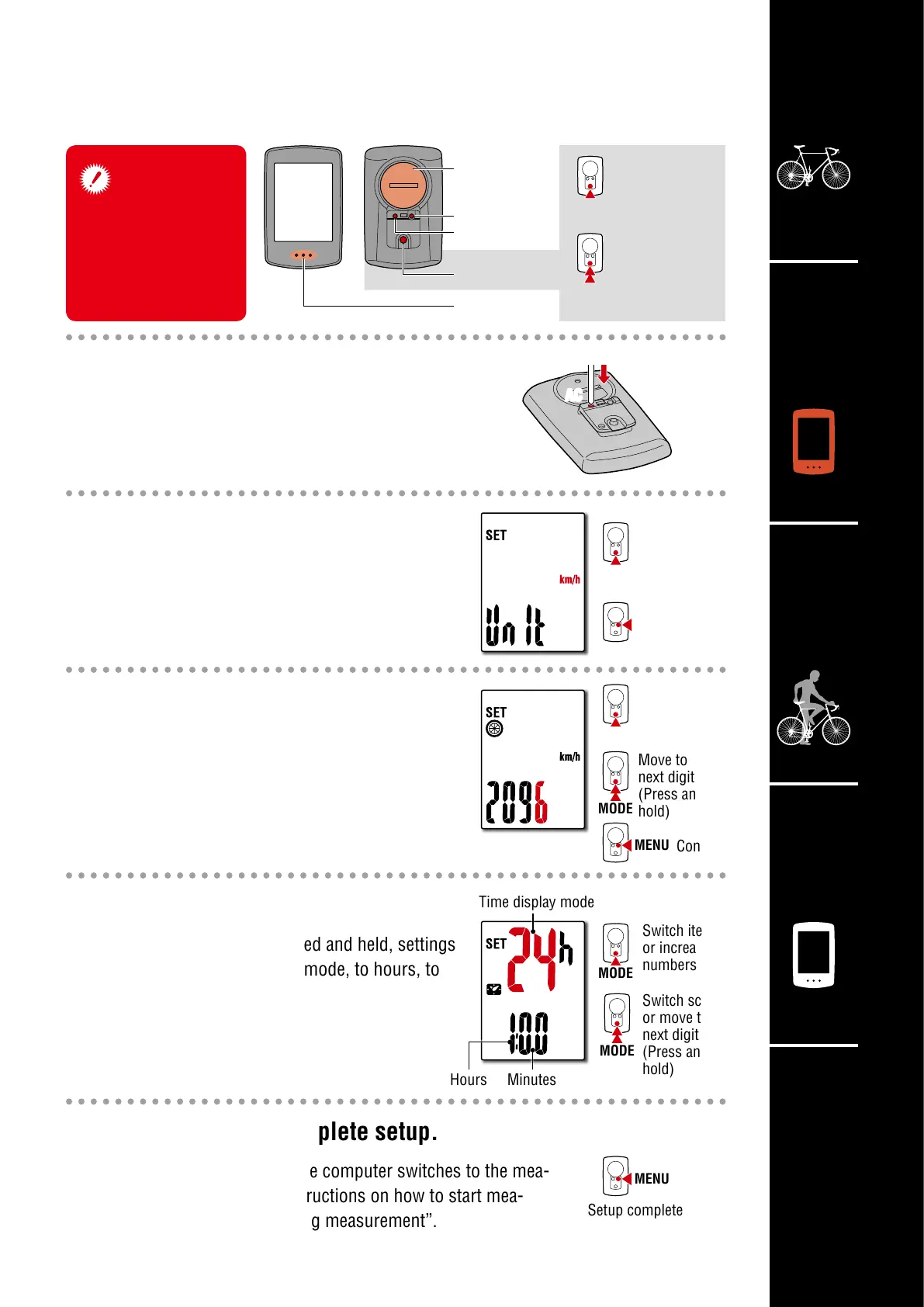
Press the AC button on the back of the computer.
* All data is deleted and the computer is reset
to its factory default settings.
2
Select the measurement unit.
Select “km/h” or “mph”.
3
Set tire circumference.
Enter the tire circumference of the front wheel
in mm.
* Refer to “Tire circumference”.
4
Set the clock.
Each time MODE is pressed and held, settings
switch from time display mode, to hours, to
minutes.
5
Press MENU to complete setup.
Setup is completed and the computer switches to the mea-
surement screen. For instructions on how to start mea-
surement, refer to “Starting measurement”.
MODE
Setting up the computer
km/h
↔
mph
Confirm
Increase
numbers
Move to
next digit
(Press and
hold)
Confirm
Setup complete
Switch item
or increase
numbers
Switch screen
or move to
next digit
(Press and
hold)
Time display mode
MinutesHours












 To Next Page