2
3
1
Appendix
4
SET
9
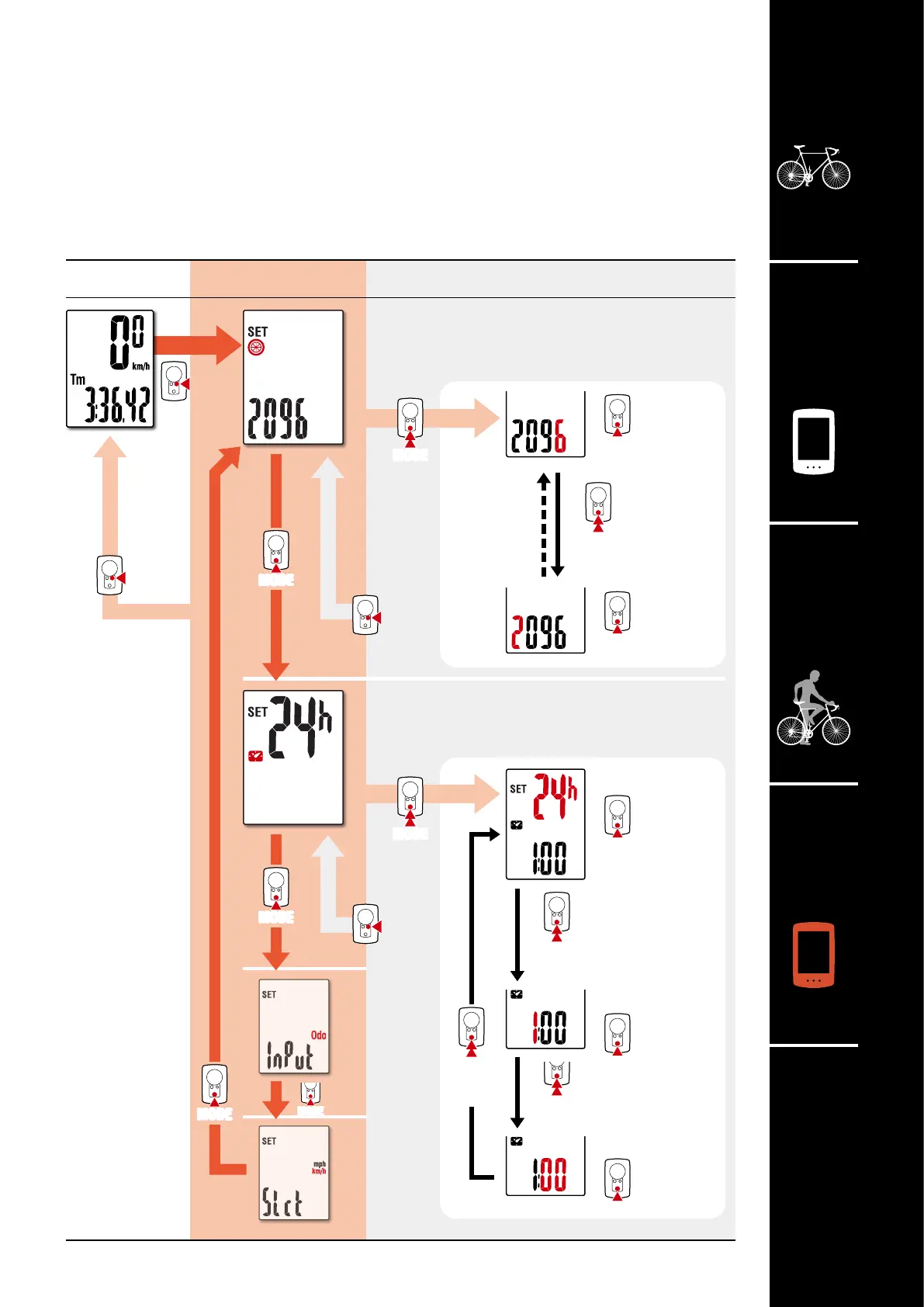
Changing settings
Tire circumference
Lets you set the tire circumference.
Clock
Lets you set the clock.
Manual
distance
input
Select
measure-
ment unit
Increase
numbers
Increase
numbers
Measurement
screen
Menu screen Description
On the measurement screen, press MENU to go to the menu screen.
Various settings can be changed on the menu screen.
* After changing settings, always press MENU to confirm changes.
* When the menu screen is left on for 1 minute, the computer returns to the measurement screen.
[Menu screen]
Move to
next digit
MODE
(Press and hold)
MODE
(Press and hold)
MODE
(Press and hold)
(Press
and hold)
12h
↔
24h
Select display
Increase
numbers
Set “hours”
Increase
numbers
Set “minutes”
MODE
(Press and hold)
Change setting
MODE
(Press and hold)
Change setting
Confirm
Confirm
MODE












 To Next Page