2
4
1
Appendix
SET
3
7
* Av displays .E instead of the measurement value when Tm exceeds approximately
100 hours or Dst exceeds 9999.99 km. Reset the computer.
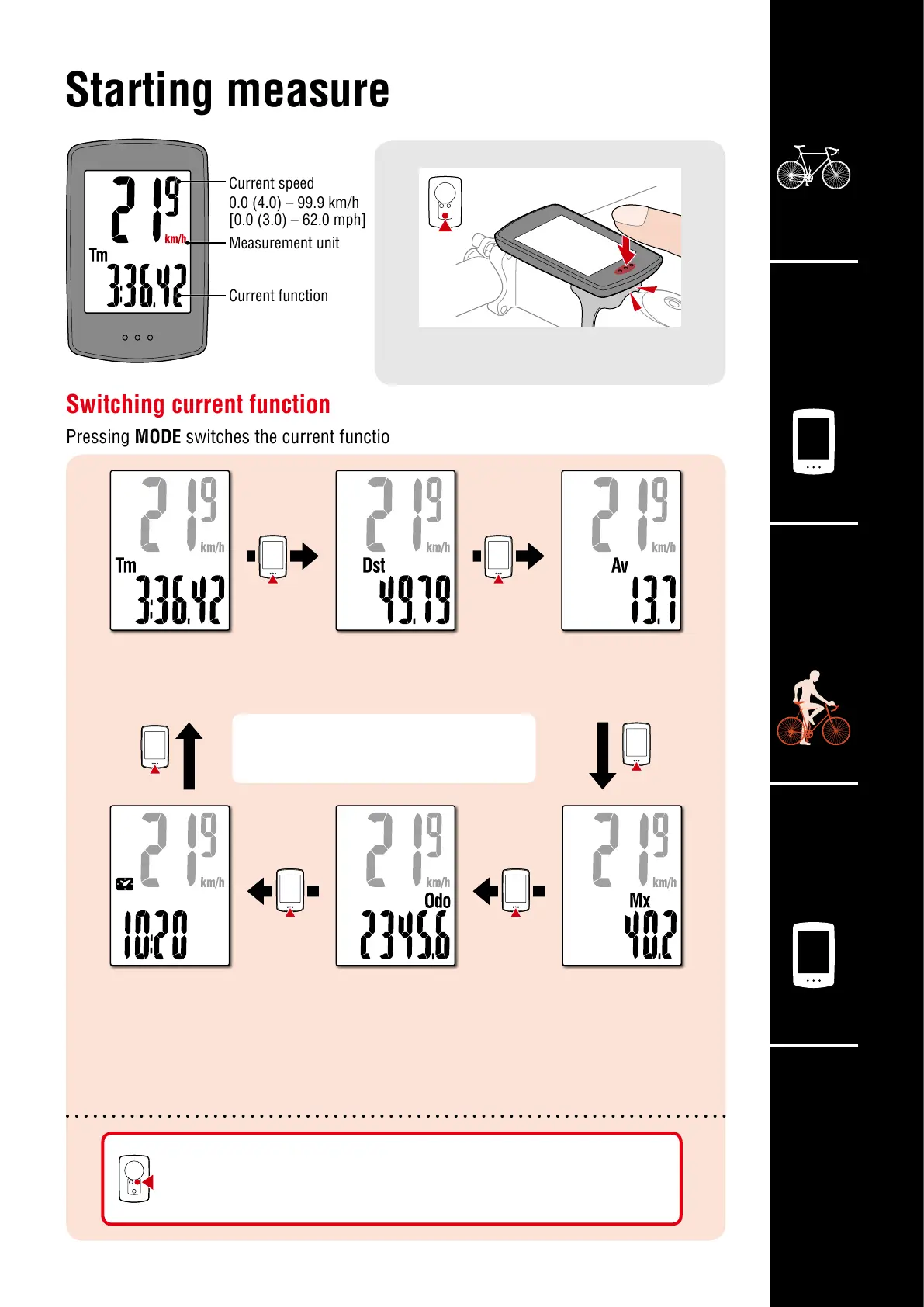
Switching current function
Pressing MODE switches the current function displayed at the bottom of the screen.
Starting measurement
On the measurement screen, press MENU to go to the menu
screen. Various settings can be changed on the menu screen.
[Measurement screen]
MODE
MODE operation when mounted on bracket
When the computer is mounted on the bracket,
pressing the dot section on the computer
depresses the MODE button.
Current speed
0.0 (4.0) – 99.9 km/h
[0.0 (3.0) – 62.0 mph]
Measurement unit
Current function
Average Speed
0.0 – 99.9 km/h
[0.0 – 62.0 mph]
Maximum Speed
0.0 (4.0) – 99.9 km/h
[0.0 (3.0) – 62.0 mph]
Elapsed Time
0:00’00” – 99:59’59”
Trip Distance
0.00 – 9999.99 km [miles]
Total distance
0.0 – 99999.9 km [miles]
Clock
0:00 – 23:59 or
1:00 – 12:59












 To Next Page