© 2024, CCV GmbH. All rights reserved. No parts of this publication may be reproduced, stored in a retrieval system, or
transmitted in any form by any means, electronic, mechanical, photocopying, recording or otherwise, without the written
permission of CCV GmbH.
5. Installation
5.1 CCV Edge IM15
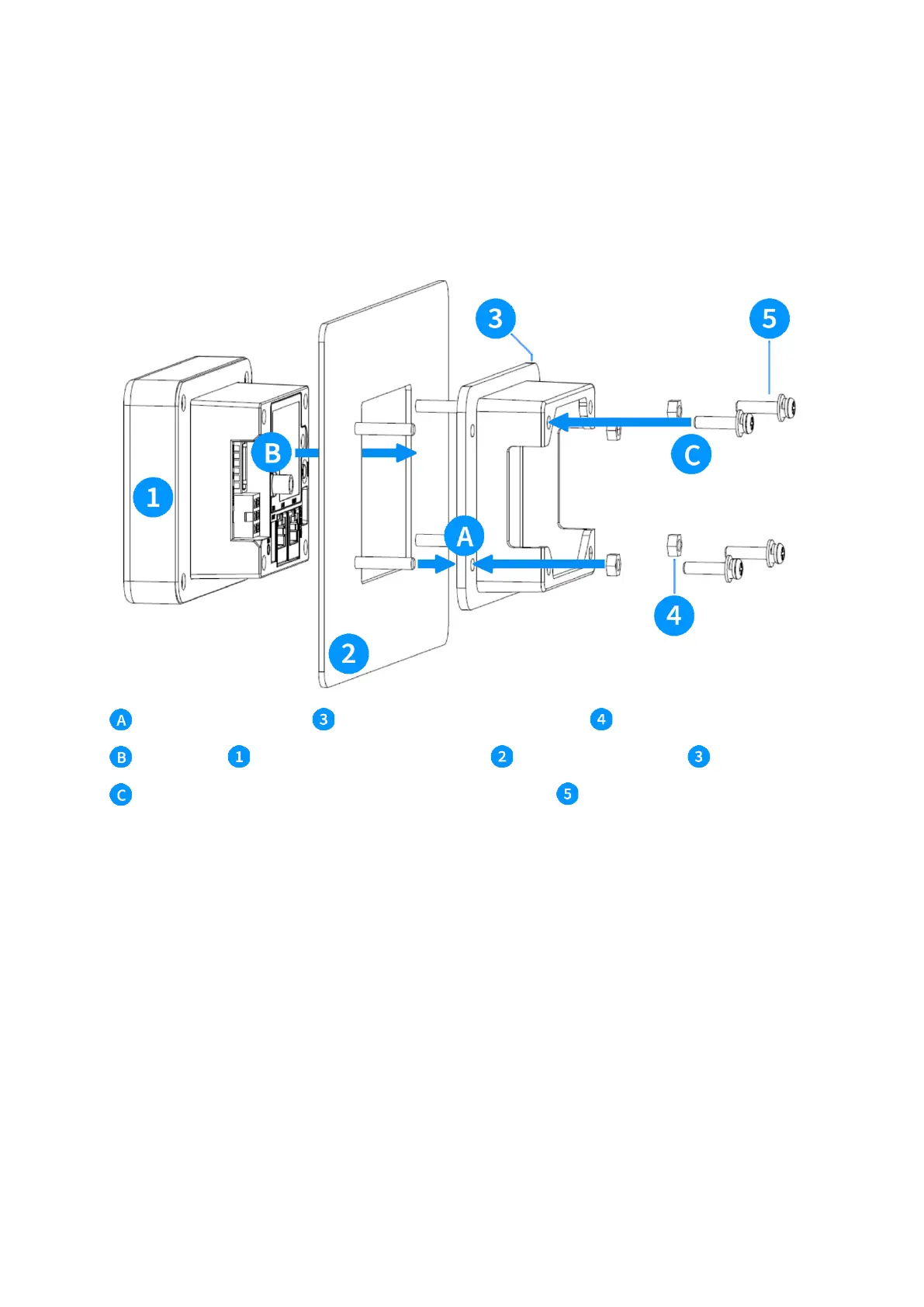
The product is designed to be installed on a vertical surface, using a mounting plate with 4 protruding M4
stud bolts. The device is shipped with a gasket to prevent intrusion of dirt and liquids between the device
(external part) and the machine front door. Before installation, always inspect this gasket for damages.
Slide the mounting bracket into place and fix with the four M4 nuts
Slide the IM15 through the mounting plate/adapter into the mounting bracket
Secure the IM15 into the mounting frame with the four M4 screws . Use a max torque of 0.8Nm +/-
0.2Nm for the M4 screws to avoid excessive pressure on the device as this may impact IP ratings of the
terminal and the host machine.
5.2 CCV Frame IM15



 To Next Page