31
cdvigroup.com
A22K
High Security Access Control 2-Door Module
ETHERNET NETWORK CONNECTION & RS485 BUS
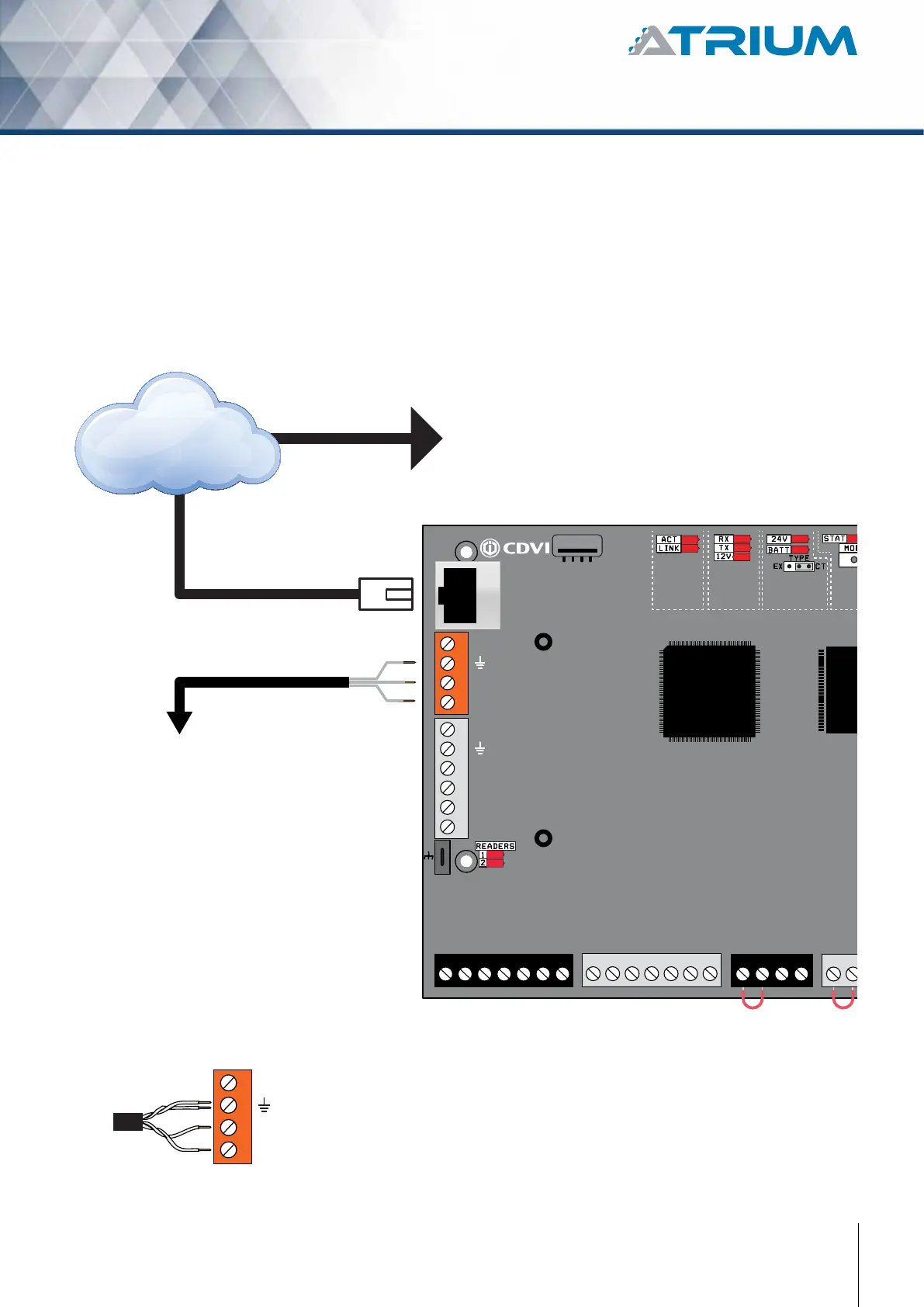
The ATRIUM A22K provides a 10/100Mbps Ethernet port to allow direct connection to a PC or to a LAN/WAN.
Connect the Ethernet 10/100 Mbps port of the ATRIUM A22K to a LAN or WAN network using an UTP cable
(maximum 100m (300ft)). Connect expansion modules on a 3 conductor RS485 communication loop in daisy
chain or star conguration up to 1220m (4000 ft) from the ATRIUM A22K controller.
Ethernet @ 10/100 Mbps
Maximum 100m (300ft.)
Maximum 1220m (4000 ft).
+12V DC
+12V DC
A+
B-
Input 1
Input 2
Output 1
Output 2
RS485
LOCAL
BUS
ETHERNET
PORT
EXTRA
INPUTS/
OUTPUTS
ETHERNET LOCAL BUS
LOCK 1 & 2
JUMPER SETTING
STATUS
24V DC INPUT/
BATTERY/
MODULE TYPE
+12V DC (Not use)
A+
B
-
RS485 Port
The RS485 port is used to connect and
communicate with an A22K set as
“Expander” or any RS485 ATRIUM modules.
Up to 4 A22K set as “Expander”
can be connected per RS485 port.
We highly recommended to use a twisted pair
wiring as shown below.
It will avoid any communication problem that
may occur in noisy environments.
RS485 port
connector
LAN or WAN
IP Port
The IP port is used to connect an A22K set as “Controller”
on a network (LAN or WAN). System administrators will be
able to configure, manage and monitor the system using the
ATRIUM software (PC only) or web browser (PC or Apple)
connected on that same network.
READER DOOR 1
INPUT
DOOR 1
LOCK
DOOR 1
LOCK
DOOR 2
INPUT
DOOR 2
READER DOOR 2
ENCLOSURE
TAMPER
SWITCH
INPUT
BUZ GRN RED D1 D0 GND 12V BUZ GRN RED D1 D0 GND GNDC112V 12VREX1
GND GND C1 NO1 NC1LK1+ LK1- C2 NO2 NC2LK2+ LK2-TMP
C2



 To Next Page