page 31 www.centsys.com
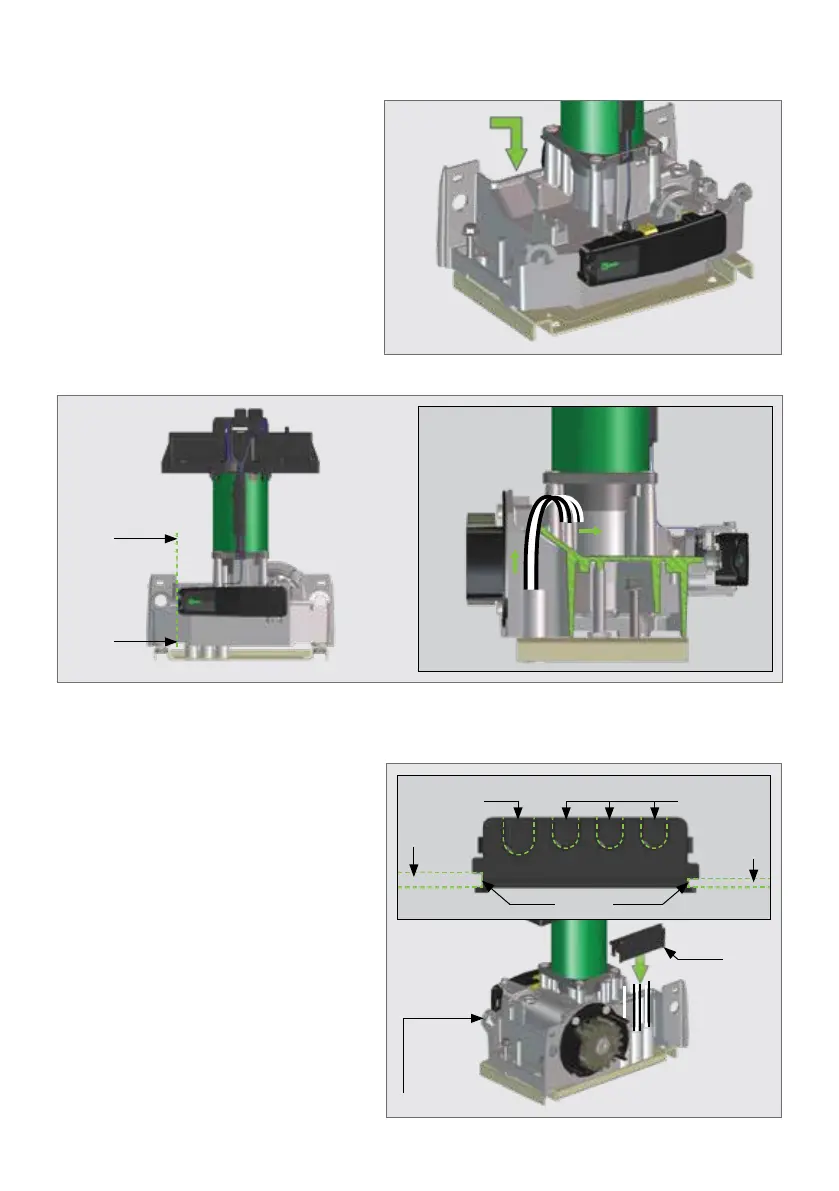
7.6. Routing the Cables
Route cables as determined in
Section 5.5 - "Cabling Requirements".
POINT A is the entry point for cables
with the conduit installed at the back
of the unit as shown in Figure 35.
FIGURE 35
AA
FIGURE 36. CABLE ROUTING FOR NEW INSTALLATIONS
Section View A-A
AA
OPERATOR INSTALLATIONSECTION 7
FIGURE 37
Replacing the Cable Shield onto the Gearbox
The Cable Shield has punch-outs on
it which cater for both Mains Cables
and Communication cables. Punch
out the holes which are needed and
place the Cable Shield back into
position onto the gearbox whilst
guiding the cables through the holes.
There is a groove on either side
of the Cable Shield to guide it into
position.
Press rmly down, and you will hear
a "click" once the Cable Shield has
located correctly.
AA
AA
Mains
Punch-out
Gearbox
Prole
Gearbox
Prole
Cable
Shield
Gearbox
Groove
Communication cable
Punch-outs



 To Next Page