page 40 www.centsys.com
FIGURE 59
FIGURE 58
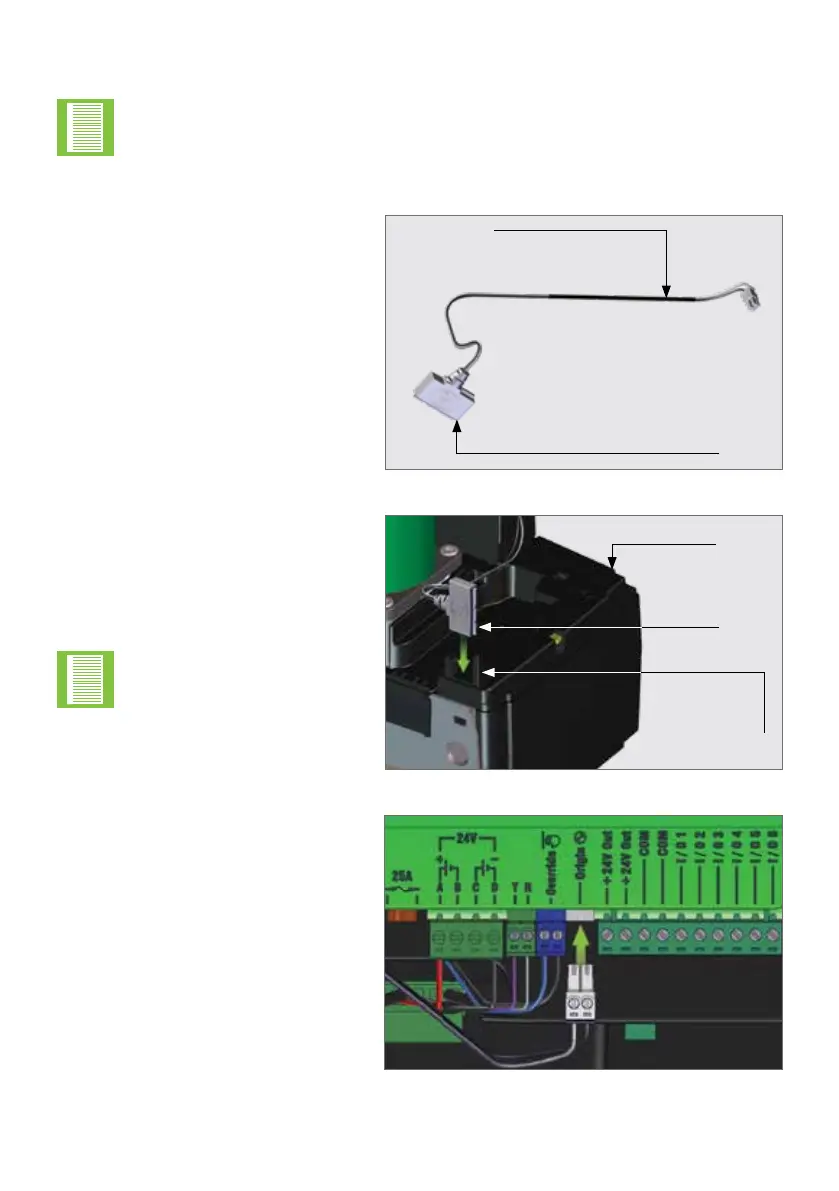
Locate the Origin Sensor and its
Harness
7.11. Installing the Origin Sensor and Marker
FIGURE 60
Place the Origin Sensor into its
dedicated slot found just above the
Pinion on the Lower Battery Tray.
Route the Harness around the
electric motor to the front of the
operator, and through the cable
retainers found in front of the
Control Card.
Connect the Harness to the white
"Origin" Terminal found on the
Control Card.
Note the orientation of the
Origin Sensor.
The Origin Sensor and Marker is an optional extra for the D10 SMART, but is
mandatory to use for the D10 Turbo SMART, and the D20 SMART as a safety
precaution.
7.11.1. Installing the Origin Sensor
Origin
Sensor
Origin
Sensor
Origin Sensor
Locating Slot
Lower
Battery
Tray
Origin Sensor
Harness
OPERATOR INSTALLATIONSECTION 7



 To Next Page