48
5. How Is The Timer To Close Feature Set Up?
Timer to Close is used to close a door automatically after a preset amount of time has passed.
Logic 3.0
To set the Timer to Close:
• Close the door.
• Turn the selector dial to PROGRAM.
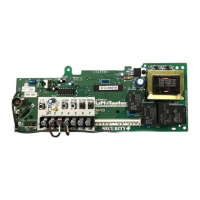
• P ress the TIMER button on the logic board.
• Press the STOP button to clear the timer.
• Press the OPEN button for every 5 seconds the operator should wait before attempting to close the door. Press the
CLOSE button for every 60 seconds the operator should wait before closing the door.
• Press the TIMER button to complete the programming. The LEDs on the OPEN and CLOSE buttons will fl ash to
confi rm the timer setting. The OPEN LED will fl ash once for every 5 seconds programmed and the CLOSE LED will
fl ash once for every 60 seconds programmed.
• Turn the selector dial to the desired timer wiring type (TS, T or FSTS).
Logic 4.0 / 5.0
• Close the door.
• Turn the selector dial to PROGRAM.
• Press and release the TIMER button on the logic board.
• Press and release the STOP button to clear the timer.
• Press and release the OPEN button for every second the operator should wait before attempting to close the door.
Press and release the CLOSE button for every 15 seconds the operator should wait before closing the door.
• Press and release the TIMER button to complete the programming. The LEDs on the OPEN and CLOSE buttons will
fl ash to confi rm the timer setting. The OPEN LED will fl ash once for every second programmed and the CLOSE LED
will fl ash once for every 15 seconds programmed.
• Turn the selector dial to the desired timer wiring type (TS ,T or FSTS).
6. How Is The Mid-Stop Feature Set Up?
Mid-Stop is used when the door is not required to open fully on every cycle. Mid-Stop will stop the door at a preset
height during the open cycle.
To set the Mid-Stop:
• Close the door.
• Turn selector dial to PROGRAM.
• Press and release the MID button on the logic board.
• Press the OPEN button. When the door reaches the desired mid-stop height, press and release the STOP button.
• Press and release the MID button to complete the programming.
• Turn the selector dial to the desired wiring type.
7. Can The Delay To Reverse Be Changed?
On a Logic Operator, the delay to reverse is preset at 1.5 seconds and is not able to be changed. This length of time
has been determined as appropriate to allow the door to reverse without jerking on the operator and door parts, which
may cause premature failure of the operator and/or door.
E
General Information
Frequently Asked Questions









 To Next Page