24VAC
M
oving
Ga
te C
an
C
auseM
oving
G
ate
C
an
C
ause
In
ju
ry
or
D
e
ath
I
njury or
D
e
at
h
KE
E
P
C
L
E
A
R
!
K
EEP
C
L
EA
R!
Ga
t
e
m
a
y
m
ove at
an
yGate
m
a
y
mov
e
a
t
a
n
y
time w
i
tho
ut
p
rio
r war
n
in
g
.
t
ime
w
i
t
h
out pr
io
r wa
rn
in
g
.
D
o
n
ot
le
t
c
hi
l
dr
en operat
e t
he
g
at
e
o
r
D
o
not
le
t
c
hild
r
en
o
p
er
at
e
the
ga
t
e
or
pla
y
in the gate
a
r
ea
.
p
l
a
y
in
the
ga
te
a
r
e
a
.
Th
i
s
e
n
tr
ance i
s f
or
veh
icl
es on
l
yT
h
i
s
e
nt
r
a
nc
e
i
s
for
v
e
h
ic
l
e
s
o
n
l
y
Pedestr
i
ans mu
s
t
u
se
s
ep
arat
e
en
tr
anc
e
Pe
des
t
r
i
a
n
s
m
u
s
t
u
se
sepa
r
a
t
e
ent
r
a
nc
e
M
ov
ing
Gate Can C
aus
e
Inj
ury or
D
e
at
h
K
EEP
C
L
E
AR!
Gate
m
a
y m
o
v
e
a
t
an
y
ti
m
e wi
t
hout
p
r
i
or warni
n
g.
D
o
no
t
l
e
t
ch
i
ld
ren o
p
era
t
e
the gate
or
p
lay
in
t
h
e gate a
r
e
a
.
T
h
i
s e
n
t
r
a
nc
e
is for
vehicl
e
s onl
y
P
edestr
i
a
ns
m
ust
u
se
separate e
n
tran
c
e
M
oving
G
ate
C
an
C
ause
I
njury or
D
e
at
h
K
EEP
C
L
EA
R!
Gate
m
a
y
mov
e
a
t
a
ny
t
ime
w
i
t
h
out pr
io
r wa
rn
in
g
.
D
o
not
le
t
c
hild
r
en
o
p
er
at
e
the
ga
t
e
or
p
l
a
y
in
the
ga
te
a
r
e
a
.
T
h
i
s
e
nt
r
a
nc
e
i
s
for
v
e
hic
l
e
s
o
n
l
y
Pe
des
t
r
i
a
n
s
m
u
s
t
u
se
sepa
r
a
t
e
ent
r
a
nc
e
M
ov
ing
Gate C
an
C
au
seM
ov
ing
Gate Can Caus
e
In
jury
or
D
e
at
hInj
ury
or
D
e
at
h
KE
E
P
C
L
E
A
R
!
K
EEP
C
L
E
AR!
Ga
t
e
m
a
y
m
ov
e at
an
y
Gate
m
a
y mo
v
e
a
t
an
y
time w
i
th
o
ut p
rio
r
war
n
in
g
.ti
m
e wi
thout
p
r
i
or warni
n
g.
D
o
n
ot
le
t
c
hi
l
dr
e
n operat
e t
he
g
at
e
o
rD
o
no
t
l
e
t
ch
i
ld
ren o
p
era
t
e
the gate
or
pla
y
i
n t
he gate
a
r
ea
.p
lay
in
t
h
e gate a
r
e
a
.
Th
i
s
e
n
tr
ance is for
vehicl
es on
ly
T
h
i
s e
n
tr
a
nc
e
is for
vehicl
e
s onl
y
Pedest
r
i
a
ns
mu
s
t
u
se
s
ep
arat
e
e
n
tranc
eP
edestr
i
a
ns
m
ust
u
se
separate e
n
tran
c
e
WIRING
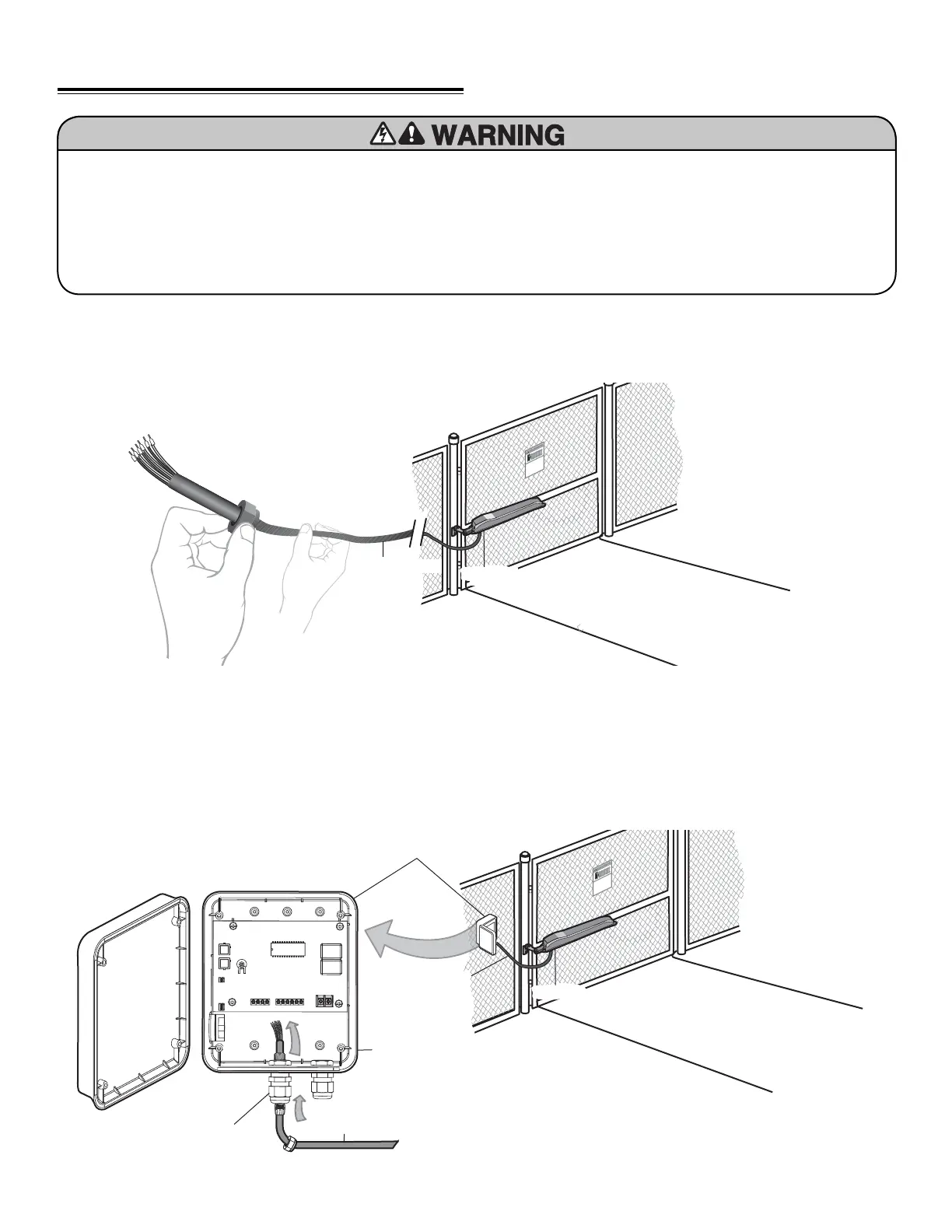
Connect Gate Operator to Control Box
WATERTIGHT CONNECTOR NUT
Remove watertight connector nut from the control box.
Insert operator cable through watertight connector nut.
INSERT OPERATOR CABLE
Insert operator cable through watertight connector
mounted in the bottom of the control box.
1
2
Wiring 18
Operator Cable
Operator
Watertight Connector
Seal Nut
Watertight Connector
Watertight Connector Nut
Operator Cable
Control Box
Operator
Cable
Operator
Control Box
BEFORE installing power wiring or control stations be sure to
follow ALL specifications and warnings described below.
• Disconnect the power supply BEFORE proceeding. Operator
MUST be properly grounded and connected in accordance
with local electrical codes.
• ALL electrical connections MUST be made by a qualified
individual.
• DO NOT install ANY wiring or attempt to run the operator
without consulting the wiring diagram.
• ALL power wiring should be on a dedicated circuit and well
protected. The location of the power disconnect should be
visible and clearly labeled.
• ALL power and control wiring MUST be run in separate
conduit.













 To Next Page