13
Power
UL
Entrapment
Placard
Warning
Placard
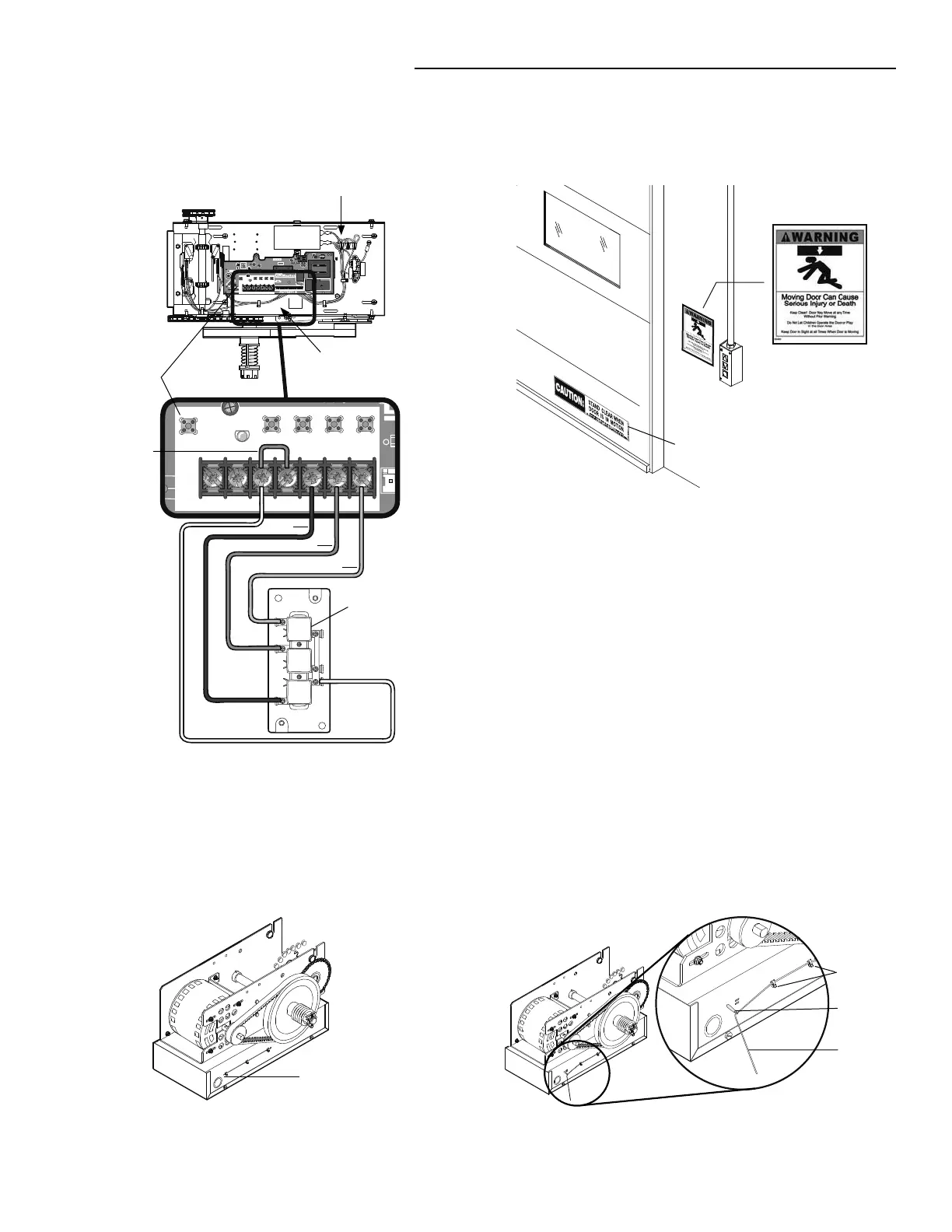
Fasten the entrapment warning placard next to the control
station.
D14
COM INTRLK STOP
LED
OPENCLOSE
TTC
LEARN
1
LMEP1 LMEP2
2 345 67
STOP CLOSE OPEN
R27
^
OPEN
^
CLOSE
O
STOP
AUX ANT
^^^^
AUX ANT
AUX ANT
D14
COM INTRLK STOP
LED
OPENCLOSE
TTC
LEARN
1
LMEP1 LMEP2
234567
STOP CLOSE OPEN
Logic Board
3-Button
Control Station
Connect wires to the control station and replace the control
station cover.
Open
Close
Stop
Control
Common
Remove factory
jumper if
external
interlock is
used
TYPICAL INSTALLATION
INSTALL 3-BUTTON CONTROL STATION
4
5
Cut this Wire Tie
Locate the wire antenna on the outside of the electrical box.
Cut the wire tie closest to the edge of the electrical box.
SETUP RADIO ANTENNA
OPTION A
Wire Ties
Antenna
Standoff
Press the plastic standoff into the hole in the side of the
electrical box.
1
2




 To Next Page