D10.D15.DRS15-MANS
Apr ‘19
- 3 -
Quick Start (cont’d)
Unit Operation
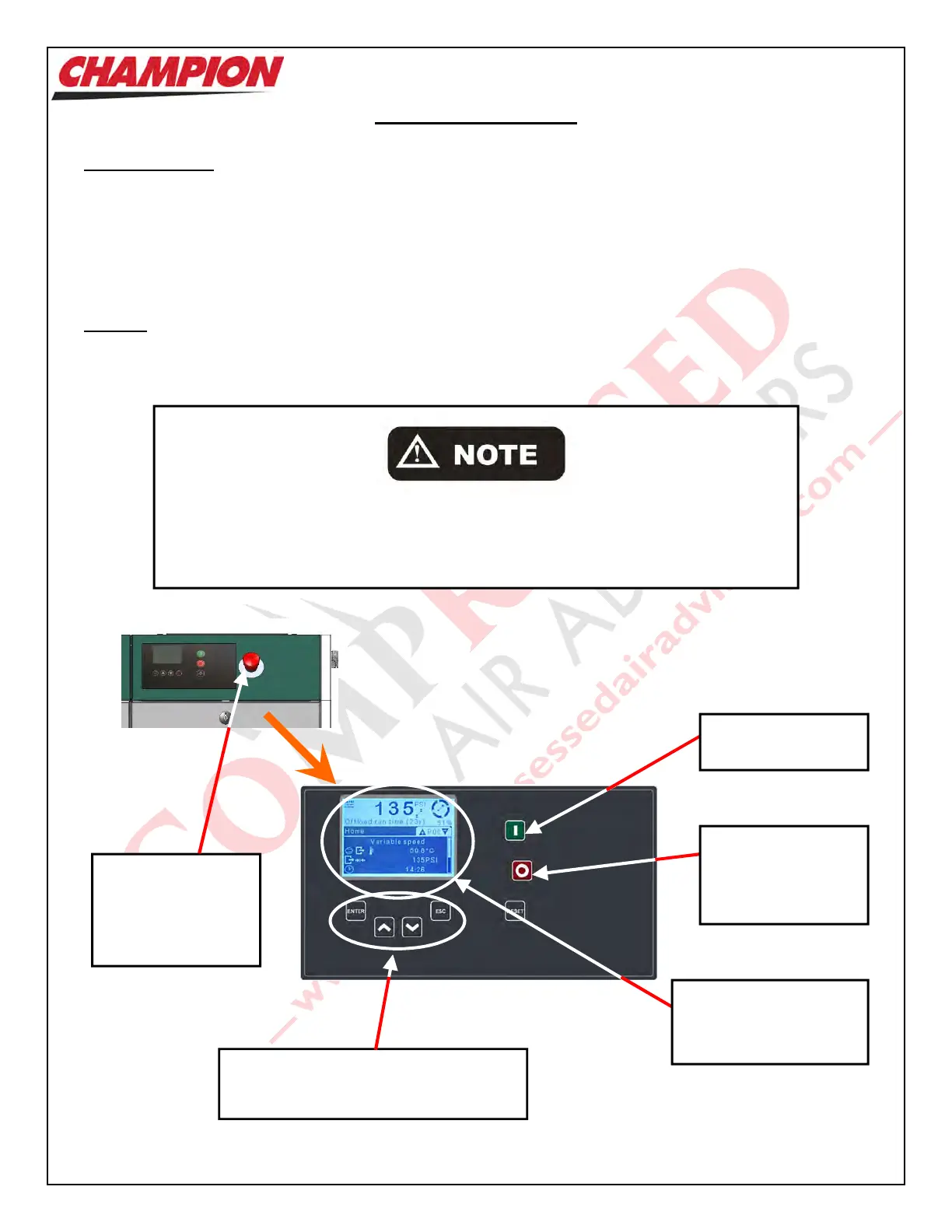
Shown below is the ‘CSC300’ Controller which regulates the operation of the Unit. It is used to start and stop the
Unit, and it provides information as to system pressure, temperature, etc.
Starting the Unit: Press the ‘Start’ Button.
Stopping the Unit: Press the ‘Stop’ Button
Cau
tion:
1. Do not stop the Unit using the ‘Emergency Stop’ Button unless there is a danger to the product or of
personnel injury.
2. Do not stop the Unit by use of a disconnect or breaker.
Emergency Stop
Will quickly shut the
Unit off. Is only to be
used in an
emergency.
Stop
Causes the Unit to
enter ‘Idle’ mode
and then shut off.
Using the Emergency Stop Button, disconnect, or breaker to stop the Unit will not
allow the Unit to go through an unloading sequence, and could result in damage to
the Motor, Starter, or other electrical components. Damage caused in this manner
is not covered by the manufacturers Warranty.
Enter, Up, Down & Escape
Used in the programming and changing
of operating parameters of the Unit.
Digital Readout
Indicates Unit pressure,
temperature, etc.
Start
Starts the Unit.



 To Next Page