D10.D15.DRS15-MANS
Apr ‘19
- 33
Variable Speed Drive (cont’d)
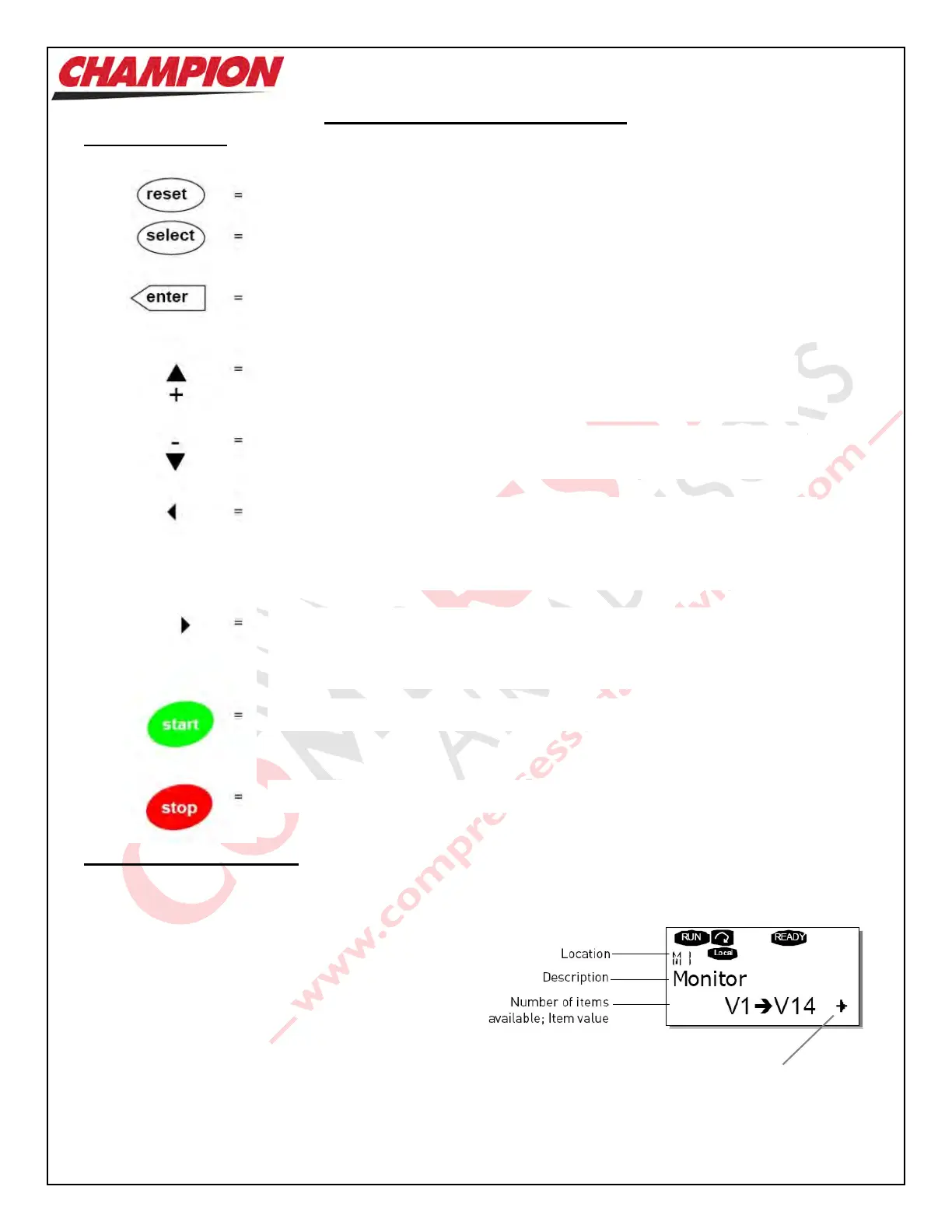
Keypad Buttons
Menu Button Navigation
The data on the VSD Control Keypad is arranged in
menus and sub-menus. Shown at right is an example of
a typical menu.
The first level consists of menus ‘M1’ to ‘M7’, and is
called the ‘Main Menu’. The User can navigate in the
Main Menu using the ‘Browse Button Up’ and ‘Browse
Button Down’ keys.
To access the various pages of a menu, use the ‘Menu
Button Left’ or ‘Menu Button Right’ keys. To access a
sub-menu, use the ‘Menu Button Right’ key.
Used to rest active Faults
Select Button Used to switch between two latest displays
May be useful to see how changing one value
influences another.
Enter Button Used for:
a) confirmation of selection
b) Fault history reset
Browse Button Up Browse the main menu and pages of sub-
menus.
Edit values
Browse Button Down Browse the main menu and pages of sub-menus.
Edit values
Menu Button Left Move backwards in menu.
Move cursor left in parameter value.
Exit edit mode.
Hold down for 3 seconds to return to Main Menu.
Menu Button Right Move forwards in menu.
Move cursor right in parameter value.
Exit edit mode.
Start Button Not Used.
Stop Button Not Used.
Indicates sub-menus
are available



 To Next Page